05.06.2026
Time to read:
7
min
How to create an app for a beauty salon
Development
Guides
Mobile technologies continue to transform the beauty industry, and the data from 2024–2025 confirms this. According to a report by Nimble AppGenie, in 2024, 72% of companies implemented online booking systems, which led to a 24% increase in the number of appointments made through digital platforms.
Demand for digital solutions continues to grow: people want to book online, receive reminders, and quickly choose services. For companies, this is a way to simplify processes, increase revenue, and improve the customer experience.
If you’re looking for a growth opportunity, today I’ll explain how to create an app for a beauty salon — a tool that can help automate processes, strengthen customer relationships, and stand out from competitors.
Why a Beauty Salon Needs a Mobile App
1. Changing customer habits
Users are increasingly choosing to book appointments online through their smartphones. It’s fast and doesn’t require phone calls. According to estimates, more than 70% of people expect to be able to book an appointment with a specialist through a digital service.
2. Competitive advantage
Developing a mobile app for a beauty salon helps you stand out from competitors who still rely on phone calls and messaging apps. You offer a convenient service with a personal account, schedule, reviews, promotions, and bonuses — all in one place.
3. Convenience and customer loyalty
The easier the customer journey, the higher the chance that the client will come back. A mobile platform makes interaction with the salon fast and pleasant: there’s no need to look for a phone number, check available time slots, or try to remember a promotion — everything is right at hand.
4. Automation and reduced workload for staff
The service takes over routine tasks: online booking, reminders, specialist schedule changes, and notifications. This reduces the workload for administrators, allowing the team to focus on service quality.
Core Features of a Mobile App for a Beauty Salon
When you begin the journey toward digitalizing your beauty business, it’s important to understand what the app should actually do. The point is not simply to “be on someone’s phone,” but to make life easier — both for your clients and for your business.
Tip: if you’re thinking about how to create a beauty salon app, start with the core functionality — the MVP that will help you enter the market quickly, understand what users like, and save money at the early stage.
Here are the features worth starting with:
Online booking.
This is the key feature to begin with. Customers value the ability to quickly choose the service they need, the specialist, the day, and the time — without phone calls, waiting for a reply, or endless back-and-forth in messages. Everything is simple: open the app, tap, and book. This is not only convenient for the user, but also reduces the workload for administrators — appointments are made automatically, without human error.
Service catalog.
A structured service description is one of the keys to selling. When it is easy for a client to compare treatments, see current prices, duration, and service details, they make decisions faster. The catalog can also include photos, short descriptions, specialist recommendations, and even curated categories such as “express services,” “for a first visit,” or “seasonal favorites” — making navigation easier and the experience more personalized.
Personal account.
This is where the history of all visits, earned bonuses, current bookings, and personal offers is stored. Users can also manage notifications, reschedule, or cancel appointments. A convenient, functional, and visually appealing personal account is an important part of the app that increases engagement and encourages repeat visits. And honestly, it’s just nice when a service “remembers you.”
Push notifications.
Appointment reminders, special offers, new services, or holiday greetings — push notifications work gently but effectively. They are non-intrusive, easy to configure, and help you stay connected with clients even outside the salon. Relevant, convenient, and without spam — exactly how users want to receive information.
Salon management tools.
Inside the service, there is a panel for the owner and administrator. It shows the schedule, specialist workload, the number of bookings, and may also include statistics on repeat visits, reviews, and campaign performance. This tool gives real-time control over the business — allowing you to react quickly to changes and make management decisions without extra spreadsheets and calls.
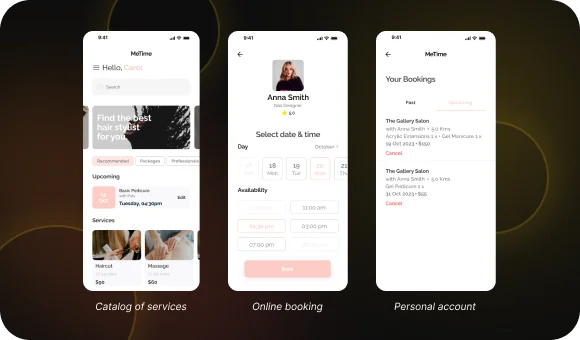
This starter set of features will help make the service useful and easy to understand. From there, you can continue developing it in line with users’ needs.
Benefits of the App for Different Audiences
A good app works for everyone — and that is its main advantage. Each group of users has its own needs, and if you take all of them into account, the app becomes a useful tool rather than just “an icon on the screen.”
For clients:
Time savings.
Clients can book an appointment with a specialist at any time of day — there’s no need to call the administrator or wait for a response in a messaging app.
Access to promotions and loyalty programs.
Clients are always aware of special offers, can receive personal discounts, collect bonus points, and use them during future visits.
Transparent pricing and services.
The service lets users check the price, duration, and description of each treatment in advance.
For owners:
Higher loyalty.
When it’s convenient for a customer, they come back. The platform helps build ongoing communication: appointment reminders, holiday greetings, personal offers — all of this strengthens the relationship with the audience.
Reduced workload for administrators.
The service handles booking, automated reminders, and even collecting reviews. Administrators are freed from routine tasks and can focus on service quality on site.
An additional marketing channel.
Push notifications, banners, and a news feed become a communication channel with clients. You can quickly share information about new services, promotions, or changes in business hours.
For specialists:
Convenient schedule management.
Specialists can see their bookings directly and don’t need to clarify anything with the administrator. Confusion is eliminated, and they can prepare for each visit in advance.
Direct communication with clients.
Through the app, a specialist can clarify procedure details, remind clients about preparation rules, or offer additional services. This helps build trust and improves the level of service.
Stages of Mobile App Development
Developing a mobile app for a beauty salon is not only about technology — it’s also about care. For the service to work well and help businesses, it is important to go through all stages of development step by step.
Here’s how it works:
Analysis and planning
Before moving on to design and development, you need to understand why you need the platform and what it should be like.
Analyzing the target audience and business goals
At this stage, it is important to understand who your users are and what they need. The analysis shows how people book appointments, which services are most popular, and what difficulties they face — for example, not being able to reach the administrator or confusion about appointment times. At the same time, business goals are defined: automating booking, promoting new services, or working with returning clients.
Creating the technical specification
Based on the analysis, a detailed technical specification is created. This document lists all sections and features of the future service: online booking, personal account, promotions, notifications, CRM integration. The specification helps everyone involved in the project — from designers to developers — move in the same direction and not overlook anything important.
Design
At this stage, the visual side is created — what the user sees first.
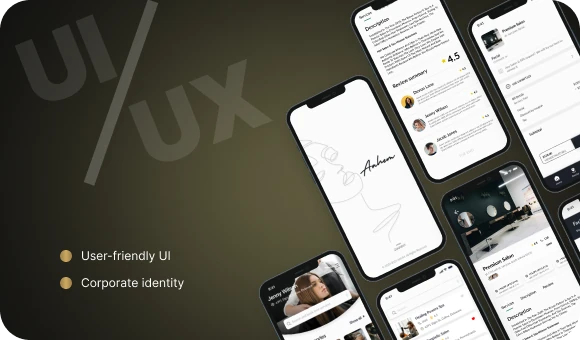
Designing a user-friendly interface (UX/UI)
There should be nothing unnecessary in the app. The user should be able to easily find the schedule, book quickly, and see their bonus balance. Screens are designed and the interaction logic is built. The simpler and more intuitive it is, the greater the chance that the person will want to use the platform again.
Brand-style design
Colors, fonts, logo, and visuals are all tailored to your salon’s style. If you run a cozy family beauty club, that creates one kind of mood. If it’s a stylish urban salon, that’s a completely different one. The main thing is that the service feels like an extension of the brand and inspires trust.
Development
Once the design is approved, the most technical stage begins — building the app itself.
Choosing the platform
At this point, the team decides where the platform will run: iOS, Android, or both. Many studios choose cross-platform development, for example with Flutter, so they don’t have to build two separate products and can launch the MVP faster.
Integration with CRM and other systems
At this stage, the service is connected to internal tools: CRM, messaging systems, loyalty systems. This ensures that everything works automatically: the client books an appointment — the administrator receives a notification, the system issues bonus points, and the specialist sees the update in their schedule.
Testing
The finished service goes through a real-world testing stage. This is where all bugs are caught before launch.
Functional and UX testing
Testers go through the entire user journey: from installation and booking to receiving notifications and using bonuses. This helps identify flaws before launch.
Fixing bugs and improving the logic
All identified issues are fixed, and the interface and interactions are refined if necessary. The goal is to release a stable and convenient product.
Launch and support
The final stage is publishing the app in stores and continuing to work on the product afterward.
Publishing in the App Store and Google Play
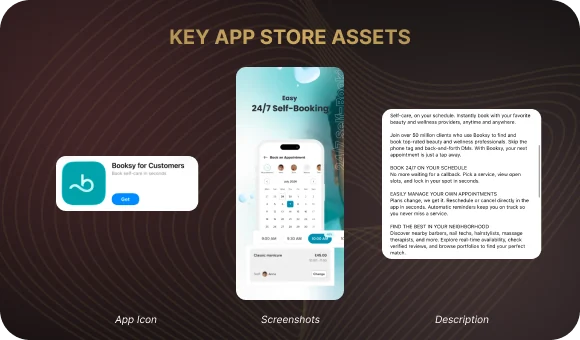
The platform is uploaded to the app stores, goes through moderation, and becomes available to users. It is important to prepare the service page well — add an icon, screenshots, a short description, and keywords so that it is easy to find.
Support and further development
After release, the team monitors how the service performs. Users may leave feedback, suggest ideas, and the business may want to add new features — such as video consultations or cosmetic product подбор? Need translate: selection. Everything can be gradually added in future versions. Don’t forget to release updates on time so the service remains stable and meets store requirements.
Examples of Successful Beauty Salon Apps
Here are a few strong examples that show how mobile solutions help salons and specialists grow their businesses.
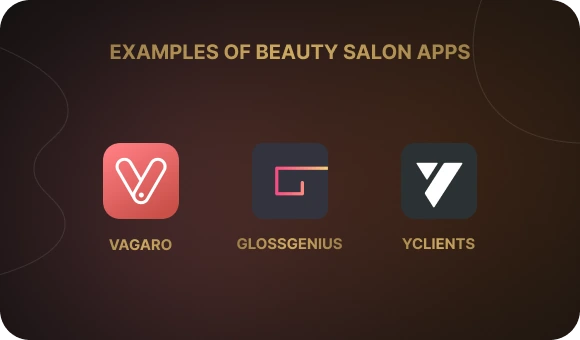
Vagaro.
One of the most popular services in the beauty industry, especially in the United States. It helps manage bookings, customer databases, and sales. Thanks to its user-friendly interface and built-in payment system, many salons have reduced administrative time and increased revenue. Vagaro is actively used by hair salons, barbershops, spas, and nail technicians.
GlossGenius.
An app created specifically for independent specialists and small studios. GlossGenius focuses on stylish design and ease of use. Inside, there are tools for booking, client management, payments, and marketing templates. Thanks to these capabilities, specialists have been able to grow their client base faster, while users are more willing to return.
YCLIENTS.
A local example showing how service businesses can be successfully automated. YCLIENTS is a full ecosystem: a mobile app, CRM, loyalty system, and marketing tools. Many salons across Russia use it as their primary operating tool. Appointment automation, review collection, specialist workload analytics, and sales tracking — everything is available in one solution. Thanks to YCLIENTS, many salons have reduced no-show rates and increased repeat bookings.
Conclusion
If you’re thinking about how to create a beauty salon app, remember that first impressions matter a lot in this industry — and a mobile app is no exception. It should be stylish, convenient, and reliable so that it makes life easier for the client and gives them a reason to come back.
Ready to turn your idea into action? Leave a request on the website — we’ll help you figure out where to start and find the best solution for your business together.
Your app — our responsibility!
Why a Beauty Salon Needs a Mobile App
1. Changing customer habits
Users are increasingly choosing to book appointments online through their smartphones. It’s fast and doesn’t require phone calls. According to estimates, more than 70% of people expect to be able to book an appointment with a specialist through a digital service.
2. Competitive advantage
Developing a mobile app for a beauty salon helps you stand out from competitors who still rely on phone calls and messaging apps. You offer a convenient service with a personal account, schedule, reviews, promotions, and bonuses — all in one place.
3. Convenience and customer loyalty
The easier the customer journey, the higher the chance that the client will come back. A mobile platform makes interaction with the salon fast and pleasant: there’s no need to look for a phone number, check available time slots, or try to remember a promotion — everything is right at hand.
4. Automation and reduced workload for staff
The service takes over routine tasks: online booking, reminders, specialist schedule changes, and notifications. This reduces the workload for administrators, allowing the team to focus on service quality.
Core Features of a Mobile App for a Beauty Salon
When you begin the journey toward digitalizing your beauty business, it’s important to understand what the app should actually do. The point is not simply to “be on someone’s phone,” but to make life easier — both for your clients and for your business.
Tip: if you’re thinking about how to create a beauty salon app, start with the core functionality — the MVP that will help you enter the market quickly, understand what users like, and save money at the early stage.
Here are the features worth starting with:
Online booking.
This is the key feature to begin with. Customers value the ability to quickly choose the service they need, the specialist, the day, and the time — without phone calls, waiting for a reply, or endless back-and-forth in messages. Everything is simple: open the app, tap, and book. This is not only convenient for the user, but also reduces the workload for administrators — appointments are made automatically, without human error.
Service catalog.
A structured service description is one of the keys to selling. When it is easy for a client to compare treatments, see current prices, duration, and service details, they make decisions faster. The catalog can also include photos, short descriptions, specialist recommendations, and even curated categories such as “express services,” “for a first visit,” or “seasonal favorites” — making navigation easier and the experience more personalized.
Personal account.
This is where the history of all visits, earned bonuses, current bookings, and personal offers is stored. Users can also manage notifications, reschedule, or cancel appointments. A convenient, functional, and visually appealing personal account is an important part of the app that increases engagement and encourages repeat visits. And honestly, it’s just nice when a service “remembers you.”
Push notifications.
Appointment reminders, special offers, new services, or holiday greetings — push notifications work gently but effectively. They are non-intrusive, easy to configure, and help you stay connected with clients even outside the salon. Relevant, convenient, and without spam — exactly how users want to receive information.
Salon management tools.
Inside the service, there is a panel for the owner and administrator. It shows the schedule, specialist workload, the number of bookings, and may also include statistics on repeat visits, reviews, and campaign performance. This tool gives real-time control over the business — allowing you to react quickly to changes and make management decisions without extra spreadsheets and calls.
This starter set of features will help make the service useful and easy to understand. From there, you can continue developing it in line with users’ needs.
Benefits of the App for Different Audiences
A good app works for everyone — and that is its main advantage. Each group of users has its own needs, and if you take all of them into account, the app becomes a useful tool rather than just “an icon on the screen.”
For clients:
Time savings.
Clients can book an appointment with a specialist at any time of day — there’s no need to call the administrator or wait for a response in a messaging app.
Access to promotions and loyalty programs.
Clients are always aware of special offers, can receive personal discounts, collect bonus points, and use them during future visits.
Transparent pricing and services.
The service lets users check the price, duration, and description of each treatment in advance.
For owners:
Higher loyalty.
When it’s convenient for a customer, they come back. The platform helps build ongoing communication: appointment reminders, holiday greetings, personal offers — all of this strengthens the relationship with the audience.
Reduced workload for administrators.
The service handles booking, automated reminders, and even collecting reviews. Administrators are freed from routine tasks and can focus on service quality on site.
An additional marketing channel.
Push notifications, banners, and a news feed become a communication channel with clients. You can quickly share information about new services, promotions, or changes in business hours.
For specialists:
Convenient schedule management.
Specialists can see their bookings directly and don’t need to clarify anything with the administrator. Confusion is eliminated, and they can prepare for each visit in advance.
Direct communication with clients.
Through the app, a specialist can clarify procedure details, remind clients about preparation rules, or offer additional services. This helps build trust and improves the level of service.
Stages of Mobile App Development
Developing a mobile app for a beauty salon is not only about technology — it’s also about care. For the service to work well and help businesses, it is important to go through all stages of development step by step.
Here’s how it works:
Analysis and planning
Before moving on to design and development, you need to understand why you need the platform and what it should be like.
Analyzing the target audience and business goals
At this stage, it is important to understand who your users are and what they need. The analysis shows how people book appointments, which services are most popular, and what difficulties they face — for example, not being able to reach the administrator or confusion about appointment times. At the same time, business goals are defined: automating booking, promoting new services, or working with returning clients.
Creating the technical specification
Based on the analysis, a detailed technical specification is created. This document lists all sections and features of the future service: online booking, personal account, promotions, notifications, CRM integration. The specification helps everyone involved in the project — from designers to developers — move in the same direction and not overlook anything important.
Design
At this stage, the visual side is created — what the user sees first.
Designing a user-friendly interface (UX/UI)
There should be nothing unnecessary in the app. The user should be able to easily find the schedule, book quickly, and see their bonus balance. Screens are designed and the interaction logic is built. The simpler and more intuitive it is, the greater the chance that the person will want to use the platform again.
Brand-style design
Colors, fonts, logo, and visuals are all tailored to your salon’s style. If you run a cozy family beauty club, that creates one kind of mood. If it’s a stylish urban salon, that’s a completely different one. The main thing is that the service feels like an extension of the brand and inspires trust.
Development
Once the design is approved, the most technical stage begins — building the app itself.
Choosing the platform
At this point, the team decides where the platform will run: iOS, Android, or both. Many studios choose cross-platform development, for example with Flutter, so they don’t have to build two separate products and can launch the MVP faster.
Integration with CRM and other systems
At this stage, the service is connected to internal tools: CRM, messaging systems, loyalty systems. This ensures that everything works automatically: the client books an appointment — the administrator receives a notification, the system issues bonus points, and the specialist sees the update in their schedule.
Testing
The finished service goes through a real-world testing stage. This is where all bugs are caught before launch.
Functional and UX testing
Testers go through the entire user journey: from installation and booking to receiving notifications and using bonuses. This helps identify flaws before launch.
Fixing bugs and improving the logic
All identified issues are fixed, and the interface and interactions are refined if necessary. The goal is to release a stable and convenient product.
Launch and support
The final stage is publishing the app in stores and continuing to work on the product afterward.
Publishing in the App Store and Google Play
The platform is uploaded to the app stores, goes through moderation, and becomes available to users. It is important to prepare the service page well — add an icon, screenshots, a short description, and keywords so that it is easy to find.
Support and further development
After release, the team monitors how the service performs. Users may leave feedback, suggest ideas, and the business may want to add new features — such as video consultations or cosmetic product подбор? Need translate: selection. Everything can be gradually added in future versions. Don’t forget to release updates on time so the service remains stable and meets store requirements.
Examples of Successful Beauty Salon Apps
Here are a few strong examples that show how mobile solutions help salons and specialists grow their businesses.
Vagaro.
One of the most popular services in the beauty industry, especially in the United States. It helps manage bookings, customer databases, and sales. Thanks to its user-friendly interface and built-in payment system, many salons have reduced administrative time and increased revenue. Vagaro is actively used by hair salons, barbershops, spas, and nail technicians.
GlossGenius.
An app created specifically for independent specialists and small studios. GlossGenius focuses on stylish design and ease of use. Inside, there are tools for booking, client management, payments, and marketing templates. Thanks to these capabilities, specialists have been able to grow their client base faster, while users are more willing to return.
YCLIENTS.
A local example showing how service businesses can be successfully automated. YCLIENTS is a full ecosystem: a mobile app, CRM, loyalty system, and marketing tools. Many salons across Russia use it as their primary operating tool. Appointment automation, review collection, specialist workload analytics, and sales tracking — everything is available in one solution. Thanks to YCLIENTS, many salons have reduced no-show rates and increased repeat bookings.
Conclusion
If you’re thinking about how to create a beauty salon app, remember that first impressions matter a lot in this industry — and a mobile app is no exception. It should be stylish, convenient, and reliable so that it makes life easier for the client and gives them a reason to come back.
Ready to turn your idea into action? Leave a request on the website — we’ll help you figure out where to start and find the best solution for your business together.
Your app — our responsibility!