07.06.2026
Time to read:
8
min
Modern mobile app development technologies
Guides
Development
Mobile apps have become the core of the digital ecosystem: people use them to order taxis and food, manage finances, interact with brands, and plan trips. In 2024, the number of smartphone users reached 6.8 billion, while mobile traffic accounted for more than 60% of global internet usage.
Behind these numbers is a clear message for businesses: mobile app development is no longer just an option, but a strategic tool. This is especially true in industries where user experience directly affects loyalty and profit. How can you navigate the world of technology, and which mobile app development technologies are used today? Let’s take a closer look.



Native Development: Precision, Performance, and Depth
Building native apps is like custom assembly for each platform: development is done separately for Android and iOS, fully taking each operating system’s specifics into account. For iOS, developers use Swift or Objective-C with Xcode; for Android, Kotlin or Java with Android Studio. This approach provides maximum control and allows you to use the full potential of the device without compromise.
Advantages of native development:
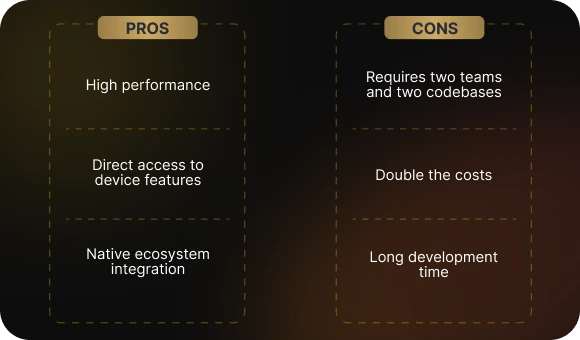
- Top-level performance, which is especially important when working with graphics, animations, and complex calculations.
- Direct access to device hardware — from the camera to Bluetooth and AR — allows the app to work at full capacity without intermediaries. It is like having the keys to the entire smartphone functionality without asking the operating system for permission.
- Seamless integration into the platform ecosystem. The app looks and behaves as if it was built inside the platform itself: its appearance and interactions feel intuitive and familiar to users, from animations to standard gestures.
Disadvantages:
- Two systems require two teams and two separate codebases.
- Maintenance, updates, and bug fixes come with double the costs.
- Development timelines are longer, especially for large-scale projects.
Large companies usually choose native development when they need maximum customization, high responsiveness, and full access to hardware capabilities. Examples include Uber, Instagram, and Snapchat.
Cross-Platform Development: Savings, Speed, Flexibility
When budgets are tight and competitors are already testing the next app update, cross-platform development becomes a lifesaver. The essence of the approach is simple: write code once and run it on both Android and iOS. This universality is made possible by modern frameworks that are already comparable to native solutions in terms of power.
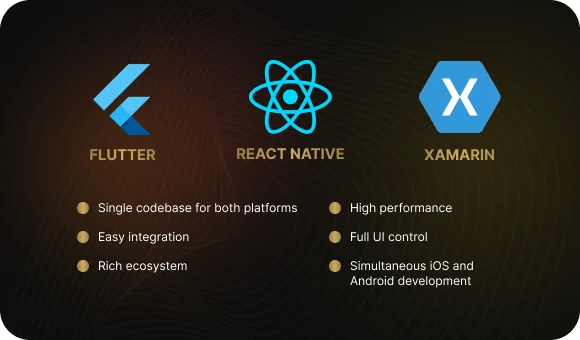
Flutter (Google): not just a tool, but an entire ecosystem. It uses the Dart language, which compiles into native code, allowing the interface to run smoothly without lag. Flutter has its own rendering engine independent of platform components. This means the interface will look the same everywhere, whether on an iPhone or an Android smartphone. Widgets can be customized like building blocks, and hot reload allows developers to see changes instantly instead of waiting.
React Native (Meta): ideal for those who think in terms of JavaScript. Its main strength lies in balancing native-quality results with flexibility. The bridge architecture gives access to native APIs when the basic components are not enough. It works well for hybrid solutions, is supported by a large community and major companies like Meta and Microsoft, and fast refresh makes iterations quick and seamless.
Xamarin (Microsoft): especially strong in enterprise environments. It works with C# and .NET, which makes it a favorite among teams already operating within the Microsoft ecosystem. It allows reuse of up to 90% of the code across platforms, reducing costs and risks. Through Xamarin.iOS and Xamarin.Android, developers can access native APIs, while Visual Studio and Azure turn the process into a structured CI/CD development flow. It is valued for reliability, security, and predictability.
Why it is worth considering:
- Development cost reduction of up to 40%
- Faster MVP delivery without sacrificing UX
- Centralized updates to the codebase
- Easy integration with modern analytics, logging, and A/B testing tools
Disadvantages to keep in mind:
- It does not always handle heavy 3D graphics and highly custom animations well
- Sometimes native modules are still necessary, especially when access to specific device features is required
Companies already using it:
- Flutter: BMW, Alibaba, Nubank, Google Ads
- React Native: Tesla, Airbnb, Instagram
- Xamarin: UPS, Alaska Airlines, and internal corporate apps
This approach allows businesses to stay up to date, reduce technical debt, and get to market faster. In a world where speed decides everything, cross-platform development is not a compromise — it is a strategic choice.
Why Businesses Choose Cross-Platform
From an economic perspective, cross-platform apps make it possible to test a hypothesis and enter the market faster. This is especially important in competitive industries such as e-commerce, delivery, mobile banking, and aviation.
Key advantages:
- The app goes live while competitors are still debating the design: a fast time to market helps you occupy a niche earlier, test your hypothesis, and start collecting real data.
- Scalability support: the same logic modules and code parts can be adapted for new features. It is like building floor after floor on an already solid foundation — quickly, reliably, and without unnecessary rework.
- The app feels as if it was built directly into the device: the same appearance, identical behavior, and predictable logic. Users do not notice a platform switch — they simply use it naturally, from the first tap.
- Like in a well-equipped workshop, developers have thousands of libraries and tools at hand — from debugging to analytics. This speeds up development, reduces bugs, and makes it easier to implement even complex features without reinventing the wheel.
Modern mobile app development technologies allow cross-platform solutions to come closer to native in terms of speed and smoothness. For example, Flutter renders the interface directly, bypassing native components, which makes it especially fast.
Stages of Mobile App Development with a Cross-Platform Approach
1. Research and planning
Analyzing the target audience and competitive environment helps determine which features and interface will actually be in demand, identify market niches, and avoid repeating competitors’ mistakes. This is the foundation for choosing the right mobile app development technology.
Defining key requirements and selecting the framework helps establish the project’s architectural and technical boundaries in advance. This makes it possible to avoid technical debt, allocate resources accurately, and choose the best tools for business goals.
2. Interface design
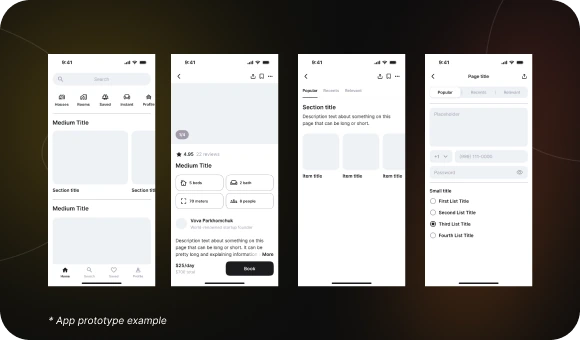
UI/UX design and prototyping help visualize the future app’s functionality, test user behavior scenarios, and identify friction points early. This reduces the risk of revisions and improves the first-touch experience.
Creating adaptive layouts for different devices ensures the interface displays correctly on smartphones, tablets, and other screens. This improves perception, reduces bounce rates, and increases user satisfaction from the very first interaction.
3. Development
Structuring the app architecture lays the foundation for logic, component interaction, and scalability. This is critical for stable performance, adding new features, and adapting to increasing load without rewriting the whole system.
Writing code using the chosen technology means implementing all the planned functionality, interfaces, and logic. High-quality code ensures app stability, security, and scalability, while also making maintenance and future enhancements easier.
Integration with the backend, databases, and APIs follows.
4. Testing
Bug checks and UX testing are mandatory stages that help identify critical failures and problematic parts of the interface. This reduces the risk of user churn, improves stability, and increases overall product satisfaction.
Performance optimization is a systematic process of identifying and removing factors that slow the app down. Improving response speed, reducing loading times, and saving device resources all affect satisfaction and retention.
Regression and load testing are key stages for ensuring stability and performance. Regression tests confirm that new changes do not break existing functionality, while load tests check how the app behaves under high traffic and stress.
5. Release and support
Preparation for publication includes designing and uploading all required assets, while metadata setup means correctly filling in app information such as the description, keywords, and screenshots. This is important for successful promotion and discoverability in the App Store and Google Play.
Uploading to the App Store and Google Play is the final major step that makes the app available to a wide audience. Proper publication ensures visibility in the stores, compliance with platform rules, and readiness for future updates.
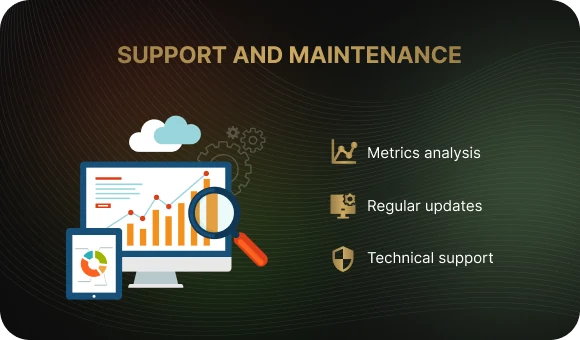
Support includes fixing bugs and adapting the app to new OS versions, updates add new features and improve the interface, and feedback collection helps identify user needs and respond to them quickly.
How to Choose the Right Strategy
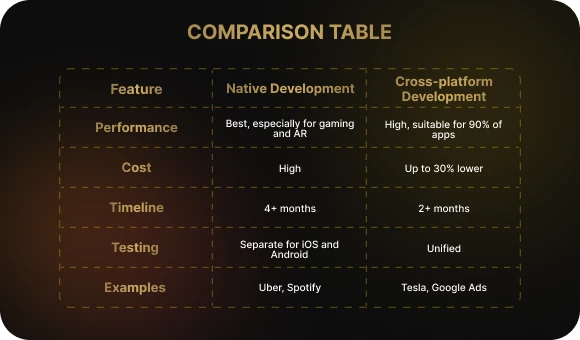
Native development is suitable if:
- You need the highest possible performance
- The app is closely tied to device capabilities such as the camera, gyroscope, or NFC
- Unique visual solutions are important
Cross-platform development is effective if:
- You need a fast launch
- The budget is limited
- You need to launch on both Android and iOS at the same time

Some companies use a hybrid strategy: an MVP built in Flutter or React Native, followed later by expansion with native modules. This helps preserve flexibility and adaptability.
New Trends in Mobile Development
- Low-code and no-code solutions are speeding up development for simple interfaces
- AI and machine learning are being integrated into mobile apps for personalization and recommendations
- Micro-frontends make it possible to split the interface into independent modules
- 5G opens up opportunities for real-time streaming, AR, and VR
It is important to keep up with trends: modern technologies change very quickly, and apps that do not adopt new solutions risk becoming outdated. Regular updates make it possible to add features, improve performance, and adapt to user expectations, which increases loyalty and engagement.
Conclusion: A Strategy, Not Just a Technology Choice
The world of mobile development is a rapidly changing space. To stay competitive in the race for user attention, businesses need to understand not only which technologies are used in mobile app development, but also how to adapt them to their own goals.
There is no universal answer. In one case, native wins; in another, cross-platform is the better choice. But in any case, the winner is the one who defines goals in advance, calculates resources, and selects the optimal tools.
We develop apps that combine technology, adaptability, and business logic. From idea to publication, we cover the full cycle.
Want your app to become a competitive advantage? Contact us. We will help turn your concept into a convenient digital product that your users will appreciate.
Native Development: Precision, Performance, and Depth
Building native apps is like custom assembly for each platform: development is done separately for Android and iOS, fully taking each operating system’s specifics into account. For iOS, developers use Swift or Objective-C with Xcode; for Android, Kotlin or Java with Android Studio. This approach provides maximum control and allows you to use the full potential of the device without compromise.
Advantages of native development:
- Top-level performance, which is especially important when working with graphics, animations, and complex calculations.
- Direct access to device hardware — from the camera to Bluetooth and AR — allows the app to work at full capacity without intermediaries. It is like having the keys to the entire smartphone functionality without asking the operating system for permission.
- Seamless integration into the platform ecosystem. The app looks and behaves as if it was built inside the platform itself: its appearance and interactions feel intuitive and familiar to users, from animations to standard gestures.
Disadvantages:
- Two systems require two teams and two separate codebases.
- Maintenance, updates, and bug fixes come with double the costs.
- Development timelines are longer, especially for large-scale projects.
Large companies usually choose native development when they need maximum customization, high responsiveness, and full access to hardware capabilities. Examples include Uber, Instagram, and Snapchat.
Cross-Platform Development: Savings, Speed, Flexibility
When budgets are tight and competitors are already testing the next app update, cross-platform development becomes a lifesaver. The essence of the approach is simple: write code once and run it on both Android and iOS. This universality is made possible by modern frameworks that are already comparable to native solutions in terms of power.
Flutter (Google): not just a tool, but an entire ecosystem. It uses the Dart language, which compiles into native code, allowing the interface to run smoothly without lag. Flutter has its own rendering engine independent of platform components. This means the interface will look the same everywhere, whether on an iPhone or an Android smartphone. Widgets can be customized like building blocks, and hot reload allows developers to see changes instantly instead of waiting.
React Native (Meta): ideal for those who think in terms of JavaScript. Its main strength lies in balancing native-quality results with flexibility. The bridge architecture gives access to native APIs when the basic components are not enough. It works well for hybrid solutions, is supported by a large community and major companies like Meta and Microsoft, and fast refresh makes iterations quick and seamless.
Xamarin (Microsoft): especially strong in enterprise environments. It works with C# and .NET, which makes it a favorite among teams already operating within the Microsoft ecosystem. It allows reuse of up to 90% of the code across platforms, reducing costs and risks. Through Xamarin.iOS and Xamarin.Android, developers can access native APIs, while Visual Studio and Azure turn the process into a structured CI/CD development flow. It is valued for reliability, security, and predictability.
Why it is worth considering:
- Development cost reduction of up to 40%
- Faster MVP delivery without sacrificing UX
- Centralized updates to the codebase
- Easy integration with modern analytics, logging, and A/B testing tools
Disadvantages to keep in mind:
- It does not always handle heavy 3D graphics and highly custom animations well
- Sometimes native modules are still necessary, especially when access to specific device features is required
Companies already using it:
- Flutter: BMW, Alibaba, Nubank, Google Ads
- React Native: Tesla, Airbnb, Instagram
- Xamarin: UPS, Alaska Airlines, and internal corporate apps
This approach allows businesses to stay up to date, reduce technical debt, and get to market faster. In a world where speed decides everything, cross-platform development is not a compromise — it is a strategic choice.
Why Businesses Choose Cross-Platform
From an economic perspective, cross-platform apps make it possible to test a hypothesis and enter the market faster. This is especially important in competitive industries such as e-commerce, delivery, mobile banking, and aviation.
Key advantages:
- The app goes live while competitors are still debating the design: a fast time to market helps you occupy a niche earlier, test your hypothesis, and start collecting real data.
- Scalability support: the same logic modules and code parts can be adapted for new features. It is like building floor after floor on an already solid foundation — quickly, reliably, and without unnecessary rework.
- The app feels as if it was built directly into the device: the same appearance, identical behavior, and predictable logic. Users do not notice a platform switch — they simply use it naturally, from the first tap.
- Like in a well-equipped workshop, developers have thousands of libraries and tools at hand — from debugging to analytics. This speeds up development, reduces bugs, and makes it easier to implement even complex features without reinventing the wheel.
Modern mobile app development technologies allow cross-platform solutions to come closer to native in terms of speed and smoothness. For example, Flutter renders the interface directly, bypassing native components, which makes it especially fast.
Stages of Mobile App Development with a Cross-Platform Approach
1. Research and planning
Analyzing the target audience and competitive environment helps determine which features and interface will actually be in demand, identify market niches, and avoid repeating competitors’ mistakes. This is the foundation for choosing the right mobile app development technology.
Defining key requirements and selecting the framework helps establish the project’s architectural and technical boundaries in advance. This makes it possible to avoid technical debt, allocate resources accurately, and choose the best tools for business goals.
2. Interface design
UI/UX design and prototyping help visualize the future app’s functionality, test user behavior scenarios, and identify friction points early. This reduces the risk of revisions and improves the first-touch experience.
Creating adaptive layouts for different devices ensures the interface displays correctly on smartphones, tablets, and other screens. This improves perception, reduces bounce rates, and increases user satisfaction from the very first interaction.
3. Development
Structuring the app architecture lays the foundation for logic, component interaction, and scalability. This is critical for stable performance, adding new features, and adapting to increasing load without rewriting the whole system.
Writing code using the chosen technology means implementing all the planned functionality, interfaces, and logic. High-quality code ensures app stability, security, and scalability, while also making maintenance and future enhancements easier.
Integration with the backend, databases, and APIs follows.
4. Testing
Bug checks and UX testing are mandatory stages that help identify critical failures and problematic parts of the interface. This reduces the risk of user churn, improves stability, and increases overall product satisfaction.
Performance optimization is a systematic process of identifying and removing factors that slow the app down. Improving response speed, reducing loading times, and saving device resources all affect satisfaction and retention.
Regression and load testing are key stages for ensuring stability and performance. Regression tests confirm that new changes do not break existing functionality, while load tests check how the app behaves under high traffic and stress.
5. Release and support
Preparation for publication includes designing and uploading all required assets, while metadata setup means correctly filling in app information such as the description, keywords, and screenshots. This is important for successful promotion and discoverability in the App Store and Google Play.
Uploading to the App Store and Google Play is the final major step that makes the app available to a wide audience. Proper publication ensures visibility in the stores, compliance with platform rules, and readiness for future updates.
Support includes fixing bugs and adapting the app to new OS versions, updates add new features and improve the interface, and feedback collection helps identify user needs and respond to them quickly.
How to Choose the Right Strategy
Native development is suitable if:
- You need the highest possible performance
- The app is closely tied to device capabilities such as the camera, gyroscope, or NFC
- Unique visual solutions are important
Cross-platform development is effective if:
- You need a fast launch
- The budget is limited
- You need to launch on both Android and iOS at the same time
Some companies use a hybrid strategy: an MVP built in Flutter or React Native, followed later by expansion with native modules. This helps preserve flexibility and adaptability.
New Trends in Mobile Development
- Low-code and no-code solutions are speeding up development for simple interfaces
- AI and machine learning are being integrated into mobile apps for personalization and recommendations
- Micro-frontends make it possible to split the interface into independent modules
- 5G opens up opportunities for real-time streaming, AR, and VR
It is important to keep up with trends: modern technologies change very quickly, and apps that do not adopt new solutions risk becoming outdated. Regular updates make it possible to add features, improve performance, and adapt to user expectations, which increases loyalty and engagement.
Conclusion: A Strategy, Not Just a Technology Choice
The world of mobile development is a rapidly changing space. To stay competitive in the race for user attention, businesses need to understand not only which technologies are used in mobile app development, but also how to adapt them to their own goals.
There is no universal answer. In one case, native wins; in another, cross-platform is the better choice. But in any case, the winner is the one who defines goals in advance, calculates resources, and selects the optimal tools.
We develop apps that combine technology, adaptability, and business logic. From idea to publication, we cover the full cycle.
Want your app to become a competitive advantage? Contact us. We will help turn your concept into a convenient digital product that your users will appreciate.