31.05.2026
Time to read:
6
min
Medical Information System: How Do You Choose an Off-the-Shelf Solution or Build Your Own?
Development
Insights
MVP
When a clinic doesn’t have a unified system, day-to-day operations quickly become more complicated. Doctors and administrators keep records in paper logs and spreadsheets, patient data and lab results are stored in different places, and some information inevitably gets lost. It becomes increasingly difficult to monitor doctors’ workloads, finances, and service quality—especially as a private clinic grows.
To bring order to these processes, clinics implement medical information systems, or MIS. Today, the market offers dozens of MIS solutions: cloud-based and on-premise products, subscription-based systems, and custom-built options. On paper, the choice is wide—but that is exactly what makes it hard for decision-makers to understand which solution is the right fit for their clinic.
A medical information system can either be a standard off-the-shelf product or a solution tailored to a clinic’s specific workflows. Below, we’ll look at both options, compare them in simple terms, and show which path is better suited to different goals and business sizes.
What Is an MIS and Why Does a Clinic Need One?
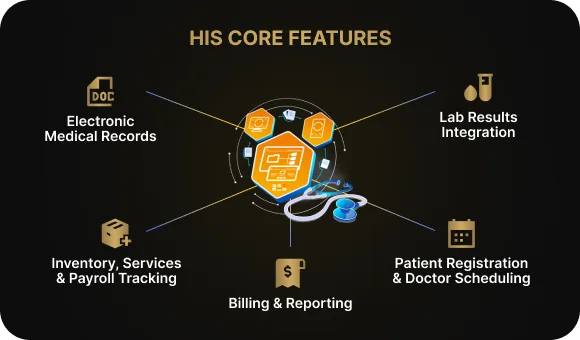
An MIS, or medical information system, is essentially a clinic’s operating system. It brings together all core day-to-day operations in one place: patient scheduling, doctors’ calendars, electronic medical records, prescriptions, lab results, payments, and reporting. Some platforms also include inventory management, service tracking, and payroll. Instead of juggling dozens of paper logs and spreadsheets, a medical center can run everything through a single system.
This kind of platform reduces routine work for staff and helps minimize errors. Doctors can access patient data faster, administrators always see the latest schedule, and management gets a clear view of physician workload and financial performance. For patients, it means a smoother experience: online booking, appointment reminders, and access to their own medical information.
At the same time, any software used in healthcare has to comply with personal data protection requirements and integrate correctly with government systems. These constraints affect both the system architecture and the choice of solution, so they need to be considered from the very start of MIS implementation.
Three MIS Options for a Clinic and How They Differ
In practice, medical centers usually have three ways to organize their operations through an MIS. A medical information system can be an off-the-shelf product, a ready-made system customized to fit, or a fully custom-built solution. Each approach affects clinic management, data handling, electronic document workflows, and integration with labs, cash registers, and external services in different ways. The option you choose will determine how quickly the system can be launched, how flexible your workflows can be, and how comfortable the platform is for staff to use.
1. Off-the-shelf MIS
The clinic purchases or subscribes to a ready-made product, usually on a subscription basis. These systems typically include a standard set of features: patient scheduling, doctor calendars, electronic health records, financial tracking, and reporting.
Pros: fast to launch, relatively affordable.
Cons: the clinic has to adapt its processes to the logic of the system.
2. Off-the-shelf MIS with customization
This approach starts with an existing medical system and adds the features the clinic needs. That might include a patient portal, a mobile app, custom analytics, or additional integrations.
Pros: a balance between speed of implementation and flexibility.
Cons: more expensive and slower to launch than a standard ready-made solution.
3. Fully custom-built MIS
The system is developed from scratch around the workflows of a specific clinic or healthcare network. This approach offers maximum flexibility, but it requires substantial resources.
Pros: the system fully matches the business logic of the medical center.
Cons: high cost, long development timelines, and ongoing support expenses.
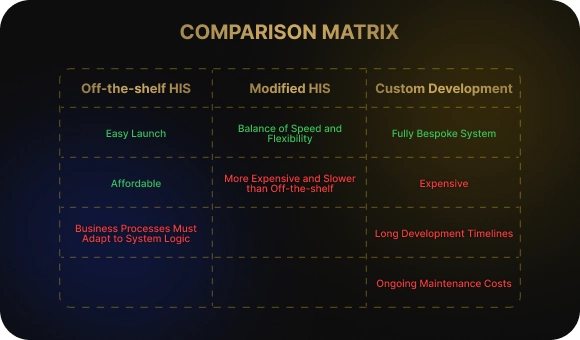
Regardless of which MIS option a clinic chooses, it is important to evaluate not just functionality, but also how well the system supports daily operations. Workflow management, data handling, electronic document management, and integration with external services all directly affect business stability. The more precisely the platform fits the clinic’s needs, the more effectively it can support growth and control.
When Building Your Own MIS Makes Sense
A custom-built MIS, or even a heavily customized one, is not necessary for every private clinic. In most cases, off-the-shelf solutions cover the core processes and allow a clinic to build stable operations without unnecessary expense. Problems usually arise when a medical center grows, expands its services, and starts running into the limits of a standard system in terms of process management and data handling. At that point, integration with labs, external services, and internal modules becomes increasingly important, and the MIS stops being just software and becomes the clinic’s main management backbone.
Developing your own system, or significantly customizing an existing one, may be justified if:
- the clinic is growing into a multi-site network with branches in different cities;
- the patient journey is complex, with transitions between departments, care programs, and physicians;
- the business uses non-standard loyalty schemes, subscription packages, or complex pricing models;
- there is a strong need for advanced analytics, investor reporting, or custom BI tools.

That said, it is important to understand that building your own MIS is not a cost-saving strategy. It is a standalone product that requires continuous investment in development, support, updates, and security. This path only makes sense if the clinic has a clear growth strategy and is prepared to keep developing the system over time rather than expecting quick wins.
Five Steps to Decide: Custom Medical Software or an Off-the-Shelf Solution
Electronic medical systems can be implemented as ready-made products or developed as proprietary medical software. In the second case, the clinic takes responsibility not only for development, but also for ongoing support, platform evolution, integration with external services, and the related operational risks. To avoid making an emotional decision or overpaying for the wrong option, it is important to assess your goals, processes, and resources step by step.
1. Define your 3–5 main priorities
Start not with the technology, but with the problems currently affecting the medical center. Think about where time, money, or patients are being lost, and which processes are suffering most.
Example: if administrators constantly face queues and appointment mix-ups, the priority should be clear scheduling and booking—not advanced analytics or custom reporting.
2. Separate must-haves from nice-to-haves
Clearly distinguish between the features the system absolutely needs and those that can be added later. This makes the selection process much easier and reduces the risk of overspending.
Example: for a dental clinic, an electronic patient record and treatment history are essential. A patient portal or mobile app can be introduced at a later stage.
3. Review several off-the-shelf solutions
Even if you are leaning toward custom development, it is still worth looking at ready-made systems. They help establish a benchmark for what the market offers and show which problems are already solved out of the box.
Example: a doctor may be comfortable filling out a patient record in a few minutes, while an administrator struggles with the scheduling interface. That is a sign the system may not work equally well for all roles in the clinic.
4. Identify the gaps in ready-made solutions
Document which features or workflow logic are missing. It is important to distinguish between minor inconveniences and serious limitations.
Example: if the system does not support complex long-term patient care programs, and those programs are a major revenue source for the clinic, that becomes a critical limitation.
5. Calculate not only the purchase price, but the full implementation cost
The cost of a system is not limited to the license fee or development budget. You also need to factor in staff training, data migration, possible downtime, and post-launch support.
Example: in a dental practice, the software itself may be affordable, but training doctors and administrators—and the productivity loss during rollout—can cost more than the license.
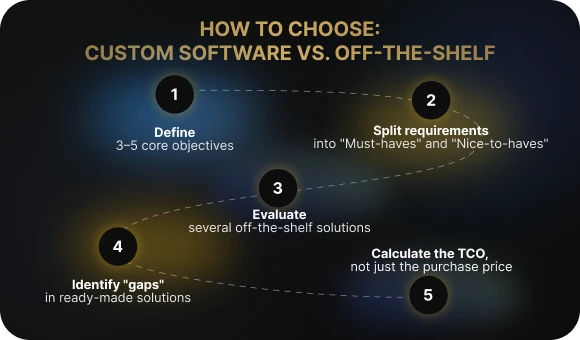
This approach makes it possible to assess realistically what role an MIS should play in a clinic. It is not just about appointment scheduling software, but about a system that supports the day-to-day work of doctors and administrators and helps manage operations in a private clinic. For a dental practice, a multidisciplinary medical center, or a clinic network, it is important to understand in advance how the information environment will be structured, which integrations with laboratories and external services will be required, and who will be responsible for the platform’s ongoing development. This helps ensure the clinic chooses a solution that supports the business rather than creating new limitations.
The Honest Conclusion: How to Choose an MIS Without Overspending
There is no single right answer. The choice of an MIS depends on the size of the clinic, its growth rate, the complexity of its workflows, and its budget. What works well for a small private practice may not be suitable for a network of medical centers—and vice versa.
A sensible place to start is not with the idea, “We want our own MIS,” but with an honest list of business problems and goals. Medical software already covers most of the standard needs of healthcare providers, and that should always be tested first. Only if ready-made solutions truly do not fit the clinic’s processes does it make sense to move on to a discussion of custom development.
If you want help choosing the right approach from specialists with hands-on MIS implementation and development experience, get in touch with us at Beetrail. We will review your clinic’s needs, assess what can be covered with ready-made solutions, and determine where customization or full custom development is truly needed. This approach helps you make an informed decision—and avoids having to replace the system a year later.
What Is an MIS and Why Does a Clinic Need One?
An MIS, or medical information system, is essentially a clinic’s operating system. It brings together all core day-to-day operations in one place: patient scheduling, doctors’ calendars, electronic medical records, prescriptions, lab results, payments, and reporting. Some platforms also include inventory management, service tracking, and payroll. Instead of juggling dozens of paper logs and spreadsheets, a medical center can run everything through a single system.
This kind of platform reduces routine work for staff and helps minimize errors. Doctors can access patient data faster, administrators always see the latest schedule, and management gets a clear view of physician workload and financial performance. For patients, it means a smoother experience: online booking, appointment reminders, and access to their own medical information.
At the same time, any software used in healthcare has to comply with personal data protection requirements and integrate correctly with government systems. These constraints affect both the system architecture and the choice of solution, so they need to be considered from the very start of MIS implementation.
Three MIS Options for a Clinic and How They Differ
In practice, medical centers usually have three ways to organize their operations through an MIS. A medical information system can be an off-the-shelf product, a ready-made system customized to fit, or a fully custom-built solution. Each approach affects clinic management, data handling, electronic document workflows, and integration with labs, cash registers, and external services in different ways. The option you choose will determine how quickly the system can be launched, how flexible your workflows can be, and how comfortable the platform is for staff to use.
1. Off-the-shelf MIS
The clinic purchases or subscribes to a ready-made product, usually on a subscription basis. These systems typically include a standard set of features: patient scheduling, doctor calendars, electronic health records, financial tracking, and reporting.
Pros: fast to launch, relatively affordable.
Cons: the clinic has to adapt its processes to the logic of the system.
2. Off-the-shelf MIS with customization
This approach starts with an existing medical system and adds the features the clinic needs. That might include a patient portal, a mobile app, custom analytics, or additional integrations.
Pros: a balance between speed of implementation and flexibility.
Cons: more expensive and slower to launch than a standard ready-made solution.
3. Fully custom-built MIS
The system is developed from scratch around the workflows of a specific clinic or healthcare network. This approach offers maximum flexibility, but it requires substantial resources.
Pros: the system fully matches the business logic of the medical center.
Cons: high cost, long development timelines, and ongoing support expenses.
Regardless of which MIS option a clinic chooses, it is important to evaluate not just functionality, but also how well the system supports daily operations. Workflow management, data handling, electronic document management, and integration with external services all directly affect business stability. The more precisely the platform fits the clinic’s needs, the more effectively it can support growth and control.
When Building Your Own MIS Makes Sense
A custom-built MIS, or even a heavily customized one, is not necessary for every private clinic. In most cases, off-the-shelf solutions cover the core processes and allow a clinic to build stable operations without unnecessary expense. Problems usually arise when a medical center grows, expands its services, and starts running into the limits of a standard system in terms of process management and data handling. At that point, integration with labs, external services, and internal modules becomes increasingly important, and the MIS stops being just software and becomes the clinic’s main management backbone.
Developing your own system, or significantly customizing an existing one, may be justified if:
- the clinic is growing into a multi-site network with branches in different cities;
- the patient journey is complex, with transitions between departments, care programs, and physicians;
- the business uses non-standard loyalty schemes, subscription packages, or complex pricing models;
- there is a strong need for advanced analytics, investor reporting, or custom BI tools.
That said, it is important to understand that building your own MIS is not a cost-saving strategy. It is a standalone product that requires continuous investment in development, support, updates, and security. This path only makes sense if the clinic has a clear growth strategy and is prepared to keep developing the system over time rather than expecting quick wins.
Five Steps to Decide: Custom Medical Software or an Off-the-Shelf Solution
Electronic medical systems can be implemented as ready-made products or developed as proprietary medical software. In the second case, the clinic takes responsibility not only for development, but also for ongoing support, platform evolution, integration with external services, and the related operational risks. To avoid making an emotional decision or overpaying for the wrong option, it is important to assess your goals, processes, and resources step by step.
1. Define your 3–5 main priorities
Start not with the technology, but with the problems currently affecting the medical center. Think about where time, money, or patients are being lost, and which processes are suffering most.
Example: if administrators constantly face queues and appointment mix-ups, the priority should be clear scheduling and booking—not advanced analytics or custom reporting.
2. Separate must-haves from nice-to-haves
Clearly distinguish between the features the system absolutely needs and those that can be added later. This makes the selection process much easier and reduces the risk of overspending.
Example: for a dental clinic, an electronic patient record and treatment history are essential. A patient portal or mobile app can be introduced at a later stage.
3. Review several off-the-shelf solutions
Even if you are leaning toward custom development, it is still worth looking at ready-made systems. They help establish a benchmark for what the market offers and show which problems are already solved out of the box.
Example: a doctor may be comfortable filling out a patient record in a few minutes, while an administrator struggles with the scheduling interface. That is a sign the system may not work equally well for all roles in the clinic.
4. Identify the gaps in ready-made solutions
Document which features or workflow logic are missing. It is important to distinguish between minor inconveniences and serious limitations.
Example: if the system does not support complex long-term patient care programs, and those programs are a major revenue source for the clinic, that becomes a critical limitation.
5. Calculate not only the purchase price, but the full implementation cost
The cost of a system is not limited to the license fee or development budget. You also need to factor in staff training, data migration, possible downtime, and post-launch support.
Example: in a dental practice, the software itself may be affordable, but training doctors and administrators—and the productivity loss during rollout—can cost more than the license.
This approach makes it possible to assess realistically what role an MIS should play in a clinic. It is not just about appointment scheduling software, but about a system that supports the day-to-day work of doctors and administrators and helps manage operations in a private clinic. For a dental practice, a multidisciplinary medical center, or a clinic network, it is important to understand in advance how the information environment will be structured, which integrations with laboratories and external services will be required, and who will be responsible for the platform’s ongoing development. This helps ensure the clinic chooses a solution that supports the business rather than creating new limitations.
The Honest Conclusion: How to Choose an MIS Without Overspending
There is no single right answer. The choice of an MIS depends on the size of the clinic, its growth rate, the complexity of its workflows, and its budget. What works well for a small private practice may not be suitable for a network of medical centers—and vice versa.
A sensible place to start is not with the idea, “We want our own MIS,” but with an honest list of business problems and goals. Medical software already covers most of the standard needs of healthcare providers, and that should always be tested first. Only if ready-made solutions truly do not fit the clinic’s processes does it make sense to move on to a discussion of custom development.
If you want help choosing the right approach from specialists with hands-on MIS implementation and development experience, get in touch with us at Beetrail. We will review your clinic’s needs, assess what can be covered with ready-made solutions, and determine where customization or full custom development is truly needed. This approach helps you make an informed decision—and avoids having to replace the system a year later.