05.06.2026
Time to read:
9
min
How to Write a Technical Specification for Mobile App Development
Development
Guides
Insights
Creating a mobile app is an exciting but complex process. One of the key stages that determines the success of the project is the technical specification for mobile app development. Without it, there is a high risk of misunderstandings between the client and the team, endless revisions, and budget overruns.
In this article, we will look at how to write such a specification, what it should include, and provide an example of a technical specification for mobile app development.


What a Technical Specification Is and Why It Matters
A technical specification is a document that describes all the requirements for a mobile app: from the project goals and user profile to functionality, design, timeline, and budget. This document becomes the foundation for the work of developers, designers, analysts, and testers.
Why a technical specification for mobile app development is more than just a formality
- It helps build transparent communication between the client and the team.
- It reduces the risk of mistakes and misunderstandings.
- It makes it possible to estimate the timeline and budget more accurately.
- It gives the team a clear understanding of the result they are working toward.

Main Sections of a Technical Specification
A good technical specification is not just a wishlist — it is logical, structured documentation that guides the team from idea to product. It covers both business goals and technical details, helping every team member understand what needs to be built, how it should work, and why it matters.
Such a document becomes the basis for planning, estimation, control, and successful project delivery. Let’s look at the key sections that should be included in a technical specification to make sure the mobile app turns out exactly as the client intended.
1. General Project Information
App goals and objectives
An app is created to solve specific user and business problems. This may include order automation, easier customer communication, higher loyalty, or expanded sales channels. A clearly defined goal helps guide development and measure project success.
The app should serve a practical purpose: help users save time, quickly get the service or information they need, and place orders without unnecessary steps. From a business perspective, it should improve processes, increase sales, and make customer interaction more convenient.
Target audience
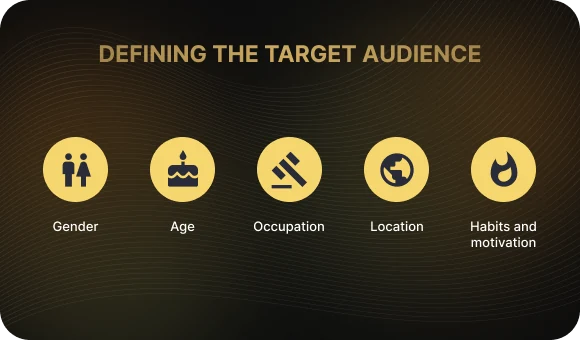
A clear understanding of the target audience helps tailor the app to real user needs. Specify age range, for example 18–35, gender, occupation, level of digital literacy, habits, and motivations: why users will open the app, in what situations, and how often. Add behavioral scenarios as well: are they willing to register, make purchases, or interact with content?
It is also important to take geography and language into account. Users in major cities may expect a more advanced interface and more sophisticated logic, while users in smaller regions may prefer simplicity and minimalism. This helps shape the design, navigation logic, and functionality around specific expectations and usage contexts.
Platforms
Specify which platforms the app is being built for: Android, iOS, or both. Is cross-platform development needed, for example with Flutter? Define the minimum supported OS versions, device types such as smartphones or tablets, and any adaptation requirements.
Is cross-platform development needed?
Cross-platform development based on Flutter, React Native, and similar technologies allows you to create one app for both Android and iOS, saving time and budget. However, it is not the right choice for every project: performance requirements, native UI expectations, and access to system features all need to be considered.
You should also specify the minimum operating system versions the app must support, since this affects both technology choice and audience reach. For example: Android 9.0+ and iOS 13+. The lower the minimum version, the broader the user coverage — but also the higher the compatibility requirements.
2. Functional Requirements
This is essentially the core of the technical specification for mobile app development. It describes in detail the functions the app should perform at launch and in the future, from basic tasks such as registration and search to more advanced scenarios. It should also include user flows, priorities, and dependencies between modules.
Core functionality
The core functionality of the app includes the key features without which the project goals cannot be achieved. Here, it is important to list the minimum required set of options: registration, payment, notifications, personal account, and so on. Each feature should be described in terms of user value and the use case it supports.
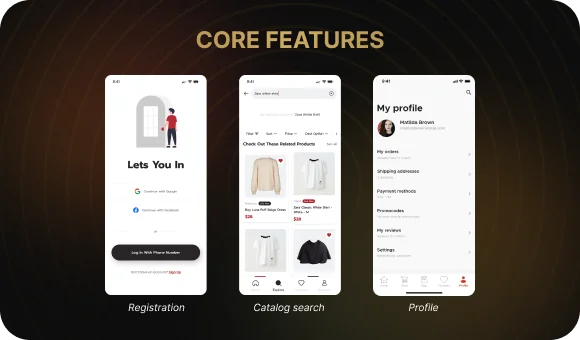
Registration and login.
This is a basic feature that gives users access to personalized functionality. It is important to specify which login methods are supported: email, phone number, social login, or biometrics. You should also describe the password recovery and identity verification flow.
User account.
This is a personalized section where the user manages personal data, orders, settings, and notifications. Specify what it includes: activity history, password change, saved items, profile settings, and more.
Catalog search.
Search should be convenient and fast. Define which parameters can be searched — for example, name, category, or filters — and whether smart search with suggestions or autocomplete will be implemented. Think about how to make search results relevant and fast.
Push notifications.
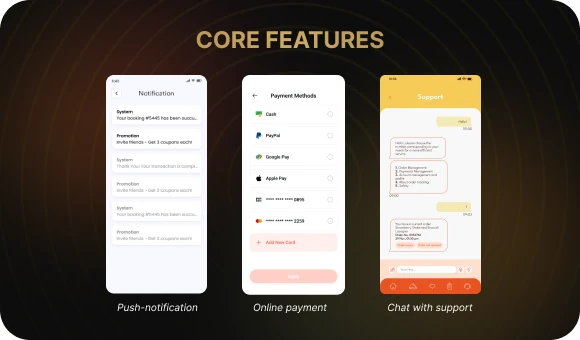
Notifications allow you to promptly inform users about order status, promotions, messages, or app events. Specify when and how they are sent, whether they can be disabled or customized, and whether deep links are supported.
Online payments.
It is important to specify which payment systems are supported: bank cards, Apple Pay, Google Pay, or digital wallets. You should also describe the payment flow, transaction security, whether card saving is supported, and whether refunds are available.
Support chat.
An in-app chat allows users to quickly get help with the app, check order status, or resolve an issue. Specify whether this will be a bot, a live agent, or a hybrid model, and which channels are supported: text, attachments, voice, and so on.
For each feature, it is helpful to describe a user story — a scenario in which the user interacts with the app:
“The user opens the app, selects a product, adds it to the cart, and pays by bank card.”
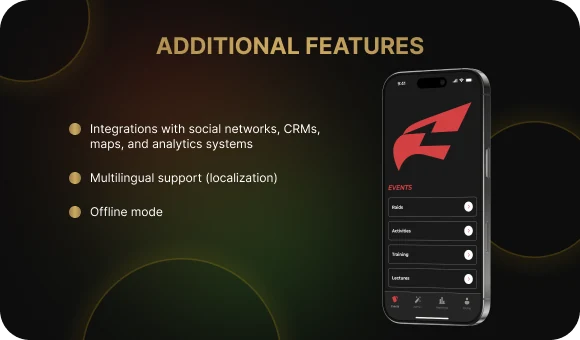
Additional functionality
- Integrations with social networks, CRM systems, maps, and analytics platforms
- Multilingual support and localization
- Offline mode
Constraints
- App size up to 100 MB
- Launch time no more than 3 seconds
- Stable operation under weak internet conditions
3. Technical Requirements
This section should describe how the functionality will be implemented, taking into account technologies, architecture, security, and expected load.
Technology stack
Specify the programming languages that will be used: Swift, Kotlin, Flutter, React Native, and so on. Explain the reasoning behind the choice — for example, Swift provides better iOS performance, while Flutter is suitable for cross-platform development. Also mention which libraries, frameworks, and SDKs are planned and why they are needed, such as Firebase for push notifications and analytics.
Backend
Describe whether the app will use a server-side architecture. Clarify whether it requires a custom backend or third-party services. Specify the type of database: SQL systems such as PostgreSQL or MySQL for structured data, or NoSQLsolutions such as MongoDB or Firebase for more flexible structures. It is also important to describe how data will be stored and exchanged: REST API, GraphQL, WebSocket, and other technologies.
Security
Security is critical for any app. Describe which data protection methods will be implemented: encryption on the device and in transit, secure token storage, restrictions on rooted or jailbroken devices, and so on. Also specify authentication methods: login and password, biometrics, or two-factor authentication. Explain how the app will be protected against leaks and attacks.
Performance
The app must work reliably even under high load. Describe the expected number of users, the volume of processed data, and the scaling strategy. Specify performance goals such as loading time — for example, no more than 2 seconds— offline support, and response speed. It is also important to plan for stress testing and performance monitoring during launch and in the future.
4. Design and UX/UI
Design concept
Define the visual style: minimalism, material design, or brand-specific identity. Specify the color palette, fonts, graphics, icon preferences, and visual accents. This will set the tone for the entire interface and improve app recognition.
Prototypes and mockups
Clarify whether ready-made mockups already exist or whether they will be created from scratch. It is important to specify the tools being used, such as Figma or Sketch, and who is responsible for them. You can also include reference examples: which apps inspire the interface and user journey.
Adaptivity
The app should display correctly on different devices and screen sizes. Specify whether tablets, landscape mode, and support for different pixel densities are required. This will affect both the design system and the front-end implementation approach.
5. Development Stages and Timeline
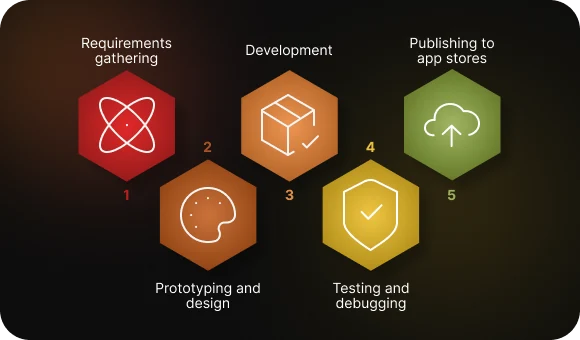
Project phases
Requirements gathering and analysis.
At this stage, the team and the client build a shared understanding of the goals, features, and constraints. This includes market and competitor research, user scenarios, and the documentation of key business processes.
Prototyping.
Interactive screen mockups are created at this stage. This helps test the interaction logic, refine the structure, and make sure the interface is convenient before development starts.
Development.
This is the main stage, where the team implements the interfaces, logic, and features according to the technical specification. It is important to establish version control, use a task management system, and follow architectural principles.
Testing.
This phase includes checking all features for bugs, stability, and compliance with the technical specification. Both manual and automated testing are carried out on different devices.
Publishing to app stores.
The final stage includes preparing the description, screenshots, and icons for the App Store and Google Play. It is important to meet platform requirements and pass moderation.
Timeline
Each phase of the project should include an estimated timeframe — for example, 2 weeks for analytics, 3 weeks for design, and 5 weeks for development. This helps with planning and progress tracking.
Feedback
Regular meetings and intermediate iterations make it possible to monitor the project, clarify tasks quickly, and make changes on time. Feedback helps the team adapt the functionality to real project requirements.
6. Budget and Resources
Budget estimation
Estimate the cost of each stage: analytics, design, development, testing, and publishing. Consider the hourly rates of specialists as well as possible overhead costs.
Additional expenses may include cloud hosting, licenses for third-party services, analytics systems, push notification delivery, and backend infrastructure maintenance.
Team
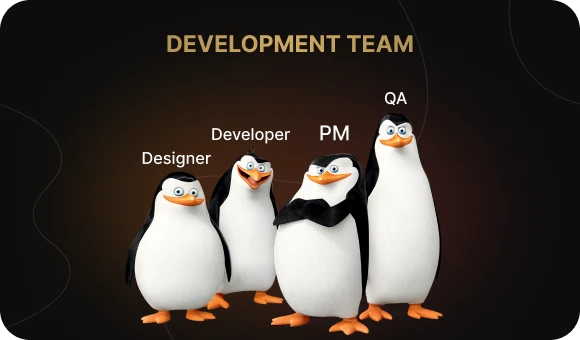
To deliver the project, you will typically need a team that includes an analyst, designer, developer, tester, and project manager. It is also worth defining in advance which third-party services and tools will be used: CRM systems, payment gateways, cloud solutions, and API services.
Example of a Technical Specification for App Development
Here is a short example of a technical specification for a food delivery app:
Project name: FoodNow
Goal: Provide users with a convenient way to order food from restaurants with online payment support.
Platforms: Android (version 9.0+), iOS (version 13+)
Features:
- Registration / login
- Restaurant catalog
- Filters by cuisine and rating
- Add to cart
- Payment via Apple Pay and Google Pay
- Push notifications about order status
- Order history
Additional requirements:
- Integration with 1C
- Support for Russian and English
- APK size up to 80 MB
Budget: from 1.5 million RUB
Estimated timeline: 3 months
Tips for Writing a Technical Specification
1. Be specific
Avoid vague phrases like “user-friendly interface.” Instead, write something like: “The home screen displays three sections: catalog, promotions, and profile.”
2. Involve the team
Work on the specification together with technical specialists, a designer, and a business analyst. This speeds up the process and improves the accuracy of the document.
3. Do not be afraid to revise the specification
This is a living document. After user interviews or new ideas, some requirements may need to be revisited.
4. Use the right tools
For prototyping:
- Figma
- Adobe XD
For planning:
- Trello
- Jira
- Notion

Conclusion
A technical specification for mobile app development is not just a document — it is the strategic foundation of the entire project. It directly affects how accurately the team understands the task and how successfully the product is delivered.
If you want your app to be high-quality and in demand, start with the specification. And if you are not sure how to prepare it correctly, we can help.
At Beetrail, we work with businesses at every stage: from idea analysis and preparation to launching the app in the stores.
Ready to turn your idea into a real project? Write to us — and we will prepare a technical specification for mobile app development that becomes a solid foundation for your future product.
What a Technical Specification Is and Why It Matters
A technical specification is a document that describes all the requirements for a mobile app: from the project goals and user profile to functionality, design, timeline, and budget. This document becomes the foundation for the work of developers, designers, analysts, and testers.
Why a technical specification for mobile app development is more than just a formality
- It helps build transparent communication between the client and the team.
- It reduces the risk of mistakes and misunderstandings.
- It makes it possible to estimate the timeline and budget more accurately.
- It gives the team a clear understanding of the result they are working toward.
Main Sections of a Technical Specification
A good technical specification is not just a wishlist — it is logical, structured documentation that guides the team from idea to product. It covers both business goals and technical details, helping every team member understand what needs to be built, how it should work, and why it matters.
Such a document becomes the basis for planning, estimation, control, and successful project delivery. Let’s look at the key sections that should be included in a technical specification to make sure the mobile app turns out exactly as the client intended.
1. General Project Information
App goals and objectives
An app is created to solve specific user and business problems. This may include order automation, easier customer communication, higher loyalty, or expanded sales channels. A clearly defined goal helps guide development and measure project success.
The app should serve a practical purpose: help users save time, quickly get the service or information they need, and place orders without unnecessary steps. From a business perspective, it should improve processes, increase sales, and make customer interaction more convenient.
Target audience
A clear understanding of the target audience helps tailor the app to real user needs. Specify age range, for example 18–35, gender, occupation, level of digital literacy, habits, and motivations: why users will open the app, in what situations, and how often. Add behavioral scenarios as well: are they willing to register, make purchases, or interact with content?
It is also important to take geography and language into account. Users in major cities may expect a more advanced interface and more sophisticated logic, while users in smaller regions may prefer simplicity and minimalism. This helps shape the design, navigation logic, and functionality around specific expectations and usage contexts.
Platforms
Specify which platforms the app is being built for: Android, iOS, or both. Is cross-platform development needed, for example with Flutter? Define the minimum supported OS versions, device types such as smartphones or tablets, and any adaptation requirements.
Is cross-platform development needed?
Cross-platform development based on Flutter, React Native, and similar technologies allows you to create one app for both Android and iOS, saving time and budget. However, it is not the right choice for every project: performance requirements, native UI expectations, and access to system features all need to be considered.
You should also specify the minimum operating system versions the app must support, since this affects both technology choice and audience reach. For example: Android 9.0+ and iOS 13+. The lower the minimum version, the broader the user coverage — but also the higher the compatibility requirements.
2. Functional Requirements
This is essentially the core of the technical specification for mobile app development. It describes in detail the functions the app should perform at launch and in the future, from basic tasks such as registration and search to more advanced scenarios. It should also include user flows, priorities, and dependencies between modules.
Core functionality
The core functionality of the app includes the key features without which the project goals cannot be achieved. Here, it is important to list the minimum required set of options: registration, payment, notifications, personal account, and so on. Each feature should be described in terms of user value and the use case it supports.
Registration and login.
This is a basic feature that gives users access to personalized functionality. It is important to specify which login methods are supported: email, phone number, social login, or biometrics. You should also describe the password recovery and identity verification flow.
User account.
This is a personalized section where the user manages personal data, orders, settings, and notifications. Specify what it includes: activity history, password change, saved items, profile settings, and more.
Catalog search.
Search should be convenient and fast. Define which parameters can be searched — for example, name, category, or filters — and whether smart search with suggestions or autocomplete will be implemented. Think about how to make search results relevant and fast.
Push notifications.
Notifications allow you to promptly inform users about order status, promotions, messages, or app events. Specify when and how they are sent, whether they can be disabled or customized, and whether deep links are supported.
Online payments.
It is important to specify which payment systems are supported: bank cards, Apple Pay, Google Pay, or digital wallets. You should also describe the payment flow, transaction security, whether card saving is supported, and whether refunds are available.
Support chat.
An in-app chat allows users to quickly get help with the app, check order status, or resolve an issue. Specify whether this will be a bot, a live agent, or a hybrid model, and which channels are supported: text, attachments, voice, and so on.
For each feature, it is helpful to describe a user story — a scenario in which the user interacts with the app:
“The user opens the app, selects a product, adds it to the cart, and pays by bank card.”
Additional functionality
- Integrations with social networks, CRM systems, maps, and analytics platforms
- Multilingual support and localization
- Offline mode
Constraints
- App size up to 100 MB
- Launch time no more than 3 seconds
- Stable operation under weak internet conditions
3. Technical Requirements
This section should describe how the functionality will be implemented, taking into account technologies, architecture, security, and expected load.
Technology stack
Specify the programming languages that will be used: Swift, Kotlin, Flutter, React Native, and so on. Explain the reasoning behind the choice — for example, Swift provides better iOS performance, while Flutter is suitable for cross-platform development. Also mention which libraries, frameworks, and SDKs are planned and why they are needed, such as Firebase for push notifications and analytics.
Backend
Describe whether the app will use a server-side architecture. Clarify whether it requires a custom backend or third-party services. Specify the type of database: SQL systems such as PostgreSQL or MySQL for structured data, or NoSQLsolutions such as MongoDB or Firebase for more flexible structures. It is also important to describe how data will be stored and exchanged: REST API, GraphQL, WebSocket, and other technologies.
Security
Security is critical for any app. Describe which data protection methods will be implemented: encryption on the device and in transit, secure token storage, restrictions on rooted or jailbroken devices, and so on. Also specify authentication methods: login and password, biometrics, or two-factor authentication. Explain how the app will be protected against leaks and attacks.
Performance
The app must work reliably even under high load. Describe the expected number of users, the volume of processed data, and the scaling strategy. Specify performance goals such as loading time — for example, no more than 2 seconds— offline support, and response speed. It is also important to plan for stress testing and performance monitoring during launch and in the future.
4. Design and UX/UI
Design concept
Define the visual style: minimalism, material design, or brand-specific identity. Specify the color palette, fonts, graphics, icon preferences, and visual accents. This will set the tone for the entire interface and improve app recognition.
Prototypes and mockups
Clarify whether ready-made mockups already exist or whether they will be created from scratch. It is important to specify the tools being used, such as Figma or Sketch, and who is responsible for them. You can also include reference examples: which apps inspire the interface and user journey.
Adaptivity
The app should display correctly on different devices and screen sizes. Specify whether tablets, landscape mode, and support for different pixel densities are required. This will affect both the design system and the front-end implementation approach.
5. Development Stages and Timeline
Project phases
Requirements gathering and analysis.
At this stage, the team and the client build a shared understanding of the goals, features, and constraints. This includes market and competitor research, user scenarios, and the documentation of key business processes.
Prototyping.
Interactive screen mockups are created at this stage. This helps test the interaction logic, refine the structure, and make sure the interface is convenient before development starts.
Development.
This is the main stage, where the team implements the interfaces, logic, and features according to the technical specification. It is important to establish version control, use a task management system, and follow architectural principles.
Testing.
This phase includes checking all features for bugs, stability, and compliance with the technical specification. Both manual and automated testing are carried out on different devices.
Publishing to app stores.
The final stage includes preparing the description, screenshots, and icons for the App Store and Google Play. It is important to meet platform requirements and pass moderation.
Timeline
Each phase of the project should include an estimated timeframe — for example, 2 weeks for analytics, 3 weeks for design, and 5 weeks for development. This helps with planning and progress tracking.
Feedback
Regular meetings and intermediate iterations make it possible to monitor the project, clarify tasks quickly, and make changes on time. Feedback helps the team adapt the functionality to real project requirements.
6. Budget and Resources
Budget estimation
Estimate the cost of each stage: analytics, design, development, testing, and publishing. Consider the hourly rates of specialists as well as possible overhead costs.
Additional expenses may include cloud hosting, licenses for third-party services, analytics systems, push notification delivery, and backend infrastructure maintenance.
Team
To deliver the project, you will typically need a team that includes an analyst, designer, developer, tester, and project manager. It is also worth defining in advance which third-party services and tools will be used: CRM systems, payment gateways, cloud solutions, and API services.
Example of a Technical Specification for App Development
Here is a short example of a technical specification for a food delivery app:
Project name: FoodNow
Goal: Provide users with a convenient way to order food from restaurants with online payment support.
Platforms: Android (version 9.0+), iOS (version 13+)
Features:
- Registration / login
- Restaurant catalog
- Filters by cuisine and rating
- Add to cart
- Payment via Apple Pay and Google Pay
- Push notifications about order status
- Order history
Additional requirements:
- Integration with 1C
- Support for Russian and English
- APK size up to 80 MB
Budget: from 1.5 million RUB
Estimated timeline: 3 months
Tips for Writing a Technical Specification
1. Be specific
Avoid vague phrases like “user-friendly interface.” Instead, write something like: “The home screen displays three sections: catalog, promotions, and profile.”
2. Involve the team
Work on the specification together with technical specialists, a designer, and a business analyst. This speeds up the process and improves the accuracy of the document.
3. Do not be afraid to revise the specification
This is a living document. After user interviews or new ideas, some requirements may need to be revisited.
4. Use the right tools
For prototyping:
- Figma
- Adobe XD
For planning:
- Trello
- Jira
- Notion
Conclusion
A technical specification for mobile app development is not just a document — it is the strategic foundation of the entire project. It directly affects how accurately the team understands the task and how successfully the product is delivered.
If you want your app to be high-quality and in demand, start with the specification. And if you are not sure how to prepare it correctly, we can help.
At Beetrail, we work with businesses at every stage: from idea analysis and preparation to launching the app in the stores.
Ready to turn your idea into a real project? Write to us — and we will prepare a technical specification for mobile app development that becomes a solid foundation for your future product.