04.06.2026
Time to read:
8
min
How to Design and Develop a Mobile App Interface
Guides
UI/UX design
When users open a mobile app, the first thing they encounter is the interface. In that moment, the device screen becomes the front door to a digital world. And whether the user chooses to stay depends largely on how convenient and enjoyable the app is to use.
In this article, we’ll look at how to design interfaces for mobile platforms — from the initial idea to the final visual solution. We’ll show why great design should be not only visually appealing, but also clear, intuitive, and easy to use.

Why Design Is About More Than Just Visuals
Mobile app design is about logic, structure, interaction flows, and a well-thought-out user journey. It determines how comfortable the product is to use, how quickly a user can find the feature they need, and whether they will come back again.
A great interface does more than create an attractive look — it builds a navigation system that actually works. Professionally crafted mobile app interface design helps hold users’ attention and build trust.
When design goes hand in hand with research and UX analysis, the result is not just a visually appealing screen, but a tool that supports the business: it retains users, increases conversion, and helps drive revenue.
UX and UI: What’s the Difference?
When designing interfaces, it is important to understand the difference between UX and UI.
UX (User Experience) is about usability. How does a user move from the first launch to the target action? Which screens and steps come before that? Everything related to logic, navigation, and emotion falls under UX.
UI (User Interface) is the visual layer. It includes the color palette, typography, icons, and the arrangement of elements on the screen — everything that shapes the app’s appearance. UI should be intuitive, especially on mobile devices where screen space is limited.
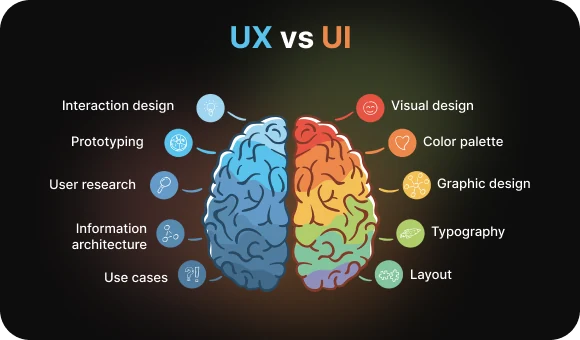
App design includes both areas: UX and UI always work together. There is also another important nuance — platforms. Mobile app interface design must take into account the specifics of both iOS and Android: behavioral patterns, Apple and Google guidelines, and interaction differences.
UX defines the structure and logic of how a user interacts with a mobile app. It includes scenarios, user flows, and prioritization in navigation and content. UI determines how all of that looks: button placement, colors, shadows, and the usability of input fields.
In a mobile app, balance is essential: screen space is limited, so the interface must be minimalistic yet informative. If UX is the map, UI is the route design that makes the journey comfortable and clear.
How the Design Process Works: The Main Stages
Design creation is not a leap from “I want an app” to “here is the finished mobile interface.” It is a structured process with development stages, iterations, and testing. This approach helps avoid unnecessary rework and improves the reliability of the user experience. App design requires consistency and an understanding of the context in which the user interacts with the product.
1. Research and Planning
This stage begins with questions. Who will use the app? What matters to them? What problems does it solve?
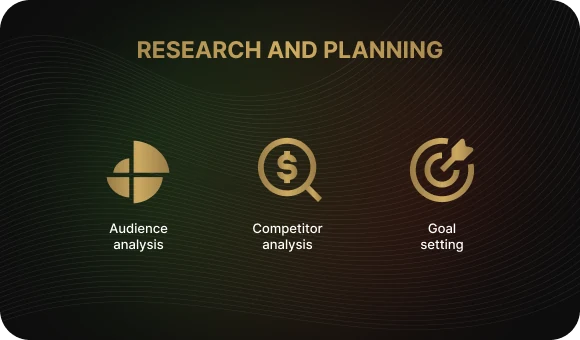
Audience analysis helps uncover real needs and behavioral patterns. This is the foundation for further development, especially if you want to create a useful and in-demand mobile app.
Competitor research helps identify gaps and weaknesses in other products’ interfaces, so you can account for them during development and offer something better.
Defining project goals is the basis for all future decisions. It helps set clear direction, define the feature set, and plan every important screen of the future app.
Without this stage, it is easy to create an interface that looks beautiful but serves no real purpose — and therefore fails. That is why it is important to rely on existing research and involve UX analytics at this point.
2. Creating Wireframes and Prototypes
Once the research is done, it is time to move on to visualization.
Wireframes are black-and-white screen layouts. They help define how navigation will work and where elements should be placed.
Prototypes are interactive models that can be tested and clicked through. This makes it possible to gather user feedback quickly and make changes before moving into the expensive visual design stage.
Iterations are the key to a successful interface. The more often a layout is improved based on testing results, the more user-friendly the final product becomes.
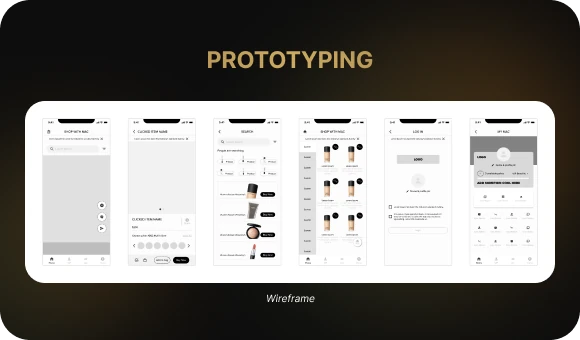
This stage is especially important when designing an app for multiple mobile devices — smartphones and tablets. A well-thought-out interface screen helps create a more adaptive and intuitive experience.
3. UI/UX Design
Now it is time to bring in color, detail, and animation.
- We work through the visual hierarchy: what the user sees first and what draws attention.
- We choose colors and fonts adapted for mobile screens.
- We apply UX principles: simplicity, predictability, and intuitiveness.
- We adapt the interface to Apple and Google guidelines. For example, Android users often expect a hamburger menu on the left, while iOS users are more used to bottom tabs.
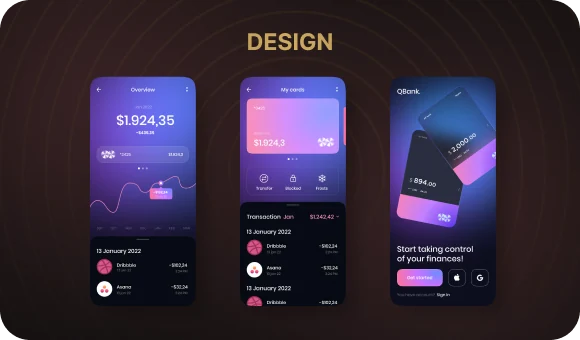
At the same time, designers and developers work closely together. This ensures the interface is not only attractive, but also technically feasible across different device types. At this stage, it is important to use a component system and ready-made UI kits.
4. Testing and Refinement
Good design is not born solely in a designer’s head. It is shaped through testing.
Usability tests show where users get confused, hesitate, or leave, and on which specific screens difficulties arise that prevent them from reaching their goal.
Feedback from real users and clients becomes the foundation for refinement: it helps identify which parts of the mobile app need improvement and why.
Further changes help improve usability, adapt the interface to real-life scenarios, and increase the product’s effectiveness.
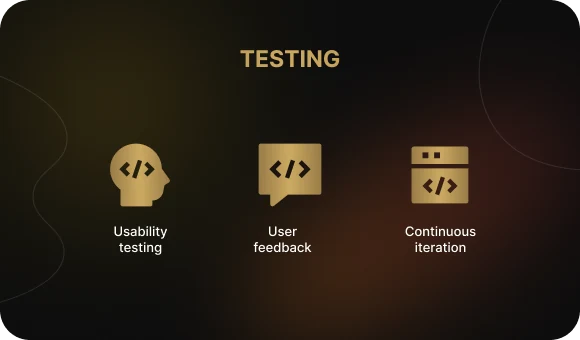
App design does not end with release. After updates or new features are introduced, the interface often needs further refinement. This allows the system to evolve along with user expectations.
It is also important to use metrics and app store reviews as ongoing sources of insight.
Tools Designers Use
Today, design work is impossible without digital tools. Here are some of the most common ones used by teams throughout the app design process:
Figma — the leading tool for UI design. Its online format makes collaboration easy. Because teams can work on the project in real time, designers and clients can discuss every screen, make quick edits, and instantly see the results. This is especially useful in mobile app design, where every pixel on the screen matters.
Sketch — a macOS tool that is especially well suited for iOS projects. It is valued for its intuitive interface and strong capabilities for creating mobile app layouts.
Adobe XD — easy to learn and well integrated with other Adobe products. It is a good fit for designers building a platform from scratch and wanting to create working prototypes quickly. It is also convenient for team collaboration when design screens and interactions need to be aligned.
InVision and Marvel — platforms for creating prototypes and presenting them to clients. They make it possible to build clickable flows that imitate the behavior of a real app. This is useful both for internal testing and for client presentations, since you can demonstrate how the platform behaves from screen to screen without waiting for the final design update.
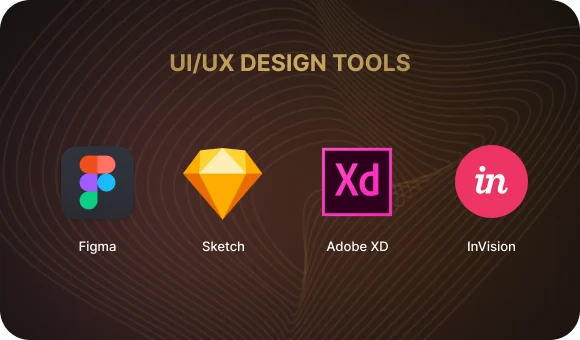
In addition, teams often use design system storage and management tools to ensure consistency and speed up interface implementation. This is especially valuable for complex applications and cross-platform products.
Best Practices: How to Avoid Common Mistakes
Here is what is definitely worth keeping in mind if you want your mobile app development project to succeed:
Put the user at the center.
Not the designer, not the client, not the manager, and not the development team — only the user. A successful project starts with understanding their tasks, habits, and behavior at every stage of app creation.
Performance matters.
A lightweight, fast, responsive interface is essential for user retention, especially given the limited resources of mobile devices. Users will not wait for a long load time — they will simply close the app. That is why screens should open instantly and all actions should feel smooth.
Follow trends carefully.
Microanimations, dark mode, and adaptability all matter. Modern visual solutions make an interface feel alive and appealing, but they must always serve usability and logic. No animation should distract from the main task, and adaptability should never interfere with understanding the content.
Devices vary — so adapt.
The same design should work well on both smartphones and tablets. In this case, interface development requires flexibility and precise adjustments: screen size, pixel density, gesture control, and element positioning all matter. The more adaptive the design is, the better the user experience will be across devices.

Use testing as a continuous improvement tool.
Testing is not a one-time check — it is an ongoing practice. It is important to identify weaknesses at every stage, adapt the interface to real user behavior, and make changes quickly to improve usability and efficiency.
Do not forget screen adaptability and cross-browser consistency.
Users access apps from different devices and browsers, and every screen needs to display correctly regardless of technical conditions. This increases trust in the product and makes interaction more predictable and intuitive.
An app whose interface is designed around user habits, mobile behavior, and visual expectations performs better than any advertisement. Such a product is not just convenient — it becomes part of everyday life.
So, What’s the Bottom Line?
Designing mobile app interfaces is not just about “making something look nice.” It is a precise and structured process, where every color and every button is backed by logic and analysis. Good app design is an investment in the business.
At Beetrail, we know how to turn ideas into thoughtful and appealing interfaces. From the first brief to the launch, we support clients at every step. We create more than just screens — we create systems people enjoy using.
If you want your app not only to look modern but also to solve real problems, we know how to make it happen.
Ready to create a product people will love? Let’s discuss your app design — and launch your project with confidence and style.
Why Design Is About More Than Just Visuals
Mobile app design is about logic, structure, interaction flows, and a well-thought-out user journey. It determines how comfortable the product is to use, how quickly a user can find the feature they need, and whether they will come back again.
A great interface does more than create an attractive look — it builds a navigation system that actually works. Professionally crafted mobile app interface design helps hold users’ attention and build trust.
When design goes hand in hand with research and UX analysis, the result is not just a visually appealing screen, but a tool that supports the business: it retains users, increases conversion, and helps drive revenue.
UX and UI: What’s the Difference?
When designing interfaces, it is important to understand the difference between UX and UI.
UX (User Experience) is about usability. How does a user move from the first launch to the target action? Which screens and steps come before that? Everything related to logic, navigation, and emotion falls under UX.
UI (User Interface) is the visual layer. It includes the color palette, typography, icons, and the arrangement of elements on the screen — everything that shapes the app’s appearance. UI should be intuitive, especially on mobile devices where screen space is limited.
App design includes both areas: UX and UI always work together. There is also another important nuance — platforms. Mobile app interface design must take into account the specifics of both iOS and Android: behavioral patterns, Apple and Google guidelines, and interaction differences.
UX defines the structure and logic of how a user interacts with a mobile app. It includes scenarios, user flows, and prioritization in navigation and content. UI determines how all of that looks: button placement, colors, shadows, and the usability of input fields.
In a mobile app, balance is essential: screen space is limited, so the interface must be minimalistic yet informative. If UX is the map, UI is the route design that makes the journey comfortable and clear.
How the Design Process Works: The Main Stages
Design creation is not a leap from “I want an app” to “here is the finished mobile interface.” It is a structured process with development stages, iterations, and testing. This approach helps avoid unnecessary rework and improves the reliability of the user experience. App design requires consistency and an understanding of the context in which the user interacts with the product.
1. Research and Planning
This stage begins with questions. Who will use the app? What matters to them? What problems does it solve?
Audience analysis helps uncover real needs and behavioral patterns. This is the foundation for further development, especially if you want to create a useful and in-demand mobile app.
Competitor research helps identify gaps and weaknesses in other products’ interfaces, so you can account for them during development and offer something better.
Defining project goals is the basis for all future decisions. It helps set clear direction, define the feature set, and plan every important screen of the future app.
Without this stage, it is easy to create an interface that looks beautiful but serves no real purpose — and therefore fails. That is why it is important to rely on existing research and involve UX analytics at this point.
2. Creating Wireframes and Prototypes
Once the research is done, it is time to move on to visualization.
Wireframes are black-and-white screen layouts. They help define how navigation will work and where elements should be placed.
Prototypes are interactive models that can be tested and clicked through. This makes it possible to gather user feedback quickly and make changes before moving into the expensive visual design stage.
Iterations are the key to a successful interface. The more often a layout is improved based on testing results, the more user-friendly the final product becomes.
This stage is especially important when designing an app for multiple mobile devices — smartphones and tablets. A well-thought-out interface screen helps create a more adaptive and intuitive experience.
3. UI/UX Design
Now it is time to bring in color, detail, and animation.
- We work through the visual hierarchy: what the user sees first and what draws attention.
- We choose colors and fonts adapted for mobile screens.
- We apply UX principles: simplicity, predictability, and intuitiveness.
- We adapt the interface to Apple and Google guidelines. For example, Android users often expect a hamburger menu on the left, while iOS users are more used to bottom tabs.
At the same time, designers and developers work closely together. This ensures the interface is not only attractive, but also technically feasible across different device types. At this stage, it is important to use a component system and ready-made UI kits.
4. Testing and Refinement
Good design is not born solely in a designer’s head. It is shaped through testing.
Usability tests show where users get confused, hesitate, or leave, and on which specific screens difficulties arise that prevent them from reaching their goal.
Feedback from real users and clients becomes the foundation for refinement: it helps identify which parts of the mobile app need improvement and why.
Further changes help improve usability, adapt the interface to real-life scenarios, and increase the product’s effectiveness.
App design does not end with release. After updates or new features are introduced, the interface often needs further refinement. This allows the system to evolve along with user expectations.
It is also important to use metrics and app store reviews as ongoing sources of insight.
Tools Designers Use
Today, design work is impossible without digital tools. Here are some of the most common ones used by teams throughout the app design process:
Figma — the leading tool for UI design. Its online format makes collaboration easy. Because teams can work on the project in real time, designers and clients can discuss every screen, make quick edits, and instantly see the results. This is especially useful in mobile app design, where every pixel on the screen matters.
Sketch — a macOS tool that is especially well suited for iOS projects. It is valued for its intuitive interface and strong capabilities for creating mobile app layouts.
Adobe XD — easy to learn and well integrated with other Adobe products. It is a good fit for designers building a platform from scratch and wanting to create working prototypes quickly. It is also convenient for team collaboration when design screens and interactions need to be aligned.
InVision and Marvel — platforms for creating prototypes and presenting them to clients. They make it possible to build clickable flows that imitate the behavior of a real app. This is useful both for internal testing and for client presentations, since you can demonstrate how the platform behaves from screen to screen without waiting for the final design update.
In addition, teams often use design system storage and management tools to ensure consistency and speed up interface implementation. This is especially valuable for complex applications and cross-platform products.
Best Practices: How to Avoid Common Mistakes
Here is what is definitely worth keeping in mind if you want your mobile app development project to succeed:
Put the user at the center.
Not the designer, not the client, not the manager, and not the development team — only the user. A successful project starts with understanding their tasks, habits, and behavior at every stage of app creation.
Performance matters.
A lightweight, fast, responsive interface is essential for user retention, especially given the limited resources of mobile devices. Users will not wait for a long load time — they will simply close the app. That is why screens should open instantly and all actions should feel smooth.
Follow trends carefully.
Microanimations, dark mode, and adaptability all matter. Modern visual solutions make an interface feel alive and appealing, but they must always serve usability and logic. No animation should distract from the main task, and adaptability should never interfere with understanding the content.
Devices vary — so adapt.
The same design should work well on both smartphones and tablets. In this case, interface development requires flexibility and precise adjustments: screen size, pixel density, gesture control, and element positioning all matter. The more adaptive the design is, the better the user experience will be across devices.
Use testing as a continuous improvement tool.
Testing is not a one-time check — it is an ongoing practice. It is important to identify weaknesses at every stage, adapt the interface to real user behavior, and make changes quickly to improve usability and efficiency.
Do not forget screen adaptability and cross-browser consistency.
Users access apps from different devices and browsers, and every screen needs to display correctly regardless of technical conditions. This increases trust in the product and makes interaction more predictable and intuitive.
An app whose interface is designed around user habits, mobile behavior, and visual expectations performs better than any advertisement. Such a product is not just convenient — it becomes part of everyday life.
So, What’s the Bottom Line?
Designing mobile app interfaces is not just about “making something look nice.” It is a precise and structured process, where every color and every button is backed by logic and analysis. Good app design is an investment in the business.
At Beetrail, we know how to turn ideas into thoughtful and appealing interfaces. From the first brief to the launch, we support clients at every step. We create more than just screens — we create systems people enjoy using.
If you want your app not only to look modern but also to solve real problems, we know how to make it happen.
Ready to create a product people will love? Let’s discuss your app design — and launch your project with confidence and style.