06.06.2026
Time to read:
5
min
How to create a marketplace app
Development
Guides
A marketplace is an online platform where sellers offer their products and buyers can find everything in one place. These platforms have become a key part of digital commerce, and in 2026 mobile apps play an especially important role here. Most users make purchases from their smartphones because it is faster, more convenient, and always at hand.
Major marketplaces have already bet on mobile solutions. Wildberries, Ozon, and Amazon are actively developing their apps because this directly affects revenue and customer retention. Wildberries, the largest online store in Russia, accounts for 47% of the country’s entire marketplace segment. Ozon, the second most popular platform, increased its revenue by 111% in 2023 compared to 2022. Amazon, the global e-commerce giant, is also actively improving its mobile service to enhance the user experience.
Developing a marketplace app is a logical step for anyone who wants to grow seriously in e-commerce. Users expect the interface to be intuitive, checkout to be fast, and the platform to run reliably. These factors influence trust, sales, and loyalty.
If you are planning a launch, it is worth thinking in advance about how to create a marketplace app: which features should be prioritized, what the user journey should look like, and which technologies to use. In this article, we will explain how to make those decisions.



Why a Marketplace Needs a Mobile App
A mobile platform is more than just a “convenient version of a website.” In 2025, it is a full-fledged tool that makes shopping easier. If you have a mobile service, you are closer to your customer — literally in their pocket.
Convenience. Everything is at hand: search, filters, cart, personal account, payment — a purchase takes just a couple of minutes. The user does not depend on a browser or computer; a smartphone is enough to order anything they need, whether on the go or from the couch.
Accessibility. Apps are always visible, and it is easier to open them than a website. And if the platform works quickly and smoothly, the user will come back again.
Push notifications. They help remind users about an abandoned cart, tell them about discounts, or bring back someone who has not ordered in a while. It is an effective and non-intrusive communication channel that really works.
Personalization. The service can “recognize” the user: suggest products they may be interested in, show items similar to previous orders, and adapt content to their behavior.
From Idea to Launch: The Journey of Building a Marketplace App
Before diving into the details, it is important to understand how to create a marketplace app that will actually be in demand. To avoid getting lost among hundreds of competitors, the service must solve specific user problems, be convenient and intuitive, and be adapted to real shopping scenarios.
Idea and Planning
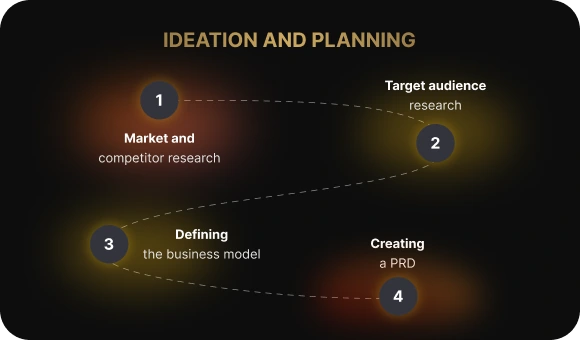
Idea and planning. You need to study the market: who is already there, how major players like Wildberries and Ozon operate, what features they use, and what their strengths and weaknesses are. The goal is not just to get inspired, but to understand why they are successful and how you can do things differently — or maybe even better.
Audience. Who is your audience? How old are they? Where do they live? What matters to them — fast delivery, easy payment, the option to try items on? The answers to these questions affect everything from features to visual style. A good product is not about “everything at once,” but about meeting user expectations precisely.
Business model. How will you make money: by charging commissions to sellers, offering subscriptions, or showing ads? These decisions need to be made at the start because they affect both the functionality and the structure of the app.
Technical specification. This is the instruction manual for the entire team: what the service must include, which features are essential, and how everything should work. A well-written specification saves time.
Design and UX/UI
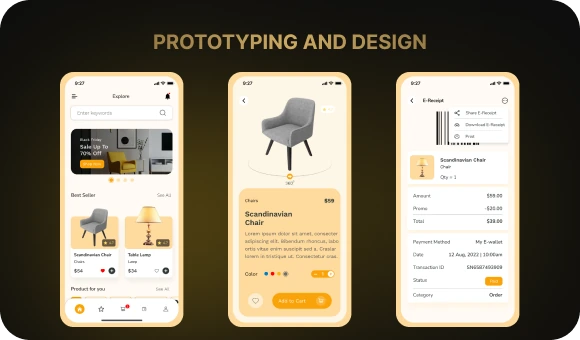
UX/UI design. It is important to make the service not only visually appealing, but also easy to use. Convenient search, logical filters, and a cart that is always within reach — these are small details that ultimately create a pleasant user experience. No one wants to spend 10 minutes just trying to find the right product.
Prototypes. Designers first create prototypes — rough screen layouts. It is like a blueprint for a house: it helps you see in advance how everything will be structured and make changes on time.
Adaptation for iOS and Android. You need to take into account that the service will work on both iOS and Android, each with its own user expectations and design conventions.
Development
Marketplace app development begins with an MVP — a minimum viable product. This is the basic version of the service with core functionality: registration, catalog, cart, and payment. It helps launch the product faster, test the idea with real users, and understand which direction to move in next.
The next stage is iterative development. This means the product evolves step by step: you collect feedback, implement improvements, add new features — and continue until you get a convenient and stable service.
Then comes testing. First, functional and load testing are carried out to make sure the app performs well even under heavy user traffic. After that comes usability testing, which helps determine how convenient the platform is for people: whether they get lost in navigation and how quickly they can complete actions.
Core App Functionality
A marketplace mobile platform usually has at least three sides — buyers, sellers, and the administrator. Each has different tasks, goals, and expectations. That is why the functionality needs to be carefully designed for all of them.

For buyers
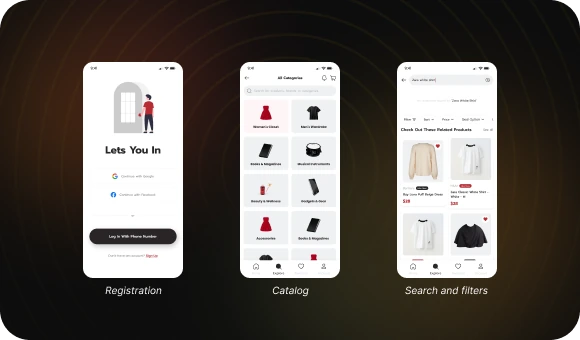
Registration should be simple: via phone number, email, or social media — the fewer steps, the better.
The product catalog is the heart of the app. It should be logically structured, with clear categories and attractive product cards.
Search and filters help users quickly find what they need. They should not have to spend much time scrolling — everything important should be easy to reach.
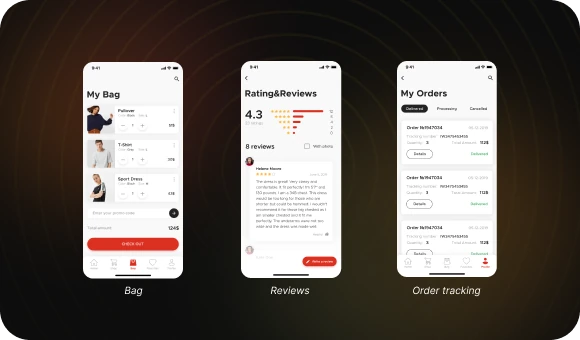
The cart should be functional, allowing users to change quantities, save items for later, or move to checkout in just a couple of taps.
Reviews and ratings. Users trust other users, so this feature is critical.
Order tracking provides transparency at every stage: when the order is packed, shipped, and delivered. This builds trust and reduces the workload on support.
For sellers
A personal dashboard that brings together all key information: orders, stock levels, and customer messages.
Product upload and management — quick addition of new items, editing prices and descriptions, and managing promotions.
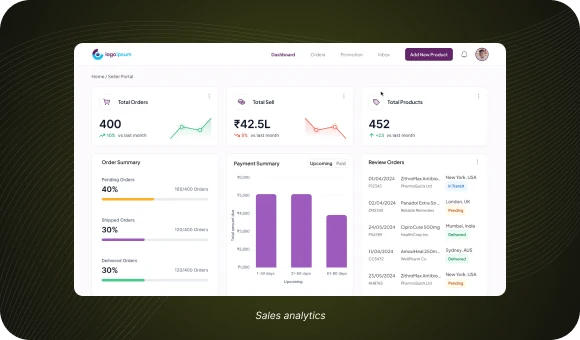
Sales analytics — visual reports, charts, and metrics help sellers make decisions: which products perform better, when sales spikes happen, and so on.
For the administrator
Content moderation — reviewing new products, descriptions, and images.
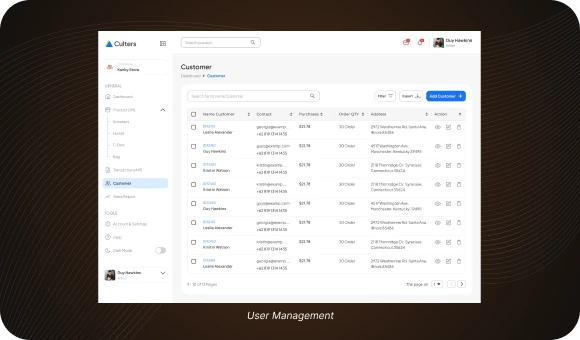
User management — the ability to block violators, assist in technical issues, or resolve disputes.
Platform analytics — global metrics such as user activity, number of orders, effectiveness of ad campaigns, server load, and more.
Launch and Publishing
When development is complete and the app is ready to go live, the launch stage begins. It includes both technical and marketing preparation, which largely determine the project’s success.
The first step is registration in the App Store and Google Play. To publish the service, you need to create developer accounts, pay the required fees, and go through moderation. Each platform has its own rules, so it is important to check everything in advance: compliance with policies, correct screenshots, description, and age ratings.
The second step is marketing. Even the best app will go unnoticed if no one promotes it. This is where ASO (App Store Optimization) comes in. You need to choose the right keywords, write a clear and engaging description, and add an icon and screenshots that make people want to download the app. You should also set up advertising: on social media, in search, through bloggers, or inside other apps.
Launch is not the end — it is the beginning of a new chapter. The better prepared you are for this stage, the faster you will attract your first users and get honest feedback that will help improve the product.
Common Marketplace Development Mistakes
When building a marketplace platform, it is important to keep in mind possible mistakes that may arise during development. Even if everything seems to be going according to plan at the start, some issues may affect the project’s success later on.
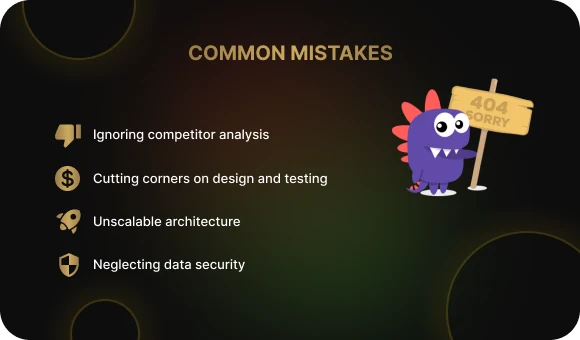
Ignoring competitor analysis. Without understanding how leaders like Wildberries, Ozon, or Amazon operate, it is difficult to offer something truly valuable. Competitor analysis is needed to understand what works, what does not, and where you can do better.
Cutting corners on design and testing. The interface is the first thing a user sees, and if the service is inconvenient or looks outdated, there is a high chance it will simply be deleted. And without testing, bugs may remain that scare away even the most loyal customers.
Lack of scalable architecture. At the beginning, everything may work perfectly — but as soon as the number of users grows, problems start: slowdowns, crashes, and errors. The ability to scale needs to be built in at the design stage.
Forgetting about data security. Users trust you with their personal information, and protecting that information must be a priority. Data leaks and weak points in the security system can seriously damage both reputation and business.
Conclusion
To create a successful service, you need to clearly understand how to build a marketplace app — from competitor analysis to setting up all the essential features. This journey requires attention to detail, the right approach to design and testing, and continuous work on improving the user experience.
With Beetrail, you get a reliable partner who can support you at every stage — from concept to publication in the App Store and Google Play. We create functional and user-friendly solutions that attract users and help businesses scale.
Take a look at our work and leave a request below. Let’s discuss together how to turn your concept into a profitable project and define the cost.
With Beetrail, your marketplace is in safe hands!
Why a Marketplace Needs a Mobile App
A mobile platform is more than just a “convenient version of a website.” In 2025, it is a full-fledged tool that makes shopping easier. If you have a mobile service, you are closer to your customer — literally in their pocket.
Convenience. Everything is at hand: search, filters, cart, personal account, payment — a purchase takes just a couple of minutes. The user does not depend on a browser or computer; a smartphone is enough to order anything they need, whether on the go or from the couch.
Accessibility. Apps are always visible, and it is easier to open them than a website. And if the platform works quickly and smoothly, the user will come back again.
Push notifications. They help remind users about an abandoned cart, tell them about discounts, or bring back someone who has not ordered in a while. It is an effective and non-intrusive communication channel that really works.
Personalization. The service can “recognize” the user: suggest products they may be interested in, show items similar to previous orders, and adapt content to their behavior.
From Idea to Launch: The Journey of Building a Marketplace App
Before diving into the details, it is important to understand how to create a marketplace app that will actually be in demand. To avoid getting lost among hundreds of competitors, the service must solve specific user problems, be convenient and intuitive, and be adapted to real shopping scenarios.
Idea and Planning
Idea and planning. You need to study the market: who is already there, how major players like Wildberries and Ozon operate, what features they use, and what their strengths and weaknesses are. The goal is not just to get inspired, but to understand why they are successful and how you can do things differently — or maybe even better.
Audience. Who is your audience? How old are they? Where do they live? What matters to them — fast delivery, easy payment, the option to try items on? The answers to these questions affect everything from features to visual style. A good product is not about “everything at once,” but about meeting user expectations precisely.
Business model. How will you make money: by charging commissions to sellers, offering subscriptions, or showing ads? These decisions need to be made at the start because they affect both the functionality and the structure of the app.
Technical specification. This is the instruction manual for the entire team: what the service must include, which features are essential, and how everything should work. A well-written specification saves time.
Design and UX/UI
UX/UI design. It is important to make the service not only visually appealing, but also easy to use. Convenient search, logical filters, and a cart that is always within reach — these are small details that ultimately create a pleasant user experience. No one wants to spend 10 minutes just trying to find the right product.
Prototypes. Designers first create prototypes — rough screen layouts. It is like a blueprint for a house: it helps you see in advance how everything will be structured and make changes on time.
Adaptation for iOS and Android. You need to take into account that the service will work on both iOS and Android, each with its own user expectations and design conventions.
Development
Marketplace app development begins with an MVP — a minimum viable product. This is the basic version of the service with core functionality: registration, catalog, cart, and payment. It helps launch the product faster, test the idea with real users, and understand which direction to move in next.
The next stage is iterative development. This means the product evolves step by step: you collect feedback, implement improvements, add new features — and continue until you get a convenient and stable service.
Then comes testing. First, functional and load testing are carried out to make sure the app performs well even under heavy user traffic. After that comes usability testing, which helps determine how convenient the platform is for people: whether they get lost in navigation and how quickly they can complete actions.
Core App Functionality
A marketplace mobile platform usually has at least three sides — buyers, sellers, and the administrator. Each has different tasks, goals, and expectations. That is why the functionality needs to be carefully designed for all of them.
For buyers
Registration should be simple: via phone number, email, or social media — the fewer steps, the better.
The product catalog is the heart of the app. It should be logically structured, with clear categories and attractive product cards.
Search and filters help users quickly find what they need. They should not have to spend much time scrolling — everything important should be easy to reach.
The cart should be functional, allowing users to change quantities, save items for later, or move to checkout in just a couple of taps.
Reviews and ratings. Users trust other users, so this feature is critical.
Order tracking provides transparency at every stage: when the order is packed, shipped, and delivered. This builds trust and reduces the workload on support.
For sellers
A personal dashboard that brings together all key information: orders, stock levels, and customer messages.
Product upload and management — quick addition of new items, editing prices and descriptions, and managing promotions.
Sales analytics — visual reports, charts, and metrics help sellers make decisions: which products perform better, when sales spikes happen, and so on.
For the administrator
Content moderation — reviewing new products, descriptions, and images.
User management — the ability to block violators, assist in technical issues, or resolve disputes.
Platform analytics — global metrics such as user activity, number of orders, effectiveness of ad campaigns, server load, and more.
Launch and Publishing
When development is complete and the app is ready to go live, the launch stage begins. It includes both technical and marketing preparation, which largely determine the project’s success.
The first step is registration in the App Store and Google Play. To publish the service, you need to create developer accounts, pay the required fees, and go through moderation. Each platform has its own rules, so it is important to check everything in advance: compliance with policies, correct screenshots, description, and age ratings.
The second step is marketing. Even the best app will go unnoticed if no one promotes it. This is where ASO (App Store Optimization) comes in. You need to choose the right keywords, write a clear and engaging description, and add an icon and screenshots that make people want to download the app. You should also set up advertising: on social media, in search, through bloggers, or inside other apps.
Launch is not the end — it is the beginning of a new chapter. The better prepared you are for this stage, the faster you will attract your first users and get honest feedback that will help improve the product.
Common Marketplace Development Mistakes
When building a marketplace platform, it is important to keep in mind possible mistakes that may arise during development. Even if everything seems to be going according to plan at the start, some issues may affect the project’s success later on.
Ignoring competitor analysis. Without understanding how leaders like Wildberries, Ozon, or Amazon operate, it is difficult to offer something truly valuable. Competitor analysis is needed to understand what works, what does not, and where you can do better.
Cutting corners on design and testing. The interface is the first thing a user sees, and if the service is inconvenient or looks outdated, there is a high chance it will simply be deleted. And without testing, bugs may remain that scare away even the most loyal customers.
Lack of scalable architecture. At the beginning, everything may work perfectly — but as soon as the number of users grows, problems start: slowdowns, crashes, and errors. The ability to scale needs to be built in at the design stage.
Forgetting about data security. Users trust you with their personal information, and protecting that information must be a priority. Data leaks and weak points in the security system can seriously damage both reputation and business.
Conclusion
To create a successful service, you need to clearly understand how to build a marketplace app — from competitor analysis to setting up all the essential features. This journey requires attention to detail, the right approach to design and testing, and continuous work on improving the user experience.
With Beetrail, you get a reliable partner who can support you at every stage — from concept to publication in the App Store and Google Play. We create functional and user-friendly solutions that attract users and help businesses scale.
Take a look at our work and leave a request below. Let’s discuss together how to turn your concept into a profitable project and define the cost.
With Beetrail, your marketplace is in safe hands!