02.06.2026
Time to read:
9
min
Artificial Intelligence in Education: How to Build an App That Personalizes Learning
Insights
If you are involved in organizing courses or managing the learning process, you probably know the situation well: you try to build a universal program, but in the end some students inevitably fall behind while others start to get bored. To solve this problem, more and more organizations are looking at AI in education as a way to adapt learning materials to each student’s actual pace and level. But the goal is not to “add AI for the sake of it” — it is to implement it in a way that genuinely helps personalize and balance the learning experience. In this article, we will look at how this kind of personalization works and which steps turn the idea of “building a smart app” into a real, working product.

How Education Stops Being One-Size-Fits-All: What AI Actually Does
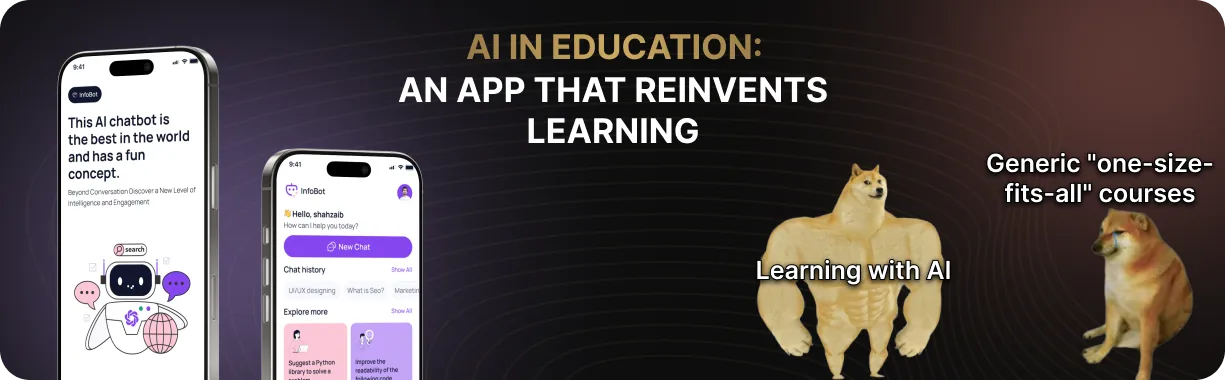
Personalized learning is an approach in which each person studies at their own pace, while the program adapts to their speed and knowledge gaps. If a topic comes easily, the system offers more advanced tasks; if a learner struggles, the pace slows down and additional explanations appear. This is where artificial intelligence shows its real value: in education, AI helps tailor learning to the student’s goals and interests. Even within the same level of English, one person may be preparing for an exam, another may need the language for travel, and a third for work — and each of them needs a different learning focus. As a result, instead of a standard course, the learner gets a flexible path that changes as they progress and provides support exactly where it is needed.
How AI Helps Personalize Learning
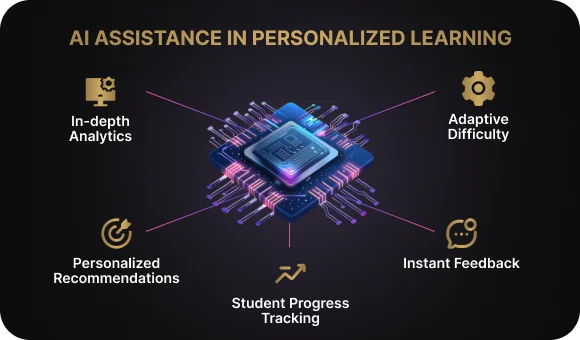
1. It sees more than standard analytics
Artificial intelligence can analyze the learner’s entire study trail: how quickly they answer test questions, where they make mistakes, which topics they revisit, and where they pause. This allows the system to understand not just the result, but also why certain material feels more difficult.
2. It adjusts tasks to the learner’s level in real time
The algorithm does not wait until the end of a module. It reacts to the learner’s actions immediately. If the material feels easy, the tasks become more challenging. If the learner gets stuck, the level is adjusted downward and extra practice appears automatically.
3. It recommends the next step
AI creates personalized recommendations: what to study next, which topic to review, and how much additional practice to add. This reduces the common anxiety of “what should I do next?” that many learners experience in online education.
4. It provides detailed feedback
Unlike standard tests that only show a dry “correct/incorrect,” AI can point out where the logic broke down, suggest an alternative way of solving the task, and offer hints.
5. It gives teachers a clear group overview
Teachers can use an analytics dashboard to see which topics cause the most difficulty, which students are falling behind, who needs support, and who is ready to move on. This saves hours of routine checking and makes timely intervention possible.
It is important to understand that artificial intelligence does not replace the teacher or instructional designer. It works more like a smart assistant: it handles routine tasks, collects and uses learning data, and highlights where human intervention is needed. Decisions about how to adjust the program still remain with the specialist.
On Both Sides of the Screen: Learning with AI from the Student’s and Teacher’s Perspective
Many organizations are already introducing AI into education, but it is not always clear what practical value it brings. To understand why it matters, it helps to look at the process through the eyes of the two key participants: the learner and the teacher.
For the learner
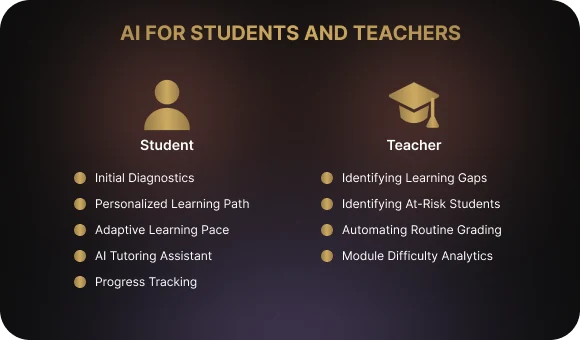
Learning begins with a short diagnostic assessment that helps the system understand the learner’s level and define a starting point. After that, the app creates a personalized path: the pace, level of difficulty, and sequence of materials are adjusted to the learner’s goals and current knowledge. If the learner gets stuck on a topic, additional explanations, simpler exercises, and reinforcement steps appear. If they move faster, the pace increases and more advanced tasks become available. At any point, the learner can ask the built-in AI assistant a question and get clarification based on the material they have already covered. Progress is displayed in a way that makes it easy to understand what knowledge has already been mastered and which small wins have been achieved along the way.
For the teacher
The application shows where the group is losing momentum: which topics generate the most errors and which tasks cause the most difficulty. It also highlights students in the risk zone so the teacher can step in on time — by offering additional materials, running a review session, or holding an individual consultation. Standard assignments and tests can be checked automatically, reducing routine workload. Course analytics make it clear which modules work well and which need to be simplified, rebuilt, or split into smaller steps.
It is important to remember that an AI-powered learning app is not a magical technology that does everything for you. It is a set of practical functions built on data and feedback. The system analyzes learning outcomes, adapts materials to the learner’s level, and helps the teacher understand group dynamics.
Where to Start: Define Goals and User Needs, Not the Neural Network
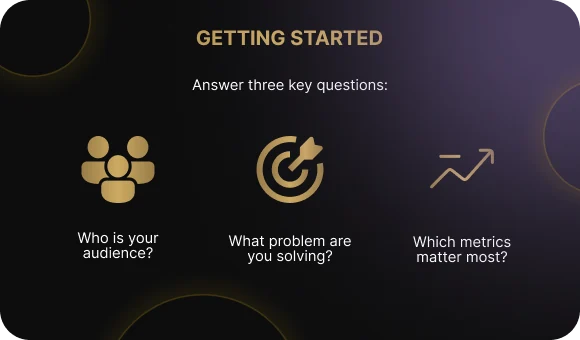
Many projects that begin with the phrase “let’s add AI” end up with useless features that annoy users more than they help. For this technology to work, the first step is to understand:
- who you want to help;
- what problem you are solving.
Who Is It For and Why: The Questions That Should Come First
Who is the app for?
Who are you helping, and how do these people learn?
- school students;
- university students;
- adult learners;
- corporate employees.
Each group has a different pace, learning format, motivation, and way of building knowledge.
What tasks should the product solve?
What exactly should the product improve or simplify?
- exam preparation;
- language learning;
- onboarding new employees;
- upskilling;
- mastering specific knowledge or practical skills.
Different goals require different personalization scenarios and different points where AI can add value.
What needs to improve?
Which outcomes matter most to you and your users?
- reduce dropout;
- increase course completion;
- improve average scores;
- shorten the time it takes a newcomer to become effective in a role;
- improve the quality of practical assignments;
- reduce the teacher’s workload.
AI in Education: Practical Examples
Example 1: An English course for company employees
In one Intermediate-level group, employees may have very different goals: a manager needs spoken English for calls, a support specialist needs clear written English for customer communication, and an analyst needs grammar for reading documentation. A short diagnostic assessment helps the system create a separate path for each person: dialogue practice for one, writing exercises for another, grammar blocks for a third. The pace also varies: fast learners unlock advanced tasks, while those who struggle receive extra explanations and practice.
Example 2: School exam preparation
Even when the whole class is preparing for the same exam, the gaps are different. One student struggles with geometry, another with probability, and another regularly makes mistakes in word problems. The system analyzes answers and errors, then builds a personalized topic set for each student: geometry for one, probability practice for another, word-problem training for a third. As progress continues, the route updates: mastered topics move down in priority, while new gaps move up.
Example 3: Onboarding new employees in a company
New hires may go through the same introductory course, but their starting backgrounds are different: one person has industry experience, another has just graduated, and another is changing careers. The system adapts the content to the role and prior knowledge: product and customer-work modules for a sales specialist, documentation, architecture, and coding standards for an engineer. The core foundation stays the same, but the depth and order of topics change. In the analytics, a manager can see who is adapting quickly and who needs extra support.

At this stage, two or three priority scenarios begin to emerge, and the app should be designed around them. These scenarios shape the entire project: from feature selection to the role AI plays in education. Without this foundation, the product can easily become a set of scattered functions without clear benefit.
In Simple Terms: How Data Becomes Personalization
To adapt learning to a specific person, the system needs to understand how they learn and what knowledge they already have. That is what “data” means here: observations that show what was completed quickly, where difficulties appeared, which topics come more easily, and what needs to be repeated. How this data is used depends on what the system can capture during the learning process: answers, completion time, number of attempts, and returns to materials. Based on these signals, the app decides what to show next — simplify the material, add an example, provide more practice, or speed up the pace.
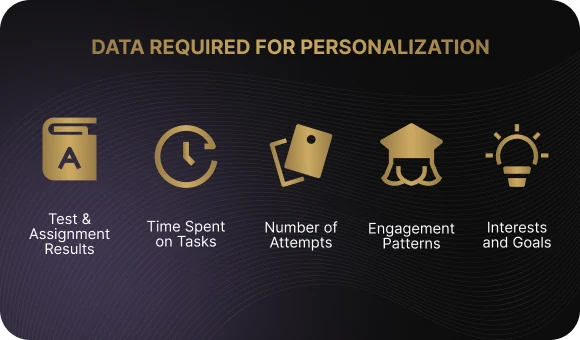
What data does the system collect?
- Test and assignment results — show which skills have already been mastered and which need reinforcement.
- Time spent on tasks — helps distinguish confident understanding from guessing or difficulty.
- Number of attempts — signals where a topic feels hard and requires more practice.
- Course behavior — tracks skipped sections, pauses, use of extra materials, and points where the learner gets stuck.
- Interests and goals — if the learner specifies priorities, the system can use them when building the path.
What kinds of personalization can be built?
- By level — the difficulty of tasks and depth of explanations change.
- By pace — the material speeds up or slows down depending on the learner’s progress.
- By content — topics, cases, texts, and formats are selected to better match the learner.
- By type of support — the learner can receive hints, extra explanations, or supporting materials.
Why data quality matters
If inaccurate or random data accumulates in the system, personalization begins to guide the learner in the wrong direction: tasks are selected oddly, the pace becomes inconsistent, and recommendations lose touch with real needs. The logic of adaptation matters just as much. If the rules are made too complicated, the system may overreact — giving tasks that are too hard or, on the contrary, oversimplifying the program. The right balance appears when algorithms rely on clear signals and do not interfere where the learner is already coping well.
Seven Steps to a Working AI-Powered Learning Product
To keep the idea of a “smart learning app” from staying trapped in a presentation, you need a simple roadmap. Below is a basic seven-step plan that most personalization projects go through.
1. Define 2–3 key scenarios and your audience
Be clear about who will use the product: school students, university students, adults, or company employees. For each segment, choose one or two priority scenarios: exam preparation, language learning, onboarding, or upskilling. At this stage, it is important to define specific situations where AI should help, rather than a vague goal like “improve learning overall.”
2. Map the user journey inside the app
Walk through the experience from the learner’s perspective: entering the system, taking a short diagnostic, receiving a personalized plan, completing tasks, getting feedback, and reaching an outcome. For each step, answer: what does the person see, what decisions does the system make, and where does AI support appear? This immediately shows which screens and functions are necessary and which can wait.
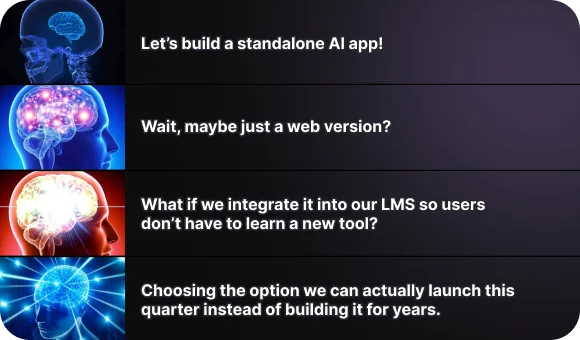
3. Decide where your solution will live
Choose the format: a standalone mobile or web app, a module inside your current LMS, or an extension of an existing platform. This affects both the technical implementation and user behavior: whether people enter a separate app or work inside a familiar system. At this stage, the goal is not to chase the perfect solution, but to choose the one you can realistically implement in your environment.
4. Define the data and the decisions based on it
Specify what data you plan to use: test results, time spent, number of attempts, where learners get stuck, and stated goals. Then define two or three simple rules: what the system does if it sees repeated errors, unusually fast progress, or skipped sections. This turns abstract AI into a clear logic: there is a signal, and there is a specific action.
5. Build an MVP around a limited set of courses
Do not try to cover everything at once. Choose one subject, one course, and one user type where personalization is especially valuable. Build the minimum feature set: diagnostics, a basic personalized plan, adaptation based on a few rules, and simple analytics. The goal of the MVP is to show clear value in a narrow segment, not to cover every possible scenario.
6. Test with a small group
Launch the product with a limited group of learners and teachers. At the same time, collect two types of feedback: live user comments about what feels convenient, confusing, or disruptive, and numbers such as completion, dropout, time spent, and return rate. Compare these results with your original expectations: where did personalization help, and where is it still not making a difference?
7. Improve and scale
Based on the test results, revise the personalization rules, interfaces, and scenarios: what should be simplified, expanded, or removed. Only after that should you roll the solution out to other courses, roles, and audiences. Scaling makes sense only when you understand exactly how the product creates value and which elements must be preserved.
An MVP is not “the whole platform at once.” It is a working fragment with clear value for a specific audience. Its purpose is to prove that personalization in selected scenarios genuinely improves learning, and only then serve as a foundation for expansion.
Your Path to Failure: Mistakes That Break AI Projects in Education
If you want a personalization product to work, there are several common traps you need to avoid. They are so widespread that almost any failed AI project can be explained through them.
1. Starting with the technology instead of the problem
The most common mistake is choosing a neural network before understanding who you are helping and what problem you are solving. As a result, the product gets a “nice AI assistant” that adds neither value nor meaning.
2. Trying to serve everyone at once
The desire to create a universal service for school students, university students, junior analysts, and top managers almost always ends badly. Such applications satisfy none of these groups, because their goals, experience, and ways of learning differ too much.
3. Building only for the learner and forgetting the teacher
If the system gives no tools to teachers and instructional designers, the analytics remain unused and the recommendations never become part of the learning process. The product falls out of real educational practice.

4. Collecting huge amounts of data without knowing what to do with it
Dashboards full of metrics may look impressive, but they are useless if they do not lead to decisions. The system should not just record numbers — it should help explain what is changing in the learning process and what actions should come next.
5. Ignoring ethics and transparency in data handling
If there is no clear consent for collecting and using data, if data storage is poorly defined, or if algorithmic decisions are opaque, trust begins to break down. This can also create serious organizational or legal problems.
6. Designing the “perfect AI product” on paper and never testing it with real people
The viability of scenarios can only be checked in real use. If the product is never shown to learners and teachers, the interfaces remain inconvenient, the logic stays untested, and personalization turns out to be useless. Motivation drops quickly, and the project stops before it ever reaches a working stage.
Conclusion
Artificial intelligence in education is not a fashionable label. When configured properly, it makes learning more human: it takes pace, goals, and knowledge gaps into account, removes part of the routine from the teacher, and gives the learner a clear path toward mastering skills. For this to work, it is important to start not with technology, but with pedagogy: define the audience and the tasks, collect the right data, build a simple personalization logic, and test it with real users. That is what creates a living result rather than a formal one.
If you are considering using AI in education or want to understand where it can genuinely improve your learning process, the Beetrail team can help you through the entire journey — from defining the task to building a working solution.
How Education Stops Being One-Size-Fits-All: What AI Actually Does
Personalized learning is an approach in which each person studies at their own pace, while the program adapts to their speed and knowledge gaps. If a topic comes easily, the system offers more advanced tasks; if a learner struggles, the pace slows down and additional explanations appear. This is where artificial intelligence shows its real value: in education, AI helps tailor learning to the student’s goals and interests. Even within the same level of English, one person may be preparing for an exam, another may need the language for travel, and a third for work — and each of them needs a different learning focus. As a result, instead of a standard course, the learner gets a flexible path that changes as they progress and provides support exactly where it is needed.
How AI Helps Personalize Learning
1. It sees more than standard analytics
Artificial intelligence can analyze the learner’s entire study trail: how quickly they answer test questions, where they make mistakes, which topics they revisit, and where they pause. This allows the system to understand not just the result, but also why certain material feels more difficult.
2. It adjusts tasks to the learner’s level in real time
The algorithm does not wait until the end of a module. It reacts to the learner’s actions immediately. If the material feels easy, the tasks become more challenging. If the learner gets stuck, the level is adjusted downward and extra practice appears automatically.
3. It recommends the next step
AI creates personalized recommendations: what to study next, which topic to review, and how much additional practice to add. This reduces the common anxiety of “what should I do next?” that many learners experience in online education.
4. It provides detailed feedback
Unlike standard tests that only show a dry “correct/incorrect,” AI can point out where the logic broke down, suggest an alternative way of solving the task, and offer hints.
5. It gives teachers a clear group overview
Teachers can use an analytics dashboard to see which topics cause the most difficulty, which students are falling behind, who needs support, and who is ready to move on. This saves hours of routine checking and makes timely intervention possible.
It is important to understand that artificial intelligence does not replace the teacher or instructional designer. It works more like a smart assistant: it handles routine tasks, collects and uses learning data, and highlights where human intervention is needed. Decisions about how to adjust the program still remain with the specialist.
On Both Sides of the Screen: Learning with AI from the Student’s and Teacher’s Perspective
Many organizations are already introducing AI into education, but it is not always clear what practical value it brings. To understand why it matters, it helps to look at the process through the eyes of the two key participants: the learner and the teacher.
For the learner
Learning begins with a short diagnostic assessment that helps the system understand the learner’s level and define a starting point. After that, the app creates a personalized path: the pace, level of difficulty, and sequence of materials are adjusted to the learner’s goals and current knowledge. If the learner gets stuck on a topic, additional explanations, simpler exercises, and reinforcement steps appear. If they move faster, the pace increases and more advanced tasks become available. At any point, the learner can ask the built-in AI assistant a question and get clarification based on the material they have already covered. Progress is displayed in a way that makes it easy to understand what knowledge has already been mastered and which small wins have been achieved along the way.
For the teacher
The application shows where the group is losing momentum: which topics generate the most errors and which tasks cause the most difficulty. It also highlights students in the risk zone so the teacher can step in on time — by offering additional materials, running a review session, or holding an individual consultation. Standard assignments and tests can be checked automatically, reducing routine workload. Course analytics make it clear which modules work well and which need to be simplified, rebuilt, or split into smaller steps.
It is important to remember that an AI-powered learning app is not a magical technology that does everything for you. It is a set of practical functions built on data and feedback. The system analyzes learning outcomes, adapts materials to the learner’s level, and helps the teacher understand group dynamics.
Where to Start: Define Goals and User Needs, Not the Neural Network
Many projects that begin with the phrase “let’s add AI” end up with useless features that annoy users more than they help. For this technology to work, the first step is to understand:
- who you want to help;
- what problem you are solving.
Who Is It For and Why: The Questions That Should Come First
Who is the app for?
Who are you helping, and how do these people learn?
- school students;
- university students;
- adult learners;
- corporate employees.
Each group has a different pace, learning format, motivation, and way of building knowledge.
What tasks should the product solve?
What exactly should the product improve or simplify?
- exam preparation;
- language learning;
- onboarding new employees;
- upskilling;
- mastering specific knowledge or practical skills.
Different goals require different personalization scenarios and different points where AI can add value.
What needs to improve?
Which outcomes matter most to you and your users?
- reduce dropout;
- increase course completion;
- improve average scores;
- shorten the time it takes a newcomer to become effective in a role;
- improve the quality of practical assignments;
- reduce the teacher’s workload.
AI in Education: Practical Examples
Example 1: An English course for company employees
In one Intermediate-level group, employees may have very different goals: a manager needs spoken English for calls, a support specialist needs clear written English for customer communication, and an analyst needs grammar for reading documentation. A short diagnostic assessment helps the system create a separate path for each person: dialogue practice for one, writing exercises for another, grammar blocks for a third. The pace also varies: fast learners unlock advanced tasks, while those who struggle receive extra explanations and practice.
Example 2: School exam preparation
Even when the whole class is preparing for the same exam, the gaps are different. One student struggles with geometry, another with probability, and another regularly makes mistakes in word problems. The system analyzes answers and errors, then builds a personalized topic set for each student: geometry for one, probability practice for another, word-problem training for a third. As progress continues, the route updates: mastered topics move down in priority, while new gaps move up.
Example 3: Onboarding new employees in a company
New hires may go through the same introductory course, but their starting backgrounds are different: one person has industry experience, another has just graduated, and another is changing careers. The system adapts the content to the role and prior knowledge: product and customer-work modules for a sales specialist, documentation, architecture, and coding standards for an engineer. The core foundation stays the same, but the depth and order of topics change. In the analytics, a manager can see who is adapting quickly and who needs extra support.
At this stage, two or three priority scenarios begin to emerge, and the app should be designed around them. These scenarios shape the entire project: from feature selection to the role AI plays in education. Without this foundation, the product can easily become a set of scattered functions without clear benefit.
In Simple Terms: How Data Becomes Personalization
To adapt learning to a specific person, the system needs to understand how they learn and what knowledge they already have. That is what “data” means here: observations that show what was completed quickly, where difficulties appeared, which topics come more easily, and what needs to be repeated. How this data is used depends on what the system can capture during the learning process: answers, completion time, number of attempts, and returns to materials. Based on these signals, the app decides what to show next — simplify the material, add an example, provide more practice, or speed up the pace.
What data does the system collect?
- Test and assignment results — show which skills have already been mastered and which need reinforcement.
- Time spent on tasks — helps distinguish confident understanding from guessing or difficulty.
- Number of attempts — signals where a topic feels hard and requires more practice.
- Course behavior — tracks skipped sections, pauses, use of extra materials, and points where the learner gets stuck.
- Interests and goals — if the learner specifies priorities, the system can use them when building the path.
What kinds of personalization can be built?
- By level — the difficulty of tasks and depth of explanations change.
- By pace — the material speeds up or slows down depending on the learner’s progress.
- By content — topics, cases, texts, and formats are selected to better match the learner.
- By type of support — the learner can receive hints, extra explanations, or supporting materials.
Why data quality matters
If inaccurate or random data accumulates in the system, personalization begins to guide the learner in the wrong direction: tasks are selected oddly, the pace becomes inconsistent, and recommendations lose touch with real needs. The logic of adaptation matters just as much. If the rules are made too complicated, the system may overreact — giving tasks that are too hard or, on the contrary, oversimplifying the program. The right balance appears when algorithms rely on clear signals and do not interfere where the learner is already coping well.
Seven Steps to a Working AI-Powered Learning Product
To keep the idea of a “smart learning app” from staying trapped in a presentation, you need a simple roadmap. Below is a basic seven-step plan that most personalization projects go through.
1. Define 2–3 key scenarios and your audience
Be clear about who will use the product: school students, university students, adults, or company employees. For each segment, choose one or two priority scenarios: exam preparation, language learning, onboarding, or upskilling. At this stage, it is important to define specific situations where AI should help, rather than a vague goal like “improve learning overall.”
2. Map the user journey inside the app
Walk through the experience from the learner’s perspective: entering the system, taking a short diagnostic, receiving a personalized plan, completing tasks, getting feedback, and reaching an outcome. For each step, answer: what does the person see, what decisions does the system make, and where does AI support appear? This immediately shows which screens and functions are necessary and which can wait.
3. Decide where your solution will live
Choose the format: a standalone mobile or web app, a module inside your current LMS, or an extension of an existing platform. This affects both the technical implementation and user behavior: whether people enter a separate app or work inside a familiar system. At this stage, the goal is not to chase the perfect solution, but to choose the one you can realistically implement in your environment.
4. Define the data and the decisions based on it
Specify what data you plan to use: test results, time spent, number of attempts, where learners get stuck, and stated goals. Then define two or three simple rules: what the system does if it sees repeated errors, unusually fast progress, or skipped sections. This turns abstract AI into a clear logic: there is a signal, and there is a specific action.
5. Build an MVP around a limited set of courses
Do not try to cover everything at once. Choose one subject, one course, and one user type where personalization is especially valuable. Build the minimum feature set: diagnostics, a basic personalized plan, adaptation based on a few rules, and simple analytics. The goal of the MVP is to show clear value in a narrow segment, not to cover every possible scenario.
6. Test with a small group
Launch the product with a limited group of learners and teachers. At the same time, collect two types of feedback: live user comments about what feels convenient, confusing, or disruptive, and numbers such as completion, dropout, time spent, and return rate. Compare these results with your original expectations: where did personalization help, and where is it still not making a difference?
7. Improve and scale
Based on the test results, revise the personalization rules, interfaces, and scenarios: what should be simplified, expanded, or removed. Only after that should you roll the solution out to other courses, roles, and audiences. Scaling makes sense only when you understand exactly how the product creates value and which elements must be preserved.
An MVP is not “the whole platform at once.” It is a working fragment with clear value for a specific audience. Its purpose is to prove that personalization in selected scenarios genuinely improves learning, and only then serve as a foundation for expansion.
Your Path to Failure: Mistakes That Break AI Projects in Education
If you want a personalization product to work, there are several common traps you need to avoid. They are so widespread that almost any failed AI project can be explained through them.
1. Starting with the technology instead of the problem
The most common mistake is choosing a neural network before understanding who you are helping and what problem you are solving. As a result, the product gets a “nice AI assistant” that adds neither value nor meaning.
2. Trying to serve everyone at once
The desire to create a universal service for school students, university students, junior analysts, and top managers almost always ends badly. Such applications satisfy none of these groups, because their goals, experience, and ways of learning differ too much.
3. Building only for the learner and forgetting the teacher
If the system gives no tools to teachers and instructional designers, the analytics remain unused and the recommendations never become part of the learning process. The product falls out of real educational practice.
4. Collecting huge amounts of data without knowing what to do with it
Dashboards full of metrics may look impressive, but they are useless if they do not lead to decisions. The system should not just record numbers — it should help explain what is changing in the learning process and what actions should come next.
5. Ignoring ethics and transparency in data handling
If there is no clear consent for collecting and using data, if data storage is poorly defined, or if algorithmic decisions are opaque, trust begins to break down. This can also create serious organizational or legal problems.
6. Designing the “perfect AI product” on paper and never testing it with real people
The viability of scenarios can only be checked in real use. If the product is never shown to learners and teachers, the interfaces remain inconvenient, the logic stays untested, and personalization turns out to be useless. Motivation drops quickly, and the project stops before it ever reaches a working stage.
Conclusion
Artificial intelligence in education is not a fashionable label. When configured properly, it makes learning more human: it takes pace, goals, and knowledge gaps into account, removes part of the routine from the teacher, and gives the learner a clear path toward mastering skills. For this to work, it is important to start not with technology, but with pedagogy: define the audience and the tasks, collect the right data, build a simple personalization logic, and test it with real users. That is what creates a living result rather than a formal one.
If you are considering using AI in education or want to understand where it can genuinely improve your learning process, the Beetrail team can help you through the entire journey — from defining the task to building a working solution.