02.06.2026
Time to read:
8
min
Application Scalability: How to Prepare Your System for Growing Traffic
Guides
Cases
Growing customer demand is the goal of any business, but for your application, rising traffic can quickly turn into a serious challenge: requests start taking 5–10 seconds to process, the system crashes at the worst possible moment, and frustrated users uninstall the app. The problem is that the application was not originally designed to handle that level of load. The good news is that scalability is not as complicated as it may seem, and it can be built step by step. In this article, we’ll explain where to start and which methods can deliver quick results.



In Simple Terms: What Scalability Means
Application scalability is your system’s ability to handle growing demand without losing performance or stability. Put simply, it means being able to support ten times more users without slowing down or risking outages. The numbers make this very real: Amazon’s research showed that every 100 milliseconds of latency costs the company 1% in lost sales — for a giant of that scale, that amounts to around $3.8 billion annually.
Tricentis statistics for 2024 show that global businesses lose up to $2.49 million a year because of poor mobile app quality. When your application does not scale, every new customer can become not a source of revenue, but the cause of a technical disaster.
Example
Imagine an online store before Black Friday. On a normal day, the site serves 500 concurrent users, but on the day of the sale that number jumps to 5,000. A non-scalable system will simply collapse under that pressure — the server becomes overloaded, the database starts choking, customers see errors, and they leave for competitors. A scalable application, by contrast, is prepared in advance: it can automatically bring in additional resources during peak traffic and release them when demand drops.
This does not mean the store has to keep capacity for 5,000 users running all the time. It simply needs an architecture that can scale quickly on demand using modern automation technologies and cloud solutions.

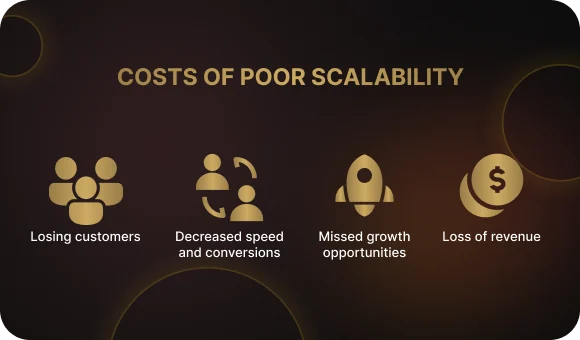
What Your Business Loses by Ignoring Scalability
Speed and conversions
A scalable product processes customer requests much faster thanks to traffic distribution and caching. High performance is a key driver of conversions: studies show that improving load time by just one second can increase conversion by 27%. For your business, that means customers complete purchases faster, feel less frustrated by waiting, and are more likely to return.
Customers because of failures and instability
A properly scaled system keeps running even during traffic spikes or partial server failures — if one server goes down, the load is automatically redistributed to the others. Research shows that 80% of users give a crashing app no more than three chances before deleting it for good. Maintaining high availability at 99.9% and above directly affects customer retention and brand reputation.
Opportunities for business growth
When your marketing works and traffic grows fivefold, a scalable app turns that growth into profit, while a non-scalable one turns it into a technical nightmare and lost money. Building with scalability in mind allows your company to grow organically: launch new features, enter new markets, and run large campaigns without worrying that the system will break. This is especially critical for startups, which can grow from a thousand to hundreds of thousands of users in a matter of months.
Money lost on inefficient infrastructure
Paradoxically, scalability also helps save money. Modern cloud technologies with auto-scaling let you pay only for the resources you actually use. Instead of keeping peak-load capacity running all the time — and overpaying during 70% of the day — the system automatically adds servers during rush hours and shuts them down at night. Companies report saving up to 38% of their IT budget when the scaling process is automated correctly.
Types of Application Scaling: Vertical and Horizontal
There are two main approaches to infrastructure scaling. Application scaling solves the problem of growing demand either vertically or horizontally — the important thing is choosing the right approach for your architecture.
Vertical scaling (Scaling Up)
What it is: strengthening an existing server by adding CPU, memory, or disk capacity. You make one server more powerful instead of adding new ones.
A simple analogy: imagine a store with one cashier who cannot keep up with the queue. Vertical scaling means training that cashier to work faster or giving them a more modern register. It is quick and simple, but there is a limit: one person cannot physically serve 100 customers at the same time.
Real-world example: many financial systems and traditional banking databases use vertical scaling. For example, Oracle Database in large banks often runs on one very powerful server with terabytes of memory. This makes transactional integrity easier to maintain, although it limits long-term growth.
Horizontal scaling (Scaling Out)
What it is: adding multiple new servers and distributing the load across them. Instead of relying on one powerful machine, you use many standard servers working in parallel.
A simple analogy: instead of one checkout desk, you open five. Each cashier serves part of the customers, and even if one is out sick, the others keep working. The line moves much faster, and there is no single point of failure.
Real-world example: Netflix uses horizontal scaling — thousands of smaller servers around the world instead of a few giant data centers. This allows the company to serve more than 230 million subscribers at the same time. Amazon, Google, and Facebook also rely fully on horizontal scaling, which gives them effectively limitless growth.
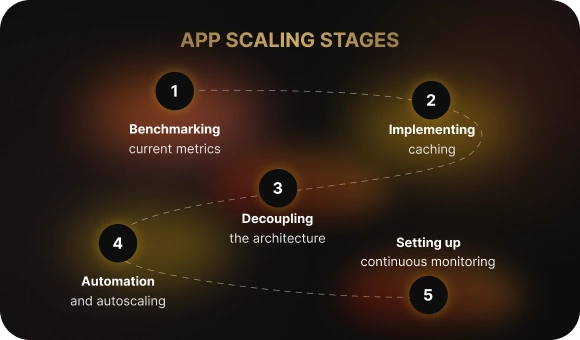
Five Steps to Scale an Application from Scratch
Scaling an application may seem complicated, but when broken down into последовательные steps, the path becomes clear even for teams just getting started.
Step 1: Measure your current performance
You cannot improve something if you do not know exactly how it works today. Start with basic metrics: application response time, error rate, CPU load, and server memory usage. These figures show the product’s current performance. Set up monitoring with tools such as Prometheus or Grafana and collect data for several weeks to understand where your bottlenecks are. This becomes your baseline — every improvement will be measured against it.
Step 2: Introduce caching to reduce load
Caching is the fastest way to lighten the load on your infrastructure. Store frequently requested data — such as product lists, user profiles, and results of complex queries — in fast memory using Redis or Memcached so that the database does not need to be queried every time. This can reduce database load by 60–90% and improve response times by up to 10x. Using a CDN for static resources such as images, CSS, and JavaScript is also critically important.
Step 3: Split the system into independent parts
If the whole application is one monolith, any traffic growth hits the entire architecture at once. Isolate the busiest components into separate services: payment processing, image handling, notifications. Split the database as well — create read replicas and move analytics into a separate storage layer. This makes it possible to scale only the parts that actually need extra performance.
Step 4: Automate deployment and scaling
Manual server management does not work at scale. Package the application into containers with Docker and set up an automated CI/CD pipeline for fast and safe updates. Use infrastructure as code with tools such as Terraform or CloudFormation so that your server configuration exists as scripts. This makes it possible to deploy a full copy of the system quickly or roll back to a previous version if problems arise.
Step 5: Set up continuous observability
Application scalability is not a one-time setup — it is an ongoing process. Implement centralized logging, such as the ELK Stack, and set alerts for critical events: high CPU usage, rising error counts, server failures. Your monitoring should tell you about problems before your users notice them. Run load tests regularly so you always know how much traffic your application can handle today.
Auto-Scaling: How the Product Adapts to Traffic on Its Own
What it is: auto-scaling means the infrastructure automatically adds or removes servers depending on the current load, without your involvement. Traffic goes up — extra capacity is launched. Traffic goes down — unnecessary resources are shut off.
When you need it: this is critical for businesses with traffic spikes, such as e-commerce during sales or streaming services during evening peaks, and for seasonal services such as tax platforms in April or food delivery during holiday periods.
Types of auto-scaling:
HPA (Horizontal Pod Autoscaler) adds more copies of the application when CPU or memory load grows.
VPA (Vertical Pod Autoscaler) automatically selects the optimal amount of resources for each container, delivering maximum performance with minimum cost.
Configuration example: a rule like “if CPU > 70%, add one more application instance” automatically scales the platform when demand rises. When usage drops to 40%, extra instances are shut down so you do not overpay for idle servers.
Where You Lose Money and Users: The Four Biggest Scaling Mistakes
1. Optimizing blindly, without metrics
Many teams start optimizing at random without understanding where the real bottlenecks are. You may spend weeks speeding up a function that runs once a day while ignoring a database that is already overloaded. Without measurements, you are putting out the wrong fire. Always start with profiling and monitoring — only data will show what is actually slowing the system down.
2. Keeping everything in one monolith and one database
When the entire application is one large codebase and all data sits in one database, scaling becomes nearly impossible. A problem in payments can overload the entire system, including product browsing. The database becomes a bottleneck through which every request must pass. Splitting the system into services and using multiple databases allows you to scale parts independently and isolate failures.
3. Skipping load testing
You may feel sure the application can handle Black Friday, but if you have never tested it in practice, that confidence means nothing. On the day of the sale, the platform crashes, customers leave, and revenue is lost. Load testing reveals performance limits before real users discover them for you. Regularly simulating peak demand is far cheaper than losing sales.
4. Sending every request directly to the database
Without caching and message queues, every user click creates a database query, and the database quickly becomes overloaded. Using Redis to cache frequently requested data can reduce database load by 60–90%. Message queues such as RabbitMQ or Kafka make it possible to process heavy tasks asynchronously without forcing users to wait. Without these tools, the database becomes a single point of failure.

A Case from Our Practice: How Scaling Increased Conversion by 125%
The situation: an online store came to us with 50,000 monthly users. Their monolithic application was running on a single server, responding in 3–5 seconds, regularly crashing during promotions, and had been unavailable for three hours on the previous Black Friday — costing them $50,000 in lost revenue. Conversion was only 1.2%, while the market average was 2–3%.
What we did: we introduced Redis for caching products and user sessions, split the database into one master for writes and two read replicas for reads, containerized the application with Docker, and deployed it on Kubernetes with auto-scaling from 2 to 10 pods depending on load. We also set up monitoring in Prometheus and alerts for critical events.
The result: after six months, response time dropped to 0.3–0.5 seconds — 6 to 10 times faster. Conversion grew to 2.7%, an increase of 125%. The infrastructure could now handle 5,000 concurrent users without crashes, and the next Black Friday passed with 99.95% uptime. Monthly revenue grew from $150K to $800K, while additional infrastructure costs were only $1,700 per month. Every unit of investment generated 205 times more additional revenue.

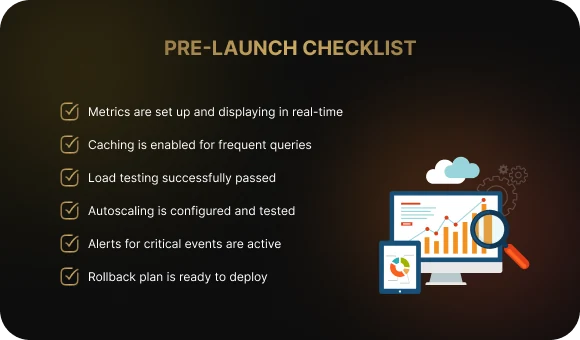
Checklist: Review Your Application Before Launch
Before launching a scalable application into production, make sure all critical elements are configured and working correctly.
- Metrics are configured and displayed in real time. Monitoring tools such as Grafana, Prometheus, or their alternatives show response times, error rates, CPU usage, and memory usage so you can see the app’s condition at any moment.
- Caching is enabled for frequent requests. Redis or Memcached stores the data requested most often — such as product catalogs and user profiles — reducing database load by 60–90%.
- Load testing has been completed successfully. You simulated peak traffic, typically 1.5–2x higher than expected, using tools such as JMeter or Gatling, and the product held up without critical errors.
- Auto-scaling is configured and tested. Rules for automatic scaling are in place, such as adding servers when CPU usage exceeds 70%, and you have verified that the infrastructure actually scales under load.
- Alerts for critical events are active. Notifications in Telegram, Slack, or email are configured for server failures, error rates above 1%, and high resource usage, so the team learns about problems before users do.
- A rollback plan is ready. If something goes wrong, you can return to the previous stable version of the application within minutes. The rollback process is documented and has been rehearsed in a test environment.
Conclusion
Scalability is not a stage of the project — it is the continuous improvement of infrastructure alongside business growth. Every second of delay costs sales, and every outage costs customers. The good news is that application scalability can be built step by step, from caching to major architectural redesign.
Is your application ready for growth? The only way to know is through a technical audit. Do not wait until users discover the problems during a critical launch.
The Beetrail team can conduct an audit, identify bottlenecks, and create a scaling plan — from quick improvements to an architecture that can handle any growth. Contact us to get a personalized scalability roadmap for your product.
In Simple Terms: What Scalability Means
Application scalability is your system’s ability to handle growing demand without losing performance or stability. Put simply, it means being able to support ten times more users without slowing down or risking outages. The numbers make this very real: Amazon’s research showed that every 100 milliseconds of latency costs the company 1% in lost sales — for a giant of that scale, that amounts to around $3.8 billion annually.
Tricentis statistics for 2024 show that global businesses lose up to $2.49 million a year because of poor mobile app quality. When your application does not scale, every new customer can become not a source of revenue, but the cause of a technical disaster.
Example
Imagine an online store before Black Friday. On a normal day, the site serves 500 concurrent users, but on the day of the sale that number jumps to 5,000. A non-scalable system will simply collapse under that pressure — the server becomes overloaded, the database starts choking, customers see errors, and they leave for competitors. A scalable application, by contrast, is prepared in advance: it can automatically bring in additional resources during peak traffic and release them when demand drops.
This does not mean the store has to keep capacity for 5,000 users running all the time. It simply needs an architecture that can scale quickly on demand using modern automation technologies and cloud solutions.
What Your Business Loses by Ignoring Scalability
Speed and conversions
A scalable product processes customer requests much faster thanks to traffic distribution and caching. High performance is a key driver of conversions: studies show that improving load time by just one second can increase conversion by 27%. For your business, that means customers complete purchases faster, feel less frustrated by waiting, and are more likely to return.
Customers because of failures and instability
A properly scaled system keeps running even during traffic spikes or partial server failures — if one server goes down, the load is automatically redistributed to the others. Research shows that 80% of users give a crashing app no more than three chances before deleting it for good. Maintaining high availability at 99.9% and above directly affects customer retention and brand reputation.
Opportunities for business growth
When your marketing works and traffic grows fivefold, a scalable app turns that growth into profit, while a non-scalable one turns it into a technical nightmare and lost money. Building with scalability in mind allows your company to grow organically: launch new features, enter new markets, and run large campaigns without worrying that the system will break. This is especially critical for startups, which can grow from a thousand to hundreds of thousands of users in a matter of months.
Money lost on inefficient infrastructure
Paradoxically, scalability also helps save money. Modern cloud technologies with auto-scaling let you pay only for the resources you actually use. Instead of keeping peak-load capacity running all the time — and overpaying during 70% of the day — the system automatically adds servers during rush hours and shuts them down at night. Companies report saving up to 38% of their IT budget when the scaling process is automated correctly.
Types of Application Scaling: Vertical and Horizontal
There are two main approaches to infrastructure scaling. Application scaling solves the problem of growing demand either vertically or horizontally — the important thing is choosing the right approach for your architecture.
Vertical scaling (Scaling Up)
What it is: strengthening an existing server by adding CPU, memory, or disk capacity. You make one server more powerful instead of adding new ones.
A simple analogy: imagine a store with one cashier who cannot keep up with the queue. Vertical scaling means training that cashier to work faster or giving them a more modern register. It is quick and simple, but there is a limit: one person cannot physically serve 100 customers at the same time.
Real-world example: many financial systems and traditional banking databases use vertical scaling. For example, Oracle Database in large banks often runs on one very powerful server with terabytes of memory. This makes transactional integrity easier to maintain, although it limits long-term growth.
Horizontal scaling (Scaling Out)
What it is: adding multiple new servers and distributing the load across them. Instead of relying on one powerful machine, you use many standard servers working in parallel.
A simple analogy: instead of one checkout desk, you open five. Each cashier serves part of the customers, and even if one is out sick, the others keep working. The line moves much faster, and there is no single point of failure.
Real-world example: Netflix uses horizontal scaling — thousands of smaller servers around the world instead of a few giant data centers. This allows the company to serve more than 230 million subscribers at the same time. Amazon, Google, and Facebook also rely fully on horizontal scaling, which gives them effectively limitless growth.
Five Steps to Scale an Application from Scratch
Scaling an application may seem complicated, but when broken down into последовательные steps, the path becomes clear even for teams just getting started.
Step 1: Measure your current performance
You cannot improve something if you do not know exactly how it works today. Start with basic metrics: application response time, error rate, CPU load, and server memory usage. These figures show the product’s current performance. Set up monitoring with tools such as Prometheus or Grafana and collect data for several weeks to understand where your bottlenecks are. This becomes your baseline — every improvement will be measured against it.
Step 2: Introduce caching to reduce load
Caching is the fastest way to lighten the load on your infrastructure. Store frequently requested data — such as product lists, user profiles, and results of complex queries — in fast memory using Redis or Memcached so that the database does not need to be queried every time. This can reduce database load by 60–90% and improve response times by up to 10x. Using a CDN for static resources such as images, CSS, and JavaScript is also critically important.
Step 3: Split the system into independent parts
If the whole application is one monolith, any traffic growth hits the entire architecture at once. Isolate the busiest components into separate services: payment processing, image handling, notifications. Split the database as well — create read replicas and move analytics into a separate storage layer. This makes it possible to scale only the parts that actually need extra performance.
Step 4: Automate deployment and scaling
Manual server management does not work at scale. Package the application into containers with Docker and set up an automated CI/CD pipeline for fast and safe updates. Use infrastructure as code with tools such as Terraform or CloudFormation so that your server configuration exists as scripts. This makes it possible to deploy a full copy of the system quickly or roll back to a previous version if problems arise.
Step 5: Set up continuous observability
Application scalability is not a one-time setup — it is an ongoing process. Implement centralized logging, such as the ELK Stack, and set alerts for critical events: high CPU usage, rising error counts, server failures. Your monitoring should tell you about problems before your users notice them. Run load tests regularly so you always know how much traffic your application can handle today.
Auto-Scaling: How the Product Adapts to Traffic on Its Own
What it is: auto-scaling means the infrastructure automatically adds or removes servers depending on the current load, without your involvement. Traffic goes up — extra capacity is launched. Traffic goes down — unnecessary resources are shut off.
When you need it: this is critical for businesses with traffic spikes, such as e-commerce during sales or streaming services during evening peaks, and for seasonal services such as tax platforms in April or food delivery during holiday periods.
Types of auto-scaling:
HPA (Horizontal Pod Autoscaler) adds more copies of the application when CPU or memory load grows.
VPA (Vertical Pod Autoscaler) automatically selects the optimal amount of resources for each container, delivering maximum performance with minimum cost.
Configuration example: a rule like “if CPU > 70%, add one more application instance” automatically scales the platform when demand rises. When usage drops to 40%, extra instances are shut down so you do not overpay for idle servers.
Where You Lose Money and Users: The Four Biggest Scaling Mistakes
1. Optimizing blindly, without metrics
Many teams start optimizing at random without understanding where the real bottlenecks are. You may spend weeks speeding up a function that runs once a day while ignoring a database that is already overloaded. Without measurements, you are putting out the wrong fire. Always start with profiling and monitoring — only data will show what is actually slowing the system down.
2. Keeping everything in one monolith and one database
When the entire application is one large codebase and all data sits in one database, scaling becomes nearly impossible. A problem in payments can overload the entire system, including product browsing. The database becomes a bottleneck through which every request must pass. Splitting the system into services and using multiple databases allows you to scale parts independently and isolate failures.
3. Skipping load testing
You may feel sure the application can handle Black Friday, but if you have never tested it in practice, that confidence means nothing. On the day of the sale, the platform crashes, customers leave, and revenue is lost. Load testing reveals performance limits before real users discover them for you. Regularly simulating peak demand is far cheaper than losing sales.
4. Sending every request directly to the database
Without caching and message queues, every user click creates a database query, and the database quickly becomes overloaded. Using Redis to cache frequently requested data can reduce database load by 60–90%. Message queues such as RabbitMQ or Kafka make it possible to process heavy tasks asynchronously without forcing users to wait. Without these tools, the database becomes a single point of failure.
A Case from Our Practice: How Scaling Increased Conversion by 125%
The situation: an online store came to us with 50,000 monthly users. Their monolithic application was running on a single server, responding in 3–5 seconds, regularly crashing during promotions, and had been unavailable for three hours on the previous Black Friday — costing them $50,000 in lost revenue. Conversion was only 1.2%, while the market average was 2–3%.
What we did: we introduced Redis for caching products and user sessions, split the database into one master for writes and two read replicas for reads, containerized the application with Docker, and deployed it on Kubernetes with auto-scaling from 2 to 10 pods depending on load. We also set up monitoring in Prometheus and alerts for critical events.
The result: after six months, response time dropped to 0.3–0.5 seconds — 6 to 10 times faster. Conversion grew to 2.7%, an increase of 125%. The infrastructure could now handle 5,000 concurrent users without crashes, and the next Black Friday passed with 99.95% uptime. Monthly revenue grew from $150K to $800K, while additional infrastructure costs were only $1,700 per month. Every unit of investment generated 205 times more additional revenue.
Checklist: Review Your Application Before Launch
Before launching a scalable application into production, make sure all critical elements are configured and working correctly.
- Metrics are configured and displayed in real time. Monitoring tools such as Grafana, Prometheus, or their alternatives show response times, error rates, CPU usage, and memory usage so you can see the app’s condition at any moment.
- Caching is enabled for frequent requests. Redis or Memcached stores the data requested most often — such as product catalogs and user profiles — reducing database load by 60–90%.
- Load testing has been completed successfully. You simulated peak traffic, typically 1.5–2x higher than expected, using tools such as JMeter or Gatling, and the product held up without critical errors.
- Auto-scaling is configured and tested. Rules for automatic scaling are in place, such as adding servers when CPU usage exceeds 70%, and you have verified that the infrastructure actually scales under load.
- Alerts for critical events are active. Notifications in Telegram, Slack, or email are configured for server failures, error rates above 1%, and high resource usage, so the team learns about problems before users do.
- A rollback plan is ready. If something goes wrong, you can return to the previous stable version of the application within minutes. The rollback process is documented and has been rehearsed in a test environment.
Conclusion
Scalability is not a stage of the project — it is the continuous improvement of infrastructure alongside business growth. Every second of delay costs sales, and every outage costs customers. The good news is that application scalability can be built step by step, from caching to major architectural redesign.
Is your application ready for growth? The only way to know is through a technical audit. Do not wait until users discover the problems during a critical launch.
The Beetrail team can conduct an audit, identify bottlenecks, and create a scaling plan — from quick improvements to an architecture that can handle any growth. Contact us to get a personalized scalability roadmap for your product.