Artificial intelligence in education: how to create an app that personalizes learning
Artificial intelligence in education: how to create an app that personalizes learning
If you are organizing courses or an educational process, you know the situation for sure: you are trying to put together a universal program, but as a result, some students inevitably fall behind, while others get bored. To solve this problem, more and more companies are looking at the use of AI in education as a way to adjust the material to the student's actual pace and level. But the goal is not to “build AI for beauty”, but to implement it in a way that really helps equalize learning. In this article, we'll look at how this personalization works and what steps turn the idea of “making a smart app” into a working product.
How education is no longer the same for everyone: what artificial intelligence actually does
How education is no longer the same for everyone: what artificial intelligence actually does
Personalized education is an approach in which people learn at their own pace, and the program adapts to their speed and gaps. If the topic is easy, the system offers more complex tasks; if difficulties arise, the pace slows down and additional explanations appear. This format clearly shows how artificial intelligence works: use in education helps to take into account the student's goals and interests. Even at one level of English, one person is studying for an exam, another needs a language to travel, another person needs to study for work, and everyone needs their own focus on learning. As a result, a flexible trajectory is being formed instead of a universal course: routes change as you learn topics and provide support where it is really needed.
How AI helps personalize learning
1. Sees more than regular statistics
Artificial intelligence analyzes a student's entire learning trail: how quickly they answer tests, where they make mistakes, what topics they review, and where they pause. This allows the system to understand not only the result, but also the reason why this or that material is more difficult.
2. Matches tasks to the level in real time
The algorithm does not wait for the end of the module: it reacts to the student's actions immediately. If the material is easy, the tasks become more difficult; if the student stalls, the level automatically decreases and additional exercises appear.
3. Recommends the next step
AI makes individual recommendations: what to do next, what topic to repeat, how much practice to add. This alleviates part of the “what to do now” anxiety that often comes up in online education.
4. Gives detailed feedback
Unlike conventional tests, which give a dry “true/false” test, AI shows exactly where the logical error occurred, suggests an alternative solution, and provides clues.
5. Shows the teacher a section of the group
A teacher can use an analytical panel: which topics are difficult, which students are late, who need help, and who, on the contrary, is ready for new information. This saves hours of routine checks and allows you to intervene in time.

It is important: Artificial intelligence is not a substitute for teachers or methodologists. He works as a “smart assistant” who takes care of the routine, collects and uses data about the learning process and suggests where human intervention is needed. Decisions on how to adjust the program are still up to the specialist.
On both sides of the screen: AI learning through the eyes of a student and teacher
On both sides of the screen: AI learning through the eyes of a student and teacher
Many people are now introducing AI in education, but it is not always clear what real benefits it provides. To understand why you need it at all, you should look at the process through the eyes of the two main participants — the student and the teacher.
For a student
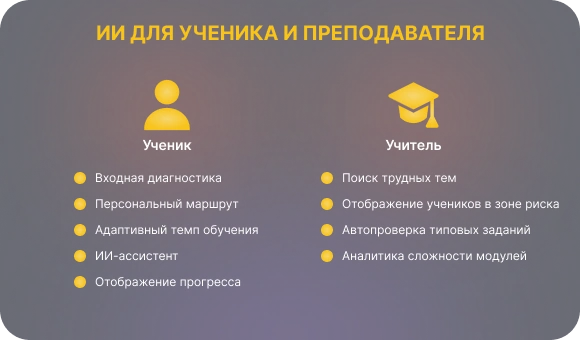
The training begins with a short diagnosis that helps the system understand the level and determine the starting point. After that, the app creates a personalized route: the pace, complexity and sequence of materials adapt to the goals and current knowledge. If a student gets stuck on a topic, additional explanations, simple exercises, and steps to reinforce appear. If you move faster, the pace increases and more difficult tasks open up. At any time, you can ask a question to the built-in AI assistant and get an explanation of the information you have covered. Progress is displayed in such a way that it is clear to the person what knowledge they have already mastered and what small victories they have gained along the way.
For teachers and methodologists
The app shows which topics the group is losing momentum on: where students make mistakes en masse, and which tasks cause the most difficulties. Students at risk are highlighted separately so that the teacher can intervene in time — offer additional materials, conduct an analysis or an individual consultation. Standard assignments and tests are checked automatically, which reduces the amount of routine work. Course analytics shows which modules work well and which ones should be simplified, rebuilt, or broken down into smaller steps.
It is important: an AI application is not a magic technology that will do everything for you, but a set of applied functions. They work on the basis of data and feedback: the system analyzes learning outcomes, adjusts materials to the student's level and helps teachers navigate group dynamics.
Where to start: we determine the goals and needs of users, rather than choose a neural network
Where to start: we determine the goals and needs of users, rather than choose a neural network
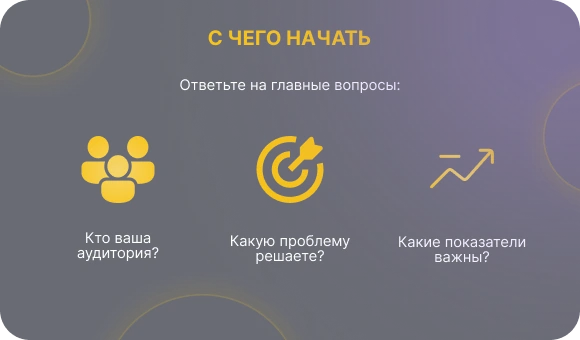
Many projects that start with the phrase “let's add AI” often end up with useless features that annoy users more than they bring results. For this technology to work, you first need to understand:
- Who would you like to help?
- What problem are you solving?
Who and why: questions to start working with AI in education
Who is the app being made for?
Who do you help and how do these people learn:
— schoolchildren;
— students;
— adult students;
— corporate employees.
Each group has a different pace, format of perception, motivation and ways to increase knowledge during the learning process.
For what tasks?
What exactly should the product improve or simplify:
— exam preparation;
— language learning;
— onboarding new employees;
— professional development;
— mastering specific knowledge and skills.
Different tasks have different personalization scenarios and different points where using artificial intelligence can help.
What needs to be improved?
What metrics are important to you and your users:
— reduce the blade;
— increase course completion;
— increase your GPA;
— speed up the newcomer's entry into the role;
— improve the quality of practical tasks;
— reduce the burden on the teacher.
Artificial intelligence in education — case studies
Example 1: English course for company employees
In one Intermediate stream, employees had different tasks: a manager needed spoken English for calls, a support specialist needed clear letters to customers, and analytics needed grammar to read documentation. A short diagnosis helps the system to put together its own route for everyone: some — interactive simulators, some — correspondence exercises, others — grammar blocks. The pace also varies: fast students get advanced tasks, while those who get stuck are given additional explanations and practice.
Example 2: preparing students for the exam
Although the class is preparing for the same exam, everyone's gaps are different: some don't understand stereometry, some are confused about probabilities, some regularly make mistakes in text tasks. The system analyzes answers and errors, and then collects its own set of topics for each: one — geometry, another — probability practice, and the third — text problem training. As you progress, the route is updated: mastered blocks go down, and new topics are raised as a priority.
Example 3: onboarding new employees in the company
Beginners take the same introductory course, but everyone has different starting experience: some have already worked in the industry, some have come after university, some have changed their profession. The system selects content by role and background: for a sales specialist, blocks for product and customer service, for an engineer, documentation, architecture, and code standards. The common base remains, but the depth and order of the topics are changing. The analytics manager sees who is adapting quickly and who needs additional support.

The result: At this stage, two or three priority scenarios are being formed, for which the application will be designed. They are setting the direction for everything from the choice of functionality to the role of AI in education. Without such support, the product easily turns into a set of disparate functions without clear usefulness.
In plain words and without formulas: how data turns into personalization
In plain words and without formulas: how data turns into personalization
To tailor training to a particular person, the system needs to understand how they learn and what knowledge they already have. This is “data” — observations that show what happened quickly, where the difficulties arose, which topics are easier to learn and what needs to be repeated. The use of this data depends on what information the system receives while the student is working: answers, completion time, number of attempts, and returns to materials. Based on these signals, the app decides what to show next — to simplify the material, add an example, give more practice, or speed up the pace.
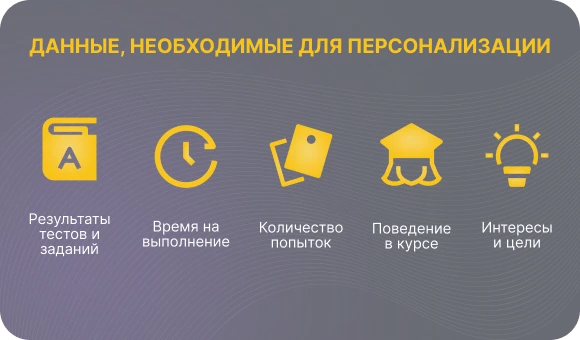
What data does the system collect
- The results of tests and assignments: They show which skills have already been mastered and what needs to be strengthened.
- Time to complete: helps distinguish confident understanding from guessing or difficulty.
- Number of attempts: gives a signal where the topic is difficult and additional practice is required.
- Course behavior: passes, places, use of additional materials and where the student gets stuck are recorded.
- Interests and goals: if the student himself specifies priorities, the system uses them when choosing a route.
What types of personalization can be built
- By level: the complexity of the tasks and the depth of explanations are changing.
- By pace: the material accelerates or slows down if the student walks faster or slower.
- By content: topics, cases, texts and formats are selected that are better suited to a particular student.
- By type of support: You can get hints, additional explanations, or supporting materials.
Why data quality matters
If the system accumulates inaccurate or random data, personalization begins to lead the student in the wrong direction: assignments are chosen strangely, the pace slows down, and recommendations lose touch with real needs. The pure logic of work is no less important. If the adaptation rules are complicated, the system may go too far — giving too difficult tasks or, conversely, simplifying the program too much. A balance is achieved when algorithms rely on understandable signals and do not intervene where the student does on his own.
7 steps to a working AI education service
7 steps to a working AI education service
So that the idea of “making a smart app” doesn't get stuck in the presentation, you need a simple route. Below is a basic seven-step plan that almost all personalization projects go through.
1. Identify 2-3 key scenarios and audience
Describe who will use the product: schoolchildren, students, adults, company employees. For each segment, choose one or two priority scenarios: preparing for the exam, learning a new language, onboarding, and professional development. At this step, it is important to record specific situations in which artificial intelligence should help, rather than vaguely “improve learning in general”.
2. Describe the user's path within the app
Complete the route through the student's eyes: logging in, making a short diagnosis, getting a personal plan, completing tasks, getting feedback and getting the final result. For each step, answer the following questions: what does a person see, what decisions the system makes, and where AI support comes in. This scenario immediately shows which screens and features are needed and which ones can be postponed.
3. Decide where your solution will live
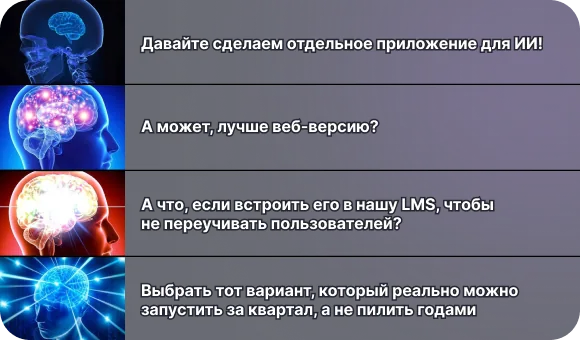
Decide on the format: a separate mobile or web application, a module within the current LMS, an extension of an existing platform. This affects both technical implementation and user behavior: whether they will log into the application separately or work in a familiar system. At this step, it's important not to chase after the perfect solution, but to choose an option that can actually be implemented in your environment.
4. Define data and decisions based on it
Formulate what data you plan to use: test scores, completion times, number of attempts, points where students get stuck, and stated goals. Then set 2-3 simple rules: what the system does if it sees that a person is wrong, goes too fast, or skips blocks. This turns abstract AI into understandable logic: there is a signal → there is a concrete action.
5. Make an MVP on a limited set of courses
Don't try to cover it all at once. Choose one subject, one course, and one type of user where personalization is especially needed. Collect the minimum functionality: diagnostics, a basic personal plan, adaptation according to several rules, and simple analytics. The MVP's goal is to show tangible benefits in a narrow segment, rather than cover all possible scenarios.
6. Test on a small group
Launch the product on a limited sample of students and teachers. At the same time, collect two types of feedback: live user comments (which is convenient, it's not clear where it's getting in the way) and numbers (passability, dump, completion time, rate of return to the course). Compare the results to your initial expectations: where personalization has helped and where it hasn't worked yet.
7. Refine and scale
As a result of the test, review the personalization rules, interfaces, and scenarios: what to simplify, what to expand, what to remove. Only then transfer your solution to other courses, roles, and audiences. Scaling makes sense when you understand how the product is useful and what elements you need to keep.
It is important: MVP is not “the whole platform at once”, but a working fragment with understandable benefits for a specific audience. Its task is to prove that personalization in selected scenarios really improves education, and only then serve as a basis for expansion.
Your path to failure: mistakes that break AI projects in education
Your path to failure: mistakes that break AI projects in education
For a personalized product to work, you need to avoid several typical pitfalls. They are so common that almost any failed AI project can be analyzed according to these points.
1. Start with the technology, not the task
The most common mistake is choosing a neural network before understanding who you're helping and what problem you're solving. As a result, the product adds a “beautiful AI assistant” that does not provide any benefit or meaning.
2. Try to reach everyone at once
The desire to create a universal service for schoolchildren, students, aspiring analysts and top managers almost always fails. Such apps don't meet the needs of any group because the goals, experience, and training methods vary widely from user to user.
3. Create an app only for students and forget about the teacher
If the system does not provide tools for methodologists and teachers, analytics remains unpopular, and tips are not integrated into the educational process. The product falls out of real work.

4. Collect mountains of data without knowing what to do with it
Metric panels look impressive, but they are pointless if there are no management decisions underneath them. The system should not just record figures, but help you understand what is changing in education and what steps are needed next.
5. Ignore the ethics and transparency of data processing
The lack of clear consent to the collection and use of information, unclear data storage procedures, and opaque algorithm decisions — all this undermines trust and can cause problems at the organizational or legislative level.
6. Design the “perfect AI product” on paper and don't test it on humans
The viability of scenarios is tested only in real use. If you don't show the product to students and teachers, interfaces remain inconvenient, logic is ill-conceived, and personalization is useless. As a result, motivation quickly drops, and the project stops without reaching the working level.
The hidden risks of AI in educational projects
The hidden risks of AI in educational projects
Even smart personalization solutions may face limitations that are not related to UX or product logic, but lie deeper in the nature of the technology itself. These are risks that most teams think about too late. Here are some of the key ones and ways to get around them.
Conclusion
Artificial intelligence in education is not a fashionable icon, but a tool that, when properly configured, makes education more human: it takes into account pace, goals and gaps, removes part of the routine from the teacher and gives students a clear route to learn skills. For this to work, it is important to start not with technology, but with pedagogy: identify tasks and audiences, collect the necessary data, build a simple personalization logic and test it on real users. This approach gives a live rather than a formal result.
If you are considering using AI in education or want to understand exactly where it can improve your learning process, the Beetrail team will help you go all the way, from setting tasks to working solutions.