05.06.2026
Time to read:
9
min
Restaurant Mobile App Development in 2026
Development
Guides
The food service industry continues to grow rapidly. According to Rosstat, in 2023 the turnover of the Russian restaurant market reached RUB 2.83 trillion, which is 12.3% higher than the previous year.
The number of newly opened establishments in 2023 was already 11.7% higher than a year earlier. In 2024, the restaurant market audience grew by 10%, while the average bill increased by 5%. At the same time, according to a study by Mobisharks, 70% of users place orders via smartphones.
If you want to keep up with the times and attract more guests, now is the right time to create a mobile app for your restaurant business.
In this article, we will look at how to approach the development of such a solution. We will explain which features are essential, how to avoid common mistakes, and how to create a product that helps a restaurant stand out from the competition.

Why You Should Build a Restaurant App
Today, more and more restaurants and cafés are adopting mobile solutions. These apps help optimize order processing and table reservations, collect analytics on customer preferences, increase sales, and strengthen guest loyalty. And this trend is gaining momentum every year.
Here are a few examples of how mobile app development helps restaurant businesses grow.
1. Subway
The Subway chain in Russia launched its own service, which became a direct communication channel with customers. The app attracted users with its bright design and user-friendly interface. Built-in gamification increased conversion and added positive emotions to the user experience.
2. Presto
The Presto coffee shop chain introduced an app with online ordering, a loyalty program, and a marketing platform. This helped increase foot traffic and improve retention among regular guests. In addition, the share of direct orders grew from 50% to 65%, depending on the city, which reduced spending on aggregator commissions.
3. Sumo Sushi & Bento
The Sumo Sushi & Bento chain developed a platform that also helped increase order volume and improve guest engagement. Through the app, users can order dishes, pay the bill, and view restaurant offers and promotions.
Why does it work?
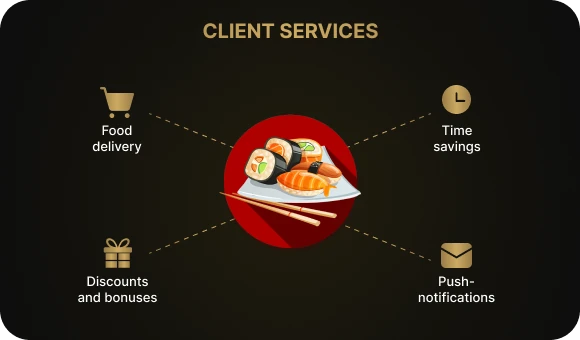
The answer is simple: these services make life easier for customers and allow them to order food and drinks quickly. This saves time and makes the purchasing process more convenient. With the help of push notifications, discounts, and bonuses, restaurants can encourage repeat orders and increase overall revenue.
The Relevance and Demand for Restaurant Mobile Apps
According to research, 68% of users regularly order food through smartphones, which confirms the growing demand for mobile solutions. Building a restaurant app is essential for businesses that want to stay competitive and meet customer expectations.
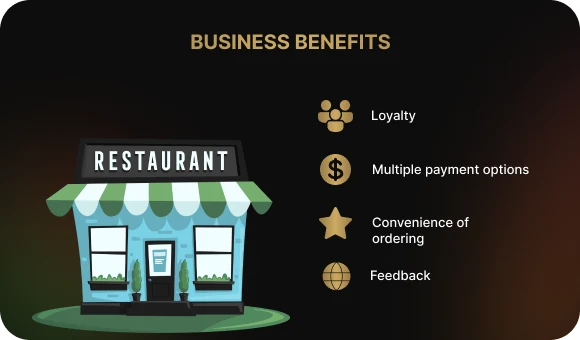
What Benefits Can a Restaurant Gain from Its Own Mobile App?
A mobile platform can expand your customer base, increase profit, and reduce the workload on staff. Let’s look at some of the additional benefits it can bring.
Loyalty.
In a competitive market, it is important to stand out. An app helps turn a restaurant into a more personalized experience for each guest. Bonuses, special offers, and birthday deals are what keep customers coming back again and again.
Ordering convenience.
Ordering online is fast. Customers can choose dishes and drinks and place an order in just a couple of taps, without extra steps. This saves time and makes the overall dining experience more pleasant. With an app, guests can order food in advance or on the way to the restaurant, which is especially important for people who do not want to waste time waiting.
Variety of payment methods.
In the app, customers can pay by bank card, e-wallet, or QR code. It is convenient and secure, and it avoids awkward situations when the customer does not have cash.
Feedback for better service.
When a person leaves a review or complaint through the app, you can respond quickly and improve service quality. This also strengthens guest trust by showing that their opinion matters.
Features for Users
When developing the app, it is important to remember that the key priority is user convenience and comfort. The easier and faster it is for a guest to place an order, the more likely they are to return. In this section, we will go over the core features that make the app as convenient as possible.
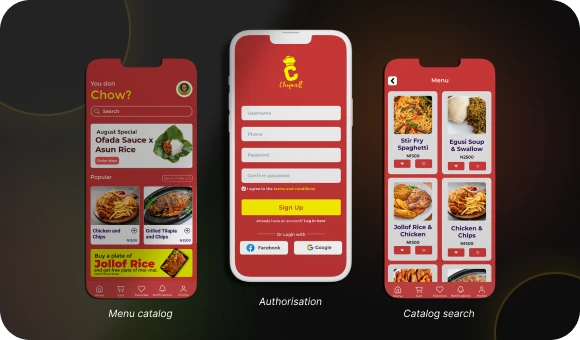
Registration
Registration allows users to create a personal profile, save preferences, and receive a personalized experience. Thanks to registration, you can integrate loyalty programs, store order history, and recommend favorite dishes.
Menu catalog and dish selection
A simple and clear menu catalog is the foundation of the experience. Each dish should be placed in easy-to-understand categories such as soups, mains, desserts, and drinks. Additional sections like “kids’ menu” or “vegetarian dishes” can also be added for convenience. The interface should be intuitive and easy to navigate.
Catalog search
When a guest knows exactly what they want, the search bar saves time. The user simply enters the name of the dish, and the platform shows it instantly, without forcing them to scroll through the entire menu.
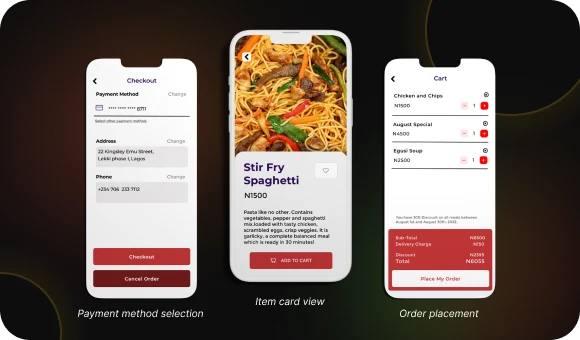
Dish details page
Each dish should be presented with a detailed description and photos. This not only helps the customer better understand what they are ordering, but also gives them confidence that the dish matches their expectations. Anyone placing an order online wants to know what they are paying for. :)
Order placement
One of the key goals in restaurant app development is to create a fast and convenient ordering flow. Everything should be intuitive and available in just a few taps. Here is how it can work:
- Dish selection. The user easily finds the desired item, reviews its description and photos, and makes a choice.
- Dine-in or takeaway. The customer decides whether they will enjoy the meal at the restaurant or order it to go.
- Payment method selection. For convenience, the app can offer several payment options, including cards, e-wallets, and cash.
- Order total review. Guests can always see the total cost of the order and avoid unpleasant surprises at checkout.
Table reservation
A table reservation feature allows customers to feel confident that a table will be available when they arrive, which is especially important during peak hours.
Push notifications for new items and promotions
Push notifications are a great tool for staying in touch with customers. They inform users about new dishes, promotions, and events, making sure your restaurant stays top of mind.
“Call a Waiter” feature
This feature is a great solution for guests who want to get assistance quickly. With the app, they can call a waiter without putting down their phone.

Feedback
Leaving feedback after a visit becomes much easier. With a built-in review feature, users can share their opinion about the restaurant, while you receive valuable insights to improve service quality.
Features for the Restaurant, Café, and Other Food Businesses
When creating a mobile app for a restaurant, it is important not to forget the functionality that will be useful for the business itself. Here are some of the key features.
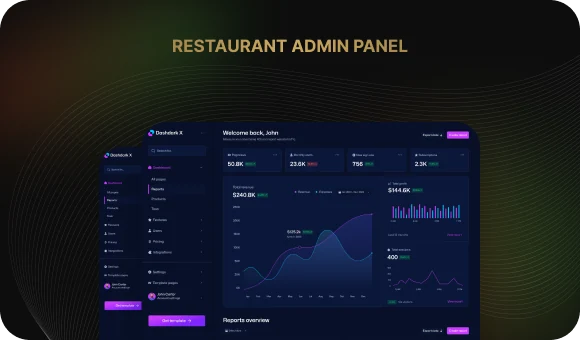
App admin panel
The admin panel helps control processes such as adding new menu items and setting up promotions and discounts. It is important for the panel to support different access levels to make management easier.
Order management
By integrating with automation systems such as R-Keeper, you can track every order and manage the process more efficiently. This keeps order timing and fulfillment under control and helps staff work quickly and in sync.
Notifications
Push notifications are a direct path to your customers’ attention. Through the platform, you can inform them about new dishes, special offers, and promotions. This helps remind guests about your restaurant and encourages them to return.
Inventory and stock management
No one likes “surprises” such as discovering their favorite dish is unavailable. Through the app, you can easily track remaining ingredients and reorder supplies on time.
Integration with automation systems
A mobile platform can be easily integrated with POS software such as R-Keeper and CRM systems like Bitrix or 1C.
Order analytics and reporting
With in-app analytics, you can get accurate data on what customers order, which dishes are most popular, and when the restaurant performs best.
Customer interaction
Reviews and ratings are an opportunity to hear your guests and understand what can be improved. The faster you respond to feedback, the stronger customer loyalty becomes.
Special offers for customers
Everyone likes to feel special. You can set up personalized discounts and bonuses and offer exclusive promotions. These small “extras” help attract repeat visitors, improve loyalty, and increase average order value.
Stages of Building a Successful Food Delivery App
Every app should meet user needs, stand out from competitors, and offer restaurants practical tools for growth and development. Let’s look at how the development journey works step by step.
1. Defining the target audience
Before diving into code and design, think about who will use the service. Young people ordering food after a party, families with children looking for a quick meal, or business professionals who need lunch to go.
Each of these user groups requires a different approach, and understanding that helps make the app convenient for all of them.

2. Competitor app analysis
Before starting development, take a close look at what competitors are doing. Study what users like in food delivery apps and what they complain about. For example, if every app already has a standard menu catalog, it may be worth adding filters that help users find dishes by ingredients or calories more quickly. This kind of “competitive разведка” helps you avoid repeating others’ mistakes and add something unique to your own product.
3. Defining functionality and writing the technical specification
Now that you know who the app is for and what problem it should solve, it is time to clearly define which features it will include. Will it just be a convenient catalog and ordering system, or also map integration for finding the nearest locations? These are the kinds of questions you should answer while writing the technical specification. It is the roadmap without which the project can easily lose direction.
In addition to food ordering features, think about loyalty programs for regular guests and push notifications about new promotions.
4. UX/UI design
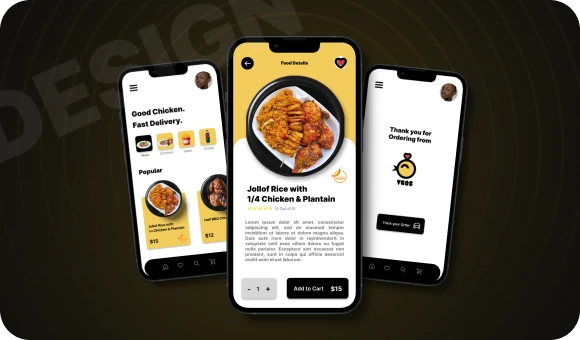
This is where the magic begins. The app should look attractive, navigation should be intuitive, and the overall experience should make users want to come back. Imagine a restaurant inside a smartphone: the menu is like a showcase, where every dish looks like a piece of art. A clean and stylish design is one of the key reasons customers enjoy using the app.
5. Development
Now that the plan and design are ready, it is time for the serious work to begin. Developers connect payment systems, build the product architecture, and implement the interface and features. At this stage, it is crucial to make sure the app works reliably and securely. Your users should feel confident that their data is protected and their order will be delivered without issues.
6. Testing and bug fixing
This is a truly important stage. An app is rarely perfect from the start, so it needs thorough testing. It is like launching a new dish in a restaurant: try it, improve it, and test it again. Make sure everything works as expected and that there are no bugs.
7. Store release and promotion
Congratulations — your product is ready to launch. But that is only the beginning. Now people need to hear about it. Publishing in the App Store and Google Play is just the first step. Promote the app, run marketing campaigns, attract your first users, collect reviews, and work with that feedback. That is the only way to ensure people actually start using your service.
8. App growth and support
Do not forget that the app continues to live even after release. Regular updates, new features, and solutions to customer problems help keep the service relevant and loved. For example, if users constantly complain that they do not have a convenient delivery tracking feature, add it in the next update — and they will appreciate your app even more.
Conclusion
Developing a mobile app for a restaurant helps not only improve interaction with guests, but also increase business efficiency. We have covered the main stages — from target audience analysis to testing and promotion — and now that you know the key points, it is time to bring your idea to life.
Beetrail offers a full-cycle approach to turnkey app development. We create modern and reliable solutions tailored to business needs — from analysis and design to launch and support.
Leave a request for a consultation, and the Beehive team will offer the best solution for your business.
Your success is our priority!
Why You Should Build a Restaurant App
Today, more and more restaurants and cafés are adopting mobile solutions. These apps help optimize order processing and table reservations, collect analytics on customer preferences, increase sales, and strengthen guest loyalty. And this trend is gaining momentum every year.
Here are a few examples of how mobile app development helps restaurant businesses grow.
1. Subway
The Subway chain in Russia launched its own service, which became a direct communication channel with customers. The app attracted users with its bright design and user-friendly interface. Built-in gamification increased conversion and added positive emotions to the user experience.
2. Presto
The Presto coffee shop chain introduced an app with online ordering, a loyalty program, and a marketing platform. This helped increase foot traffic and improve retention among regular guests. In addition, the share of direct orders grew from 50% to 65%, depending on the city, which reduced spending on aggregator commissions.
3. Sumo Sushi & Bento
The Sumo Sushi & Bento chain developed a platform that also helped increase order volume and improve guest engagement. Through the app, users can order dishes, pay the bill, and view restaurant offers and promotions.
Why does it work?
The answer is simple: these services make life easier for customers and allow them to order food and drinks quickly. This saves time and makes the purchasing process more convenient. With the help of push notifications, discounts, and bonuses, restaurants can encourage repeat orders and increase overall revenue.
The Relevance and Demand for Restaurant Mobile Apps
According to research, 68% of users regularly order food through smartphones, which confirms the growing demand for mobile solutions. Building a restaurant app is essential for businesses that want to stay competitive and meet customer expectations.
What Benefits Can a Restaurant Gain from Its Own Mobile App?
A mobile platform can expand your customer base, increase profit, and reduce the workload on staff. Let’s look at some of the additional benefits it can bring.
Loyalty.
In a competitive market, it is important to stand out. An app helps turn a restaurant into a more personalized experience for each guest. Bonuses, special offers, and birthday deals are what keep customers coming back again and again.
Ordering convenience.
Ordering online is fast. Customers can choose dishes and drinks and place an order in just a couple of taps, without extra steps. This saves time and makes the overall dining experience more pleasant. With an app, guests can order food in advance or on the way to the restaurant, which is especially important for people who do not want to waste time waiting.
Variety of payment methods.
In the app, customers can pay by bank card, e-wallet, or QR code. It is convenient and secure, and it avoids awkward situations when the customer does not have cash.
Feedback for better service.
When a person leaves a review or complaint through the app, you can respond quickly and improve service quality. This also strengthens guest trust by showing that their opinion matters.
Features for Users
When developing the app, it is important to remember that the key priority is user convenience and comfort. The easier and faster it is for a guest to place an order, the more likely they are to return. In this section, we will go over the core features that make the app as convenient as possible.
Registration
Registration allows users to create a personal profile, save preferences, and receive a personalized experience. Thanks to registration, you can integrate loyalty programs, store order history, and recommend favorite dishes.
Menu catalog and dish selection
A simple and clear menu catalog is the foundation of the experience. Each dish should be placed in easy-to-understand categories such as soups, mains, desserts, and drinks. Additional sections like “kids’ menu” or “vegetarian dishes” can also be added for convenience. The interface should be intuitive and easy to navigate.
Catalog search
When a guest knows exactly what they want, the search bar saves time. The user simply enters the name of the dish, and the platform shows it instantly, without forcing them to scroll through the entire menu.
Dish details page
Each dish should be presented with a detailed description and photos. This not only helps the customer better understand what they are ordering, but also gives them confidence that the dish matches their expectations. Anyone placing an order online wants to know what they are paying for. :)
Order placement
One of the key goals in restaurant app development is to create a fast and convenient ordering flow. Everything should be intuitive and available in just a few taps. Here is how it can work:
- Dish selection. The user easily finds the desired item, reviews its description and photos, and makes a choice.
- Dine-in or takeaway. The customer decides whether they will enjoy the meal at the restaurant or order it to go.
- Payment method selection. For convenience, the app can offer several payment options, including cards, e-wallets, and cash.
- Order total review. Guests can always see the total cost of the order and avoid unpleasant surprises at checkout.
Table reservation
A table reservation feature allows customers to feel confident that a table will be available when they arrive, which is especially important during peak hours.
Push notifications for new items and promotions
Push notifications are a great tool for staying in touch with customers. They inform users about new dishes, promotions, and events, making sure your restaurant stays top of mind.
“Call a Waiter” feature
This feature is a great solution for guests who want to get assistance quickly. With the app, they can call a waiter without putting down their phone.
Feedback
Leaving feedback after a visit becomes much easier. With a built-in review feature, users can share their opinion about the restaurant, while you receive valuable insights to improve service quality.
Features for the Restaurant, Café, and Other Food Businesses
When creating a mobile app for a restaurant, it is important not to forget the functionality that will be useful for the business itself. Here are some of the key features.
App admin panel
The admin panel helps control processes such as adding new menu items and setting up promotions and discounts. It is important for the panel to support different access levels to make management easier.
Order management
By integrating with automation systems such as R-Keeper, you can track every order and manage the process more efficiently. This keeps order timing and fulfillment under control and helps staff work quickly and in sync.
Notifications
Push notifications are a direct path to your customers’ attention. Through the platform, you can inform them about new dishes, special offers, and promotions. This helps remind guests about your restaurant and encourages them to return.
Inventory and stock management
No one likes “surprises” such as discovering their favorite dish is unavailable. Through the app, you can easily track remaining ingredients and reorder supplies on time.
Integration with automation systems
A mobile platform can be easily integrated with POS software such as R-Keeper and CRM systems like Bitrix or 1C.
Order analytics and reporting
With in-app analytics, you can get accurate data on what customers order, which dishes are most popular, and when the restaurant performs best.
Customer interaction
Reviews and ratings are an opportunity to hear your guests and understand what can be improved. The faster you respond to feedback, the stronger customer loyalty becomes.
Special offers for customers
Everyone likes to feel special. You can set up personalized discounts and bonuses and offer exclusive promotions. These small “extras” help attract repeat visitors, improve loyalty, and increase average order value.
Stages of Building a Successful Food Delivery App
Every app should meet user needs, stand out from competitors, and offer restaurants practical tools for growth and development. Let’s look at how the development journey works step by step.
1. Defining the target audience
Before diving into code and design, think about who will use the service. Young people ordering food after a party, families with children looking for a quick meal, or business professionals who need lunch to go.
Each of these user groups requires a different approach, and understanding that helps make the app convenient for all of them.
2. Competitor app analysis
Before starting development, take a close look at what competitors are doing. Study what users like in food delivery apps and what they complain about. For example, if every app already has a standard menu catalog, it may be worth adding filters that help users find dishes by ingredients or calories more quickly. This kind of “competitive разведка” helps you avoid repeating others’ mistakes and add something unique to your own product.
3. Defining functionality and writing the technical specification
Now that you know who the app is for and what problem it should solve, it is time to clearly define which features it will include. Will it just be a convenient catalog and ordering system, or also map integration for finding the nearest locations? These are the kinds of questions you should answer while writing the technical specification. It is the roadmap without which the project can easily lose direction.
In addition to food ordering features, think about loyalty programs for regular guests and push notifications about new promotions.
4. UX/UI design
This is where the magic begins. The app should look attractive, navigation should be intuitive, and the overall experience should make users want to come back. Imagine a restaurant inside a smartphone: the menu is like a showcase, where every dish looks like a piece of art. A clean and stylish design is one of the key reasons customers enjoy using the app.
5. Development
Now that the plan and design are ready, it is time for the serious work to begin. Developers connect payment systems, build the product architecture, and implement the interface and features. At this stage, it is crucial to make sure the app works reliably and securely. Your users should feel confident that their data is protected and their order will be delivered without issues.
6. Testing and bug fixing
This is a truly important stage. An app is rarely perfect from the start, so it needs thorough testing. It is like launching a new dish in a restaurant: try it, improve it, and test it again. Make sure everything works as expected and that there are no bugs.
7. Store release and promotion
Congratulations — your product is ready to launch. But that is only the beginning. Now people need to hear about it. Publishing in the App Store and Google Play is just the first step. Promote the app, run marketing campaigns, attract your first users, collect reviews, and work with that feedback. That is the only way to ensure people actually start using your service.
8. App growth and support
Do not forget that the app continues to live even after release. Regular updates, new features, and solutions to customer problems help keep the service relevant and loved. For example, if users constantly complain that they do not have a convenient delivery tracking feature, add it in the next update — and they will appreciate your app even more.
Conclusion
Developing a mobile app for a restaurant helps not only improve interaction with guests, but also increase business efficiency. We have covered the main stages — from target audience analysis to testing and promotion — and now that you know the key points, it is time to bring your idea to life.
Beetrail offers a full-cycle approach to turnkey app development. We create modern and reliable solutions tailored to business needs — from analysis and design to launch and support.
Leave a request for a consultation, and the Beehive team will offer the best solution for your business.
Your success is our priority!