05.06.2026
Time to read:
7
min
Flutter development of mobile applications
Development
Cases
In 2025, mobile apps continue to dominate the market, and educational services are no exception — they are evolving rapidly. With modern technology, people can learn without leaving home. There is no longer any need to stick to class schedules or look for suitable courses in your city — everything can be found on a smartphone.
Educational apps are interactive, offer personalized learning programs, and can be used anywhere — even while traveling or during lunch breaks. We are seeing growing interest in platforms for language learning, professional skills development, and testing. And to create high-quality solutions like these, more and more companies are choosing Flutter mobile app development.
This Google framework provides all the tools needed to build high-quality services for both iOS and Android. With Flutter, it is possible to create solutions with excellent design and high performance, which is especially important for educational platforms.
Today, we’ll explain why Flutter is a great tool for building innovative, high-quality solutions that help people learn and grow in an accessible way.
Hedgie: English Grammar Test — an Example of a Successful Educational App Built with Flutter
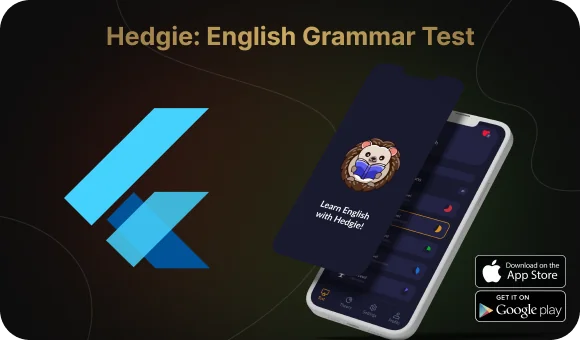
A great example of how Flutter development helps create outstanding educational apps is Hedgie: English Grammar Test. This app makes learning English easy and engaging. Users complete tests, receive explanations for their mistakes, and track their progress.
Flutter development made the platform fast, user-friendly, and smooth on both Android and iOS. Great animations, an appealing interface, and high performance all helped the service become an effective tool for learning English.
Why Is Flutter the Ideal Development Tool in 2026?
The world of mobile apps never stands still — every year they become faster, more convenient, and more visually appealing. In 2026, users expect maximum comfort, while businesses want universal solutions that work equally well across all devices.
Developers also want to build great services without unnecessary complexity. That’s where Flutter development comes in — a tool that handles all of these задач? translate properly: challenges. Let’s take a look at why it remains one of the top choices.
One codebase — two apps.
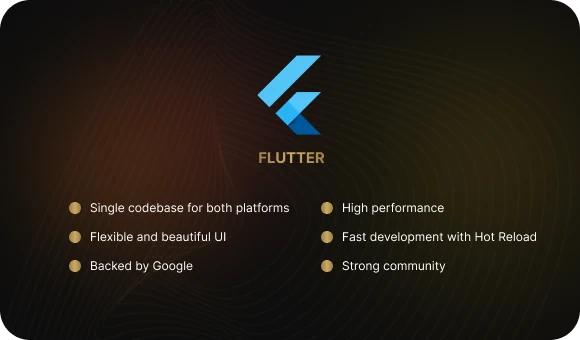
Why build two versions of the same service when you can create one? With Flutter, you can use a single codebase for both iOS and Android, which saves time and budget. At the same time, the app looks and performs natively on both platforms — without compromising quality.
Maximum speed.
Flutter uses the Dart language, which compiles into native code. This means the service launches quickly, smooth animations don’t lag, and the interface remains responsive even on less powerful devices.
Flexible and stylish design.
Flutter gives you complete freedom in design. Need an Android-style interface? Use Material Design. Want an iOS-style interface? Cupertino widgets can help. And if you want something unique, customization is practically unlimited.
Fast development without delays.
With Hot Reload, developers can instantly see code changes without restarting the app. This significantly speeds up development, while built-in DevTools help analyze performance and find bugs quickly.
Google support and an active community.
Flutter is a Google product, which means it is regularly updated and improved. On top of that, it has a huge developer community that shares experience, tricks, and ready-made solutions.
From Idea to Product: The Main Development Stages
Every service starts with an idea. But an idea alone is not enough — it is important to understand what users need, study the market, identify the product’s strengths, and choose the right technology to build it.
Let’s look at how the developers turned the concept into a full-fledged platform and what role Flutter mobile development played in this process.
Where the Idea for Hedgie Came From
The creators of the platform noticed that many people study English but struggle with grammar. Most services are either overloaded with theory or offer repetitive exercises with little interactivity. The challenge was to find a balance — to create a trainer that makes grammar learning simple, clear, and engaging.
Researching the Market and User Needs
Before development began, the team studied competitors and analyzed user expectations. Surveys and testing showed that:
- People prefer learning grammar in a game-like format rather than simply reading rules.
- It is important to see mistake explanations immediately and receive quick feedback.
- The platform needs to work without delays and be available on any device.
A Unique Approach: Fun and Comfort
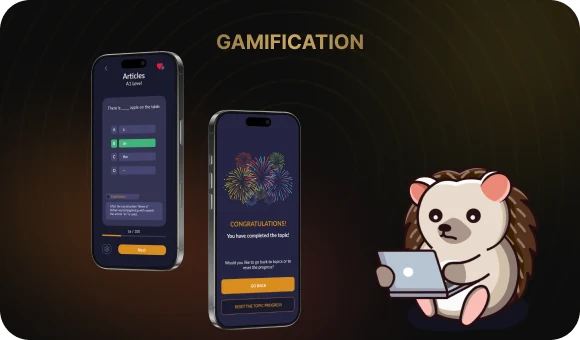
To make learning engaging, the team added gamification elements. Users complete levels, track their progress, and receive rewards for correct answers. This motivates them to keep going and not give up.
Helping them along the way is the friendly Hedgie — a virtual assistant that gives hints and encouragement. This format makes grammar learning not only useful but genuinely fun.
Hedgie is a great example of how a well-thought-out idea, market analysis, and the right technology choice can lead to a востребованный продукт — a successful and in-demand product. Flutter mobile development made the service fast, while the game mechanics made learning interesting.
Hedgie’s Main Features: How the App Works
The app is designed to make learning English grammar simple and engaging. From the very first lessons, users can see their progress and begin to understand the rules better.
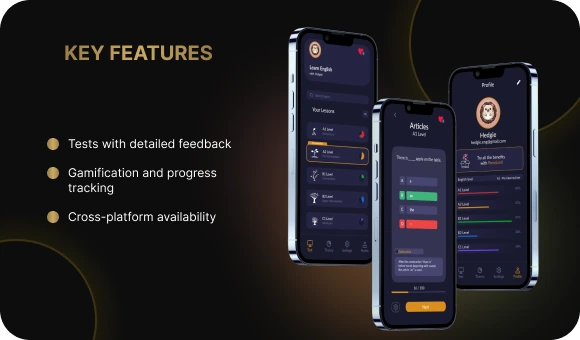
Interactive tests with mistake explanations.
There is no boring memorization here — instead, users take dynamic tests and immediately receive explanations for their mistakes. This approach helps them remember grammar structures faster and understand the language better.
Gamification: learning through play.
To keep learning from becoming routine, the app includes levels, rewards, and personalized tasks. Users can track their progress, earn bonuses, and compete with themselves by improving their results.
Works equally well on all devices.
The app is built with Flutter, so it performs well on both iOS and Android. No matter the device, it remains fast, stable, and comfortable to use.
How Monetization and the Business Model Work
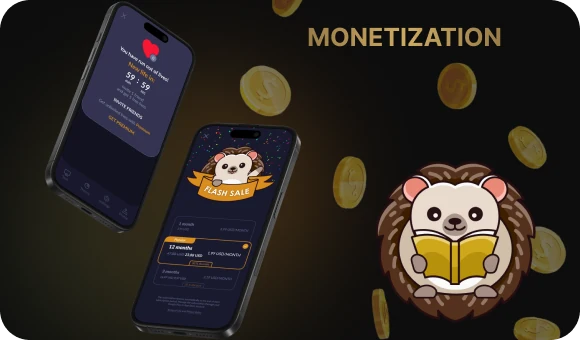
To keep the service accessible to most users, the platform uses a freemium model. This means the basic features are available for free, while additional options are unlocked through subscriptions or in-app purchases. Let’s look at how it works.
One of the key game mechanics is the lives system. Each user has 10 attempts: every mistake costs one life. If the lives run out, access to tasks is temporarily blocked, and the user has to wait 2 hours for them to be restored. This approach makes the learning process more mindful and engaging.
But there is another option — users can restore lives immediately. This can be done through a subscription or in-app purchases, which make up the core of the business model. Thanks to the balance between free features and premium options, users can learn comfortably while the project continues to grow.
Free features
Any user can install the app for free and use its core features: take grammar tests, receive real-time mistake explanations, and track their progress. This allows them to test how convenient the service is and see the first results without spending money.
Additional features by subscription
A premium subscription unlocks more features. It removes life limits, allows users to reset progress and start over, and offers exclusive characters. This makes the learning process more flexible and personalized.
Design That Makes Learning Comfortable
When creating the platform, the team aimed to make it convenient and enjoyable to use. A simple interface, clear navigation, and stylish visuals help users focus on learning instead of figuring out complicated settings.
Intuitive and logical interface.
The design is built so that every element is in the right place. Navigation is simple and clear, making it easy to find the needed features and quickly switch between sections. The minimalist style is not distracting, while convenient buttons make interaction with the service feel natural.
Colors, fonts, and animations.
The color palette was chosen to create a friendly atmosphere. Important elements are highlighted with accent shades, and clear fonts make information easier to process. Smooth animations make the platform pleasant to use and add a sense of dynamism.
Accessibility and convenience on any device.
The service was developed with accessibility principles in mind: contrasting colors, clear icons, and an adaptive interface make it comfortable for everyone. The app looks and works equally well on smartphones and tablets.
MVP: The First Step Toward a Successful App
Before launching a full educational platform, it is important to test whether the idea is truly in demand. The team started by creating an MVP — a basic version with the key features. This allowed the product to reach the market quickly, collect early feedback, and then improve the service based on real user input.
Focus on the essentials: tests, levels, progress
At the start, only the most important features were added: interactive tests, a level system, and progress tracking. This minimal approach helped users immediately dive into learning and appreciate the value of the service.
Data storage: cloud synchronization
To allow users to continue learning from any device, the platform was integrated with Firebase and Supabase.
Analytics: what do users like?
Google Analytics helps the team understand how people use the platform. Which sections are the most popular? Where do users spend the most time? What causes difficulties? Data analysis helps improve the product and make learning more convenient.

Testing and Optimization
Creating an app is only half the job. It is equally important to make sure it works reliably, is convenient for users, and genuinely supports learning. That is why the team carried out thorough testing, refinement, and issue fixing.
Usability tests
Every device is different: screens, operating systems, performance levels. To ensure that Hedgie looked and worked equally well on smartphones and tablets, the team conducted a series of usability tests. These helped verify interface accuracy, navigation convenience, and loading speed.
Fixing minor issues
After testing, bugs were fixed, design responsiveness was improved, and the service performance was optimized.
Improving UX Based on Feedback
After launching the MVP, the team analyzed feedback from the first users and their behavior inside the app. The data showed which interface elements were difficult to use, where users encountered navigation issues, and on which screens they most often closed the service. Based on this information, the developers optimized the design and simplified interaction with the main features.
Marketing Strategy and Audience Growth
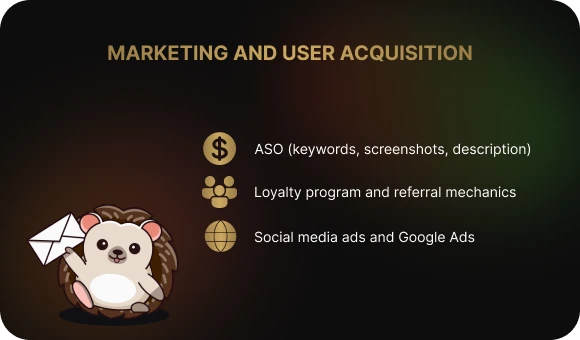
Even the best product needs promotion. To attract a new audience and increase Hedgie’s visibility, the team used a comprehensive approach. App store optimization, ad campaigns, and a loyalty program helped grow the user base and make the service more in demand.
ASO: How Hedgie Attracts Attention in the App Store and Google Play
To help the audience find the app faster among other educational platforms, the team paid special attention to ASO (App Store Optimization). Keywords were carefully selected, a clear and appealing description was created, and the visual assets — screenshots and the icon — immediately communicated the essence of the service. This approach improves visibility and helps potential users instantly understand its value.
Advertising on Social Media and Google Ads
To introduce the platform to a wide audience, the team launched targeted advertising on social media and Google Ads. Bright visuals, dynamic short videos, and clear calls to action attracted the attention of people who wanted to improve their English grammar skills. The ad campaigns were configured to reach users for whom the service would be genuinely useful.
Loyalty Programs and Referral Mechanisms
Hedgie not only attracts new users but also encourages them to share the service with friends. A referral program rewards invitations, while in-app bonuses increase engagement. This approach helps expand the audience and maintain a high level of activity.
Conclusion
In this article, we explored the journey of creating the educational app Hedgie: English Grammar Test — from idea to finished product — as well as the stages of testing, marketing, and monetization.
A key factor that helped make the service cross-platform and in demand was Flutter development. This tool makes building services easier and ensures excellent performance across different platforms.
Every project is unique, and at Beetrail we create solutions that match your goals. We provide the full development cycle — from analysis to technical support — so that you can focus on what matters most. There is no need to worry about the technical side; we will handle everything for you.
Share your idea with us, and we will help turn it into a successful product.
Hedgie: English Grammar Test — an Example of a Successful Educational App Built with Flutter
A great example of how Flutter development helps create outstanding educational apps is Hedgie: English Grammar Test. This app makes learning English easy and engaging. Users complete tests, receive explanations for their mistakes, and track their progress.
Flutter development made the platform fast, user-friendly, and smooth on both Android and iOS. Great animations, an appealing interface, and high performance all helped the service become an effective tool for learning English.
Why Is Flutter the Ideal Development Tool in 2026?
The world of mobile apps never stands still — every year they become faster, more convenient, and more visually appealing. In 2026, users expect maximum comfort, while businesses want universal solutions that work equally well across all devices.
Developers also want to build great services without unnecessary complexity. That’s where Flutter development comes in — a tool that handles all of these задач? translate properly: challenges. Let’s take a look at why it remains one of the top choices.
One codebase — two apps.
Why build two versions of the same service when you can create one? With Flutter, you can use a single codebase for both iOS and Android, which saves time and budget. At the same time, the app looks and performs natively on both platforms — without compromising quality.
Maximum speed.
Flutter uses the Dart language, which compiles into native code. This means the service launches quickly, smooth animations don’t lag, and the interface remains responsive even on less powerful devices.
Flexible and stylish design.
Flutter gives you complete freedom in design. Need an Android-style interface? Use Material Design. Want an iOS-style interface? Cupertino widgets can help. And if you want something unique, customization is practically unlimited.
Fast development without delays.
With Hot Reload, developers can instantly see code changes without restarting the app. This significantly speeds up development, while built-in DevTools help analyze performance and find bugs quickly.
Google support and an active community.
Flutter is a Google product, which means it is regularly updated and improved. On top of that, it has a huge developer community that shares experience, tricks, and ready-made solutions.
From Idea to Product: The Main Development Stages
Every service starts with an idea. But an idea alone is not enough — it is important to understand what users need, study the market, identify the product’s strengths, and choose the right technology to build it.
Let’s look at how the developers turned the concept into a full-fledged platform and what role Flutter mobile development played in this process.
Where the Idea for Hedgie Came From
The creators of the platform noticed that many people study English but struggle with grammar. Most services are either overloaded with theory or offer repetitive exercises with little interactivity. The challenge was to find a balance — to create a trainer that makes grammar learning simple, clear, and engaging.
Researching the Market and User Needs
Before development began, the team studied competitors and analyzed user expectations. Surveys and testing showed that:
- People prefer learning grammar in a game-like format rather than simply reading rules.
- It is important to see mistake explanations immediately and receive quick feedback.
- The platform needs to work without delays and be available on any device.
A Unique Approach: Fun and Comfort
To make learning engaging, the team added gamification elements. Users complete levels, track their progress, and receive rewards for correct answers. This motivates them to keep going and not give up.
Helping them along the way is the friendly Hedgie — a virtual assistant that gives hints and encouragement. This format makes grammar learning not only useful but genuinely fun.
Hedgie is a great example of how a well-thought-out idea, market analysis, and the right technology choice can lead to a востребованный продукт — a successful and in-demand product. Flutter mobile development made the service fast, while the game mechanics made learning interesting.
Hedgie’s Main Features: How the App Works
The app is designed to make learning English grammar simple and engaging. From the very first lessons, users can see their progress and begin to understand the rules better.
Interactive tests with mistake explanations.
There is no boring memorization here — instead, users take dynamic tests and immediately receive explanations for their mistakes. This approach helps them remember grammar structures faster and understand the language better.
Gamification: learning through play.
To keep learning from becoming routine, the app includes levels, rewards, and personalized tasks. Users can track their progress, earn bonuses, and compete with themselves by improving their results.
Works equally well on all devices.
The app is built with Flutter, so it performs well on both iOS and Android. No matter the device, it remains fast, stable, and comfortable to use.
How Monetization and the Business Model Work
To keep the service accessible to most users, the platform uses a freemium model. This means the basic features are available for free, while additional options are unlocked through subscriptions or in-app purchases. Let’s look at how it works.
One of the key game mechanics is the lives system. Each user has 10 attempts: every mistake costs one life. If the lives run out, access to tasks is temporarily blocked, and the user has to wait 2 hours for them to be restored. This approach makes the learning process more mindful and engaging.
But there is another option — users can restore lives immediately. This can be done through a subscription or in-app purchases, which make up the core of the business model. Thanks to the balance between free features and premium options, users can learn comfortably while the project continues to grow.
Free features
Any user can install the app for free and use its core features: take grammar tests, receive real-time mistake explanations, and track their progress. This allows them to test how convenient the service is and see the first results without spending money.
Additional features by subscription
A premium subscription unlocks more features. It removes life limits, allows users to reset progress and start over, and offers exclusive characters. This makes the learning process more flexible and personalized.
Design That Makes Learning Comfortable
When creating the platform, the team aimed to make it convenient and enjoyable to use. A simple interface, clear navigation, and stylish visuals help users focus on learning instead of figuring out complicated settings.
Intuitive and logical interface.
The design is built so that every element is in the right place. Navigation is simple and clear, making it easy to find the needed features and quickly switch between sections. The minimalist style is not distracting, while convenient buttons make interaction with the service feel natural.
Colors, fonts, and animations.
The color palette was chosen to create a friendly atmosphere. Important elements are highlighted with accent shades, and clear fonts make information easier to process. Smooth animations make the platform pleasant to use and add a sense of dynamism.
Accessibility and convenience on any device.
The service was developed with accessibility principles in mind: contrasting colors, clear icons, and an adaptive interface make it comfortable for everyone. The app looks and works equally well on smartphones and tablets.
MVP: The First Step Toward a Successful App
Before launching a full educational platform, it is important to test whether the idea is truly in demand. The team started by creating an MVP — a basic version with the key features. This allowed the product to reach the market quickly, collect early feedback, and then improve the service based on real user input.
Focus on the essentials: tests, levels, progress
At the start, only the most important features were added: interactive tests, a level system, and progress tracking. This minimal approach helped users immediately dive into learning and appreciate the value of the service.
Data storage: cloud synchronization
To allow users to continue learning from any device, the platform was integrated with Firebase and Supabase.
Analytics: what do users like?
Google Analytics helps the team understand how people use the platform. Which sections are the most popular? Where do users spend the most time? What causes difficulties? Data analysis helps improve the product and make learning more convenient.
Testing and Optimization
Creating an app is only half the job. It is equally important to make sure it works reliably, is convenient for users, and genuinely supports learning. That is why the team carried out thorough testing, refinement, and issue fixing.
Usability tests
Every device is different: screens, operating systems, performance levels. To ensure that Hedgie looked and worked equally well on smartphones and tablets, the team conducted a series of usability tests. These helped verify interface accuracy, navigation convenience, and loading speed.
Fixing minor issues
After testing, bugs were fixed, design responsiveness was improved, and the service performance was optimized.
Improving UX Based on Feedback
After launching the MVP, the team analyzed feedback from the first users and their behavior inside the app. The data showed which interface elements were difficult to use, where users encountered navigation issues, and on which screens they most often closed the service. Based on this information, the developers optimized the design and simplified interaction with the main features.
Marketing Strategy and Audience Growth
Even the best product needs promotion. To attract a new audience and increase Hedgie’s visibility, the team used a comprehensive approach. App store optimization, ad campaigns, and a loyalty program helped grow the user base and make the service more in demand.
ASO: How Hedgie Attracts Attention in the App Store and Google Play
To help the audience find the app faster among other educational platforms, the team paid special attention to ASO (App Store Optimization). Keywords were carefully selected, a clear and appealing description was created, and the visual assets — screenshots and the icon — immediately communicated the essence of the service. This approach improves visibility and helps potential users instantly understand its value.
Advertising on Social Media and Google Ads
To introduce the platform to a wide audience, the team launched targeted advertising on social media and Google Ads. Bright visuals, dynamic short videos, and clear calls to action attracted the attention of people who wanted to improve their English grammar skills. The ad campaigns were configured to reach users for whom the service would be genuinely useful.
Loyalty Programs and Referral Mechanisms
Hedgie not only attracts new users but also encourages them to share the service with friends. A referral program rewards invitations, while in-app bonuses increase engagement. This approach helps expand the audience and maintain a high level of activity.
Conclusion
In this article, we explored the journey of creating the educational app Hedgie: English Grammar Test — from idea to finished product — as well as the stages of testing, marketing, and monetization.
A key factor that helped make the service cross-platform and in demand was Flutter development. This tool makes building services easier and ensures excellent performance across different platforms.
Every project is unique, and at Beetrail we create solutions that match your goals. We provide the full development cycle — from analysis to technical support — so that you can focus on what matters most. There is no need to worry about the technical side; we will handle everything for you.
Share your idea with us, and we will help turn it into a successful product.