


'%3e%3cellipse%20cx='445.13'%20cy='588.696'%20rx='153.43'%20ry='296.996'%20fill='%23CDAA62'%20fill-opacity='0.2'/%3e%3c/g%3e%3cdefs%3e%3cfilter%20id='filter0_f_0_108'%20x='0'%20y='0'%20width='890.26'%20height='1177.39'%20filterUnits='userSpaceOnUse'%20color-interpolation-filters='sRGB'%3e%3cfeFlood%20flood-opacity='0'%20result='BackgroundImageFix'/%3e%3cfeBlend%20mode='normal'%20in='SourceGraphic'%20in2='BackgroundImageFix'%20result='shape'/%3e%3cfeGaussianBlur%20stdDeviation='145.85'%20result='effect1_foregroundBlur_0_108'/%3e%3c/filter%3e%3c/defs%3e%3c/svg%3e)
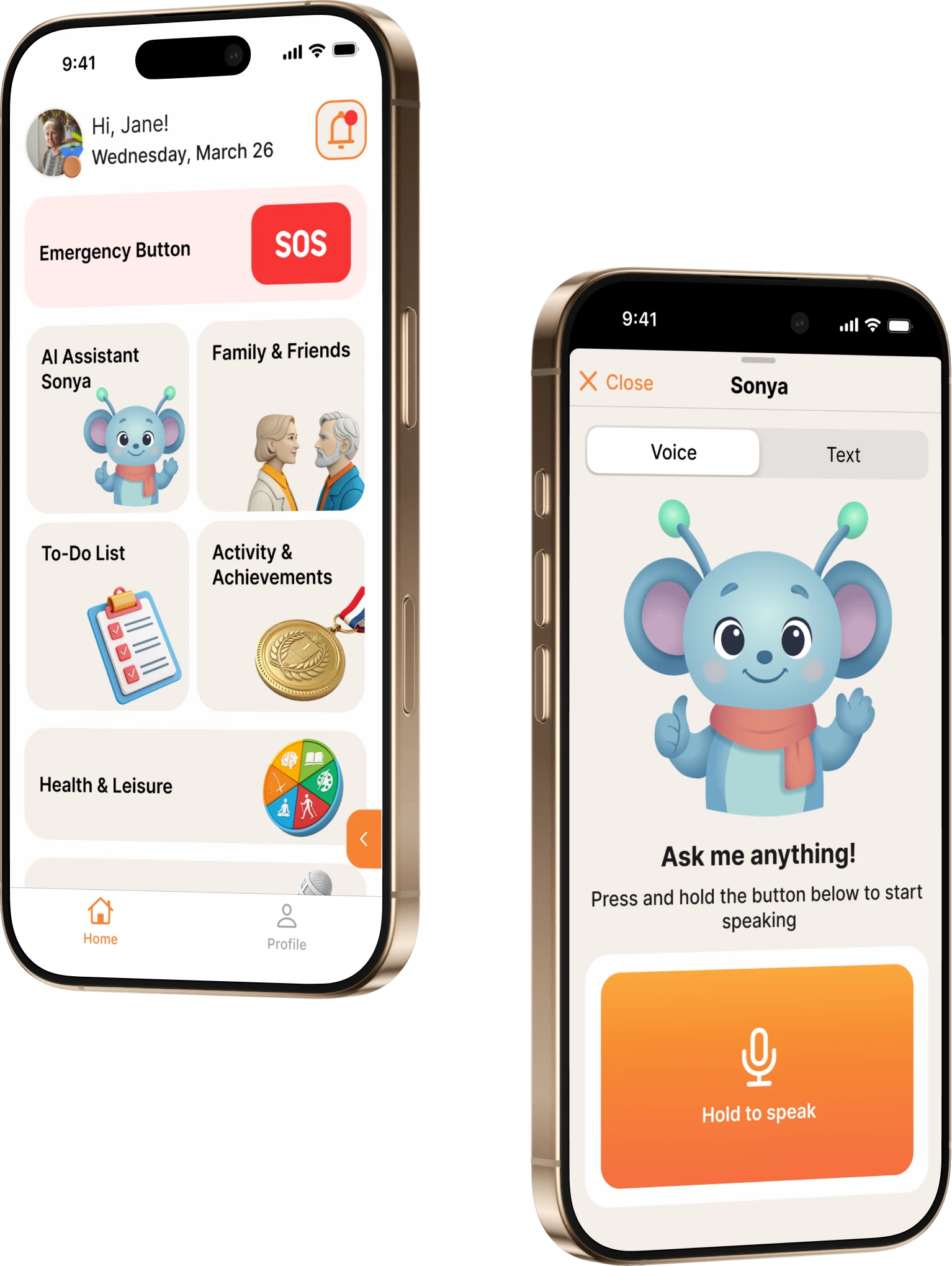
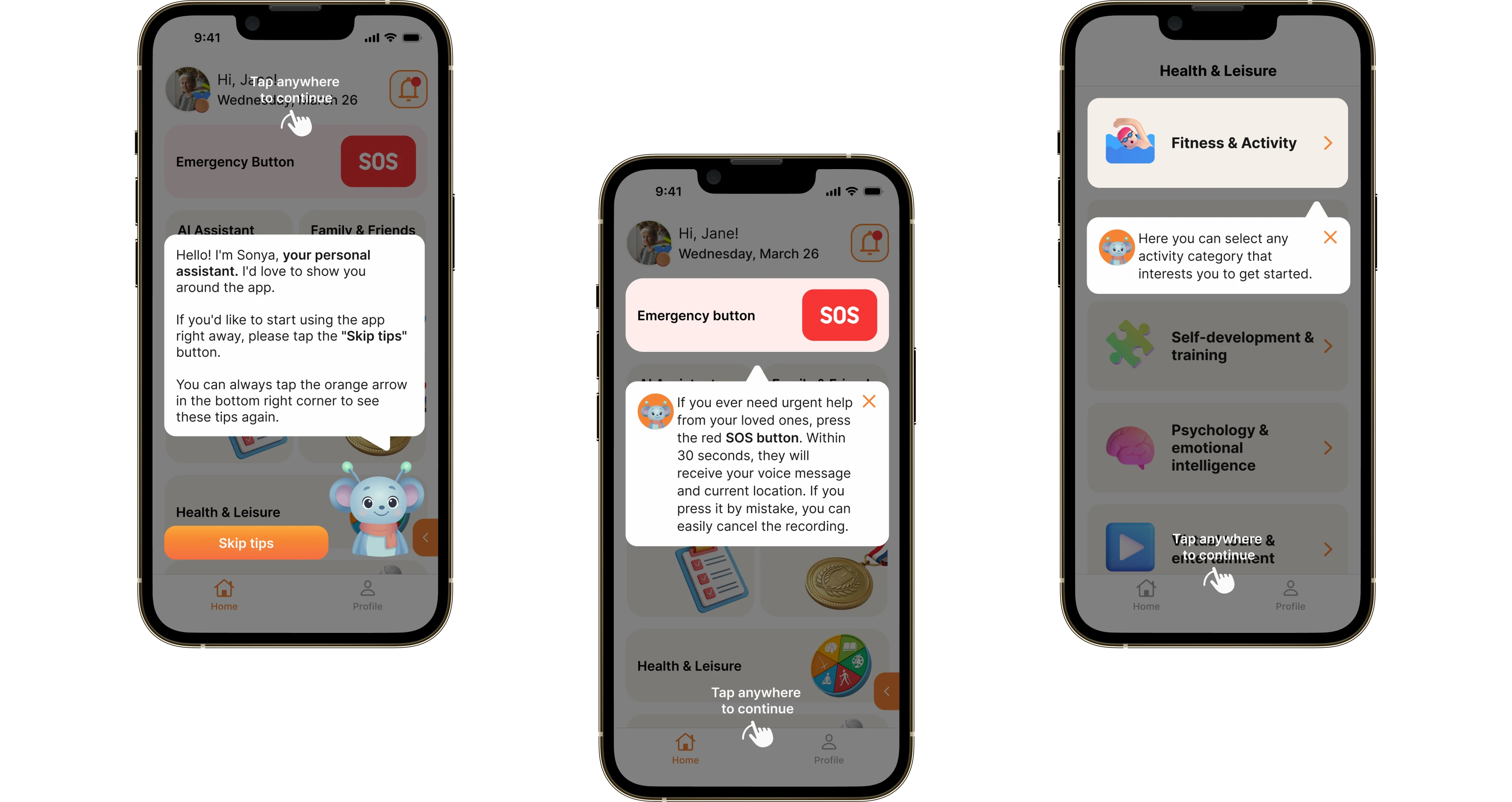
Sonya points out where things are and explains the steps in plain language.
Inter Pensioner
InterPensioner brings emergency help, reminders, and family communication together in one service. The key scenarios live on a single screen, so it stays easy to use even for people who aren’t comfortable with technology.
- SOS button response <10 sec
- Activities in the library 50+
- Feel safer 95%
The story behind the project
InterPensioner grew out of a simple need: older people often live on their own, and the family wants to be sure everything is fine — the medication has been taken, nothing has been forgotten, and in an emergency help can be summoned fast. Yet most services for this audience are overloaded and hard to learn. We brought safety, reminders and family contact together in one app and built it around a pensioner–carer model: the user stays independent while relatives help with the settings and receive the alerts that matter. The voice assistant Sonya makes the app easier to get into — it offers hints, walks people through the steps and makes daily use simpler.
What the client asked for
 An interface that makes sense to users aged 55+
 The Sonya voice assistant
 Emergency SOS help
 Staying in touch with family
Beetrail built InterPensioner, a mobile service for older people and their families. One app holds SOS, medication and task reminders, a family chat and the voice assistant Sonya. The pensioner–carer model lets relatives set up reminders and receive important alerts while staying in touch. The app is live on the App Store and Google Play.

The pain
A family needs a clear way to support an older relative from a distance: to react fast in an emergency and to see whether their daily routine is on track. In practice the tools are scattered and the interfaces are often too complex for this audience — so the services either go unused or get used only now and then.

The fix
We built the product around two scenarios: emergency help and everyday support. SOS sits on the home screen with a confirmation step and location sharing, while the pensioner–carer pairing lets relatives set up reminders and receive the alerts that matter. The voice assistant Sonya helps people find their way without extra navigation.
What the app does
InterPensioner brings safety, daily reminders and family contact together in one simple app
Main features
'/%3e%3cdefs%3e%3clinearGradient%20id='paint0_linear_0_97'%20x1='55.375'%20y1='115.798'%20x2='55.375'%20y2='-21.2024'%20gradientUnits='userSpaceOnUse'%3e%3cstop%20stop-color='%232D250A'/%3e%3cstop%20offset='0.476001'%20stop-color='%23CDAA62'/%3e%3cstop%20offset='1'%20stop-color='%232D250A'/%3e%3c/linearGradient%3e%3c/defs%3e%3c/svg%3e)
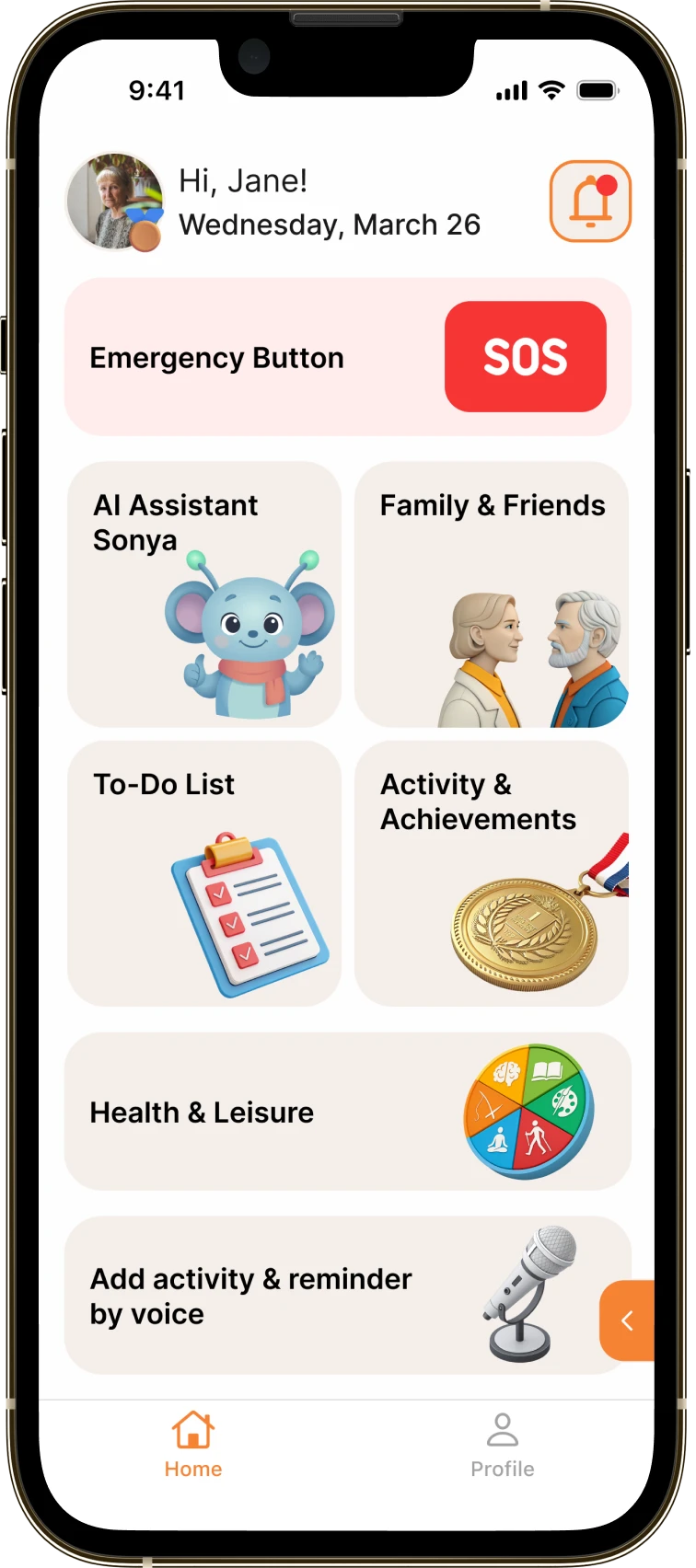
A calendar of tasks and reminders for medication, appointments and calls, each with a checkbox to mark it done.
'/%3e%3cdefs%3e%3clinearGradient%20id='paint0_linear_0_93'%20x1='55.3745'%20y1='19.1587'%20x2='55.3745'%20y2='-3.50794'%20gradientUnits='userSpaceOnUse'%3e%3cstop%20stop-color='%232D250A'/%3e%3cstop%20offset='0.476001'%20stop-color='%23CDAA62'/%3e%3cstop%20offset='1'%20stop-color='%232D250A'/%3e%3c/linearGradient%3e%3c/defs%3e%3c/svg%3e)
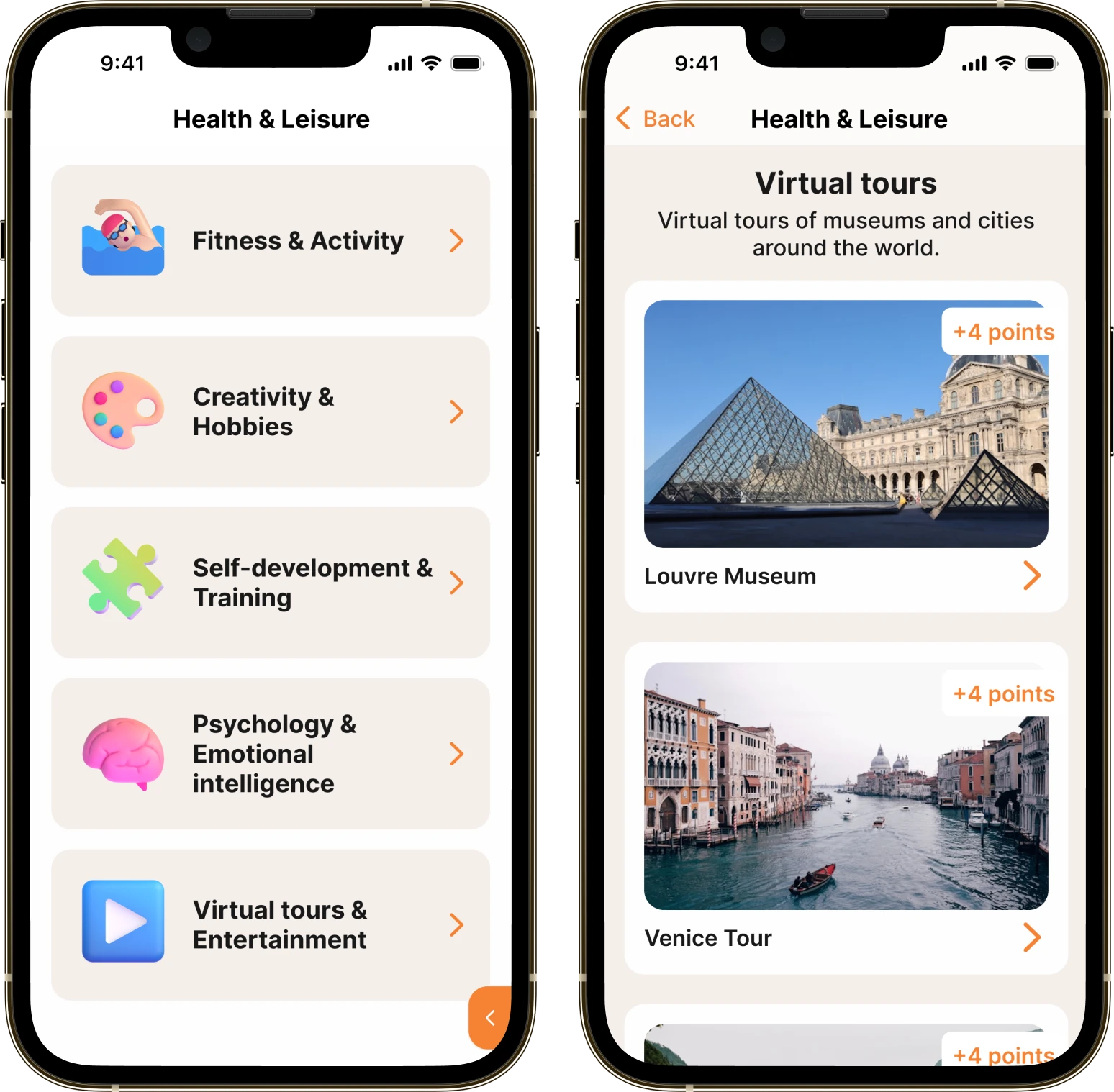
Daily picks: exercise, hobbies, learning and virtual walks, sorted by category.
'/%3e%3cdefs%3e%3clinearGradient%20id='paint0_linear_0_103'%20x1='54.625'%20y1='115.798'%20x2='54.625'%20y2='-21.2024'%20gradientUnits='userSpaceOnUse'%3e%3cstop%20stop-color='%232D250A'/%3e%3cstop%20offset='0.476001'%20stop-color='%23CDAA62'/%3e%3cstop%20offset='1'%20stop-color='%232D250A'/%3e%3c/linearGradient%3e%3c/defs%3e%3c/svg%3e)
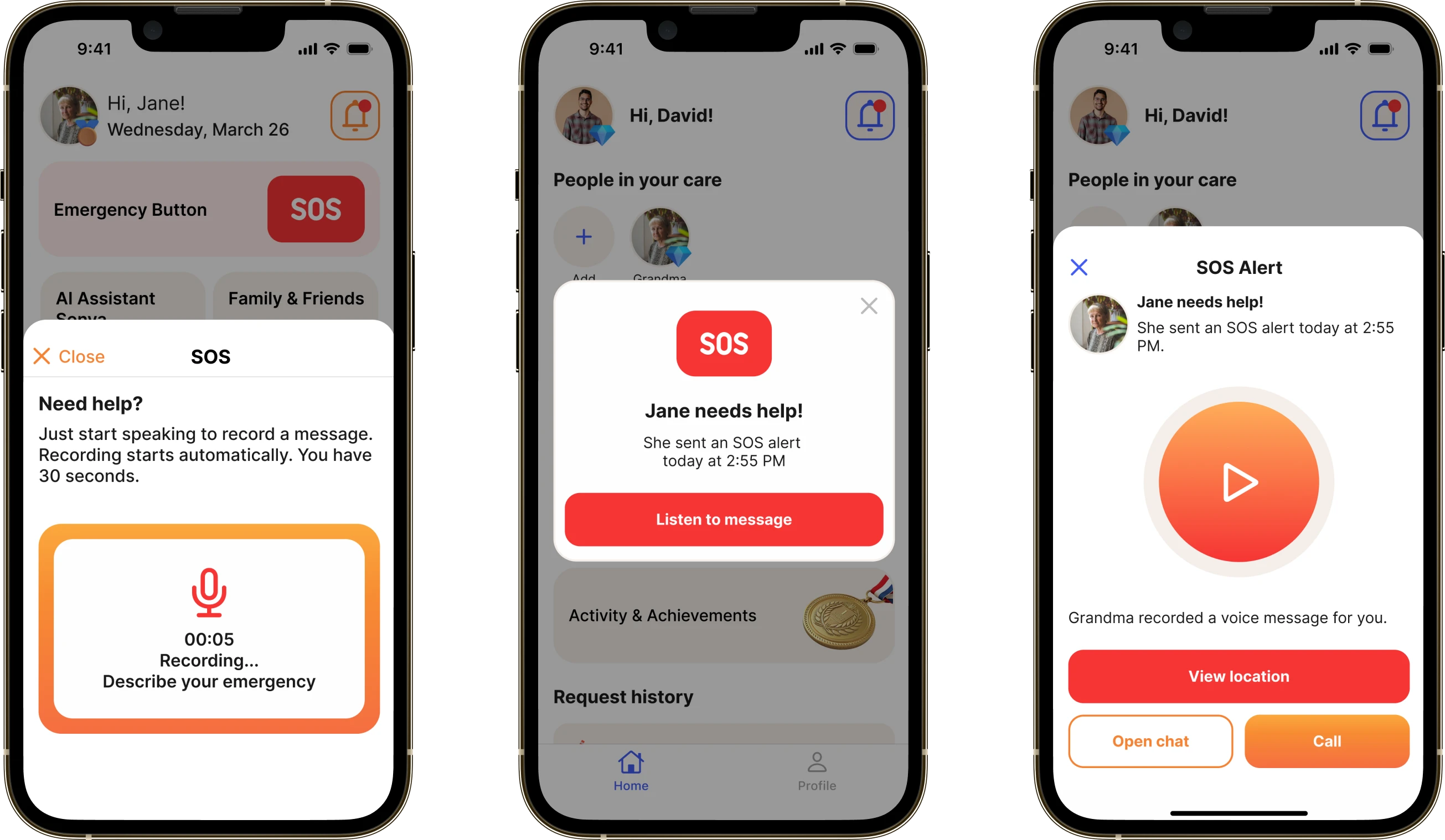
One tap sends alerts to relatives and shares the location and a voice message.
'/%3e%3cdefs%3e%3clinearGradient%20id='paint0_linear_0_100'%20x1='55.375'%20y1='115.798'%20x2='55.375'%20y2='-21.2024'%20gradientUnits='userSpaceOnUse'%3e%3cstop%20stop-color='%232D250A'/%3e%3cstop%20offset='0.476001'%20stop-color='%23CDAA62'/%3e%3cstop%20offset='1'%20stop-color='%232D250A'/%3e%3c/linearGradient%3e%3c/defs%3e%3c/svg%3e)
Talking to relatives and the carer inside the app — by text and voice messages.
'/%3e%3cdefs%3e%3clinearGradient%20id='paint0_linear_0_87'%20x1='55.3745'%20y1='19.1587'%20x2='55.3745'%20y2='-3.50794'%20gradientUnits='userSpaceOnUse'%3e%3cstop%20stop-color='%232D250A'/%3e%3cstop%20offset='0.476001'%20stop-color='%23CDAA62'/%3e%3cstop%20offset='1'%20stop-color='%232D250A'/%3e%3c/linearGradient%3e%3c/defs%3e%3c/svg%3e)
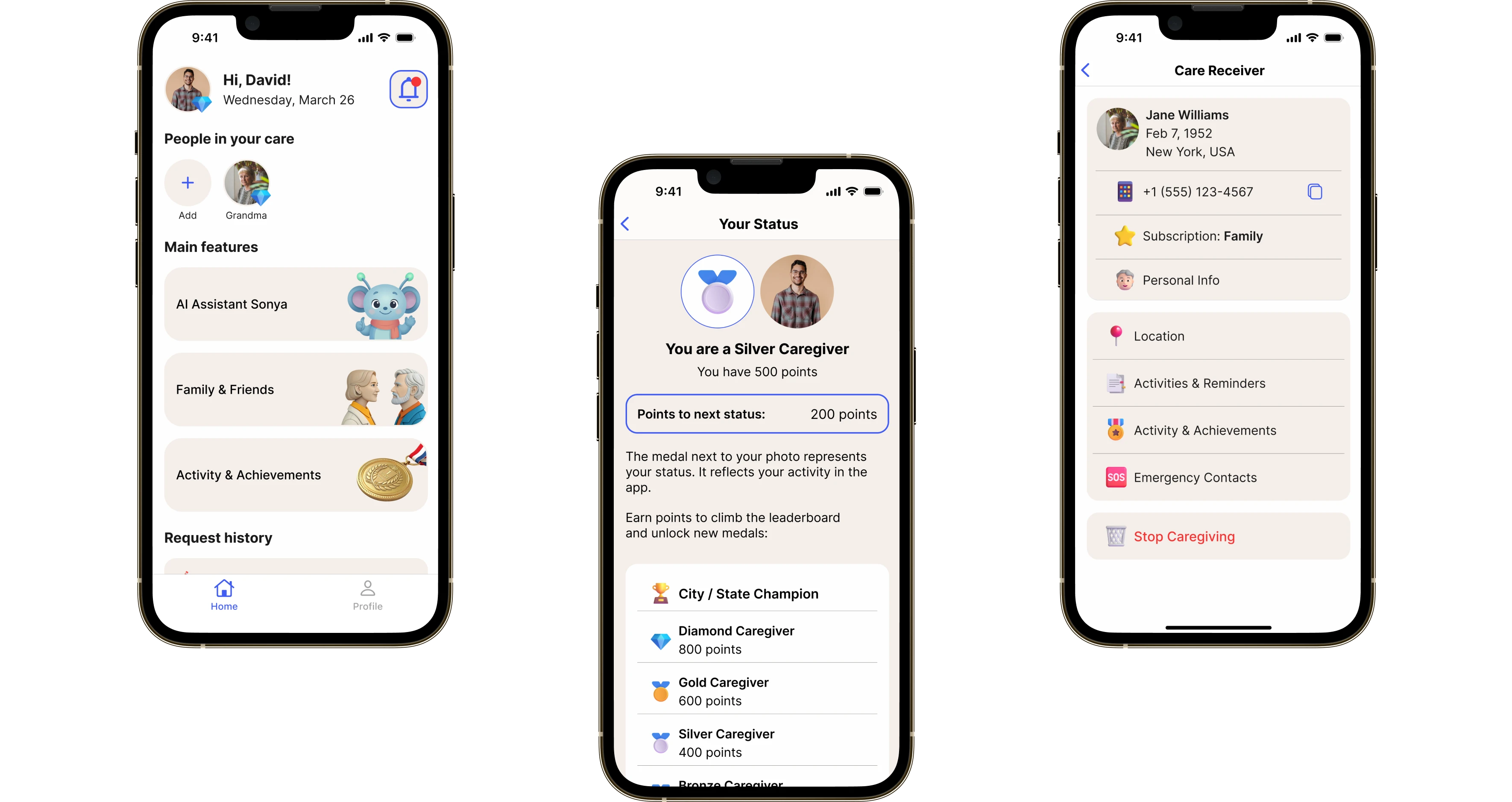
Completed tasks turn into points and levels — a gentle nudge to come back every day.
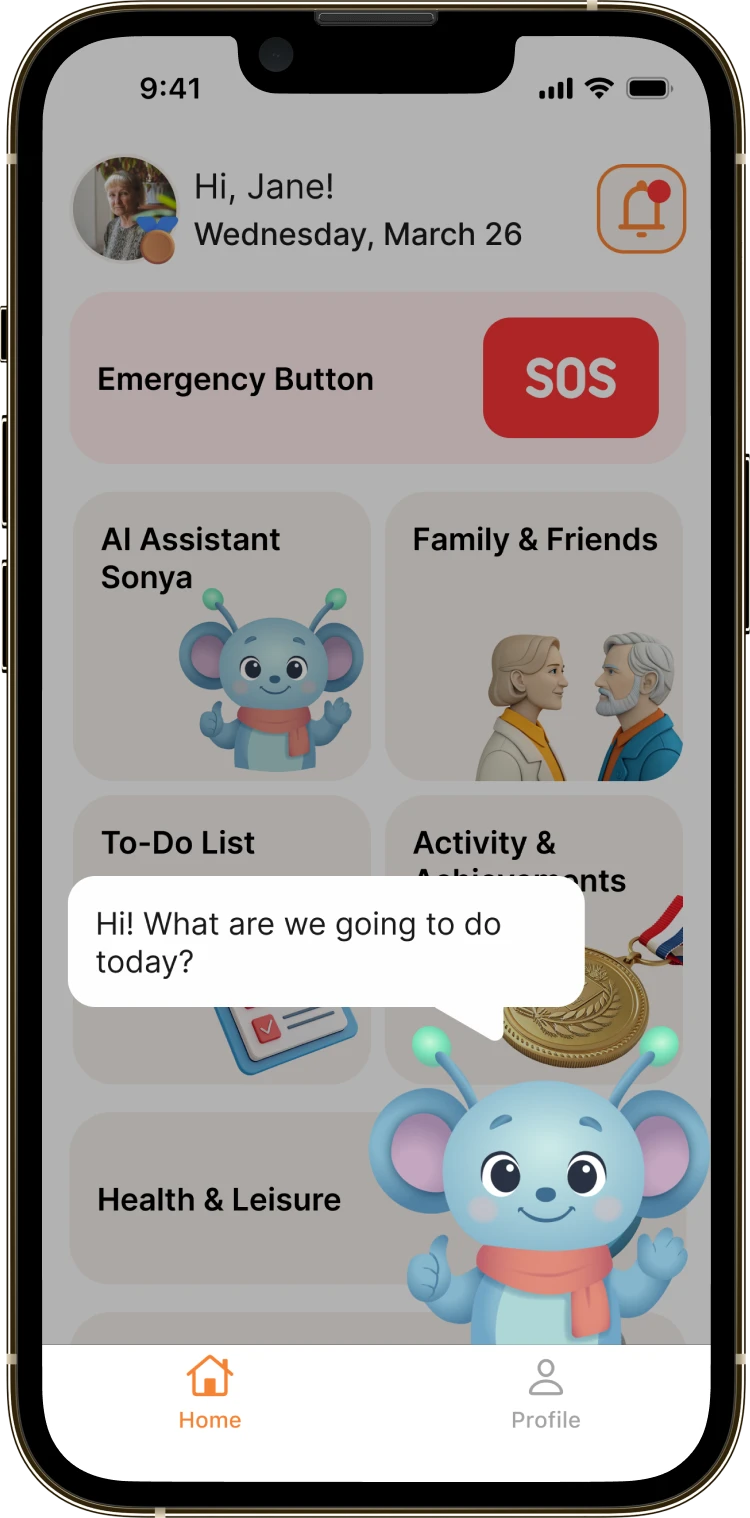
Adding an activity, setting a reminder or asking a question can all be done by voice, with no long chains of buttons.
'/%3e%3cdefs%3e%3clinearGradient%20id='paint0_linear_0_90'%20x1='54.625'%20y1='115.798'%20x2='54.625'%20y2='-21.2024'%20gradientUnits='userSpaceOnUse'%3e%3cstop%20stop-color='%232D250A'/%3e%3cstop%20offset='0.476001'%20stop-color='%23CDAA62'/%3e%3cstop%20offset='1'%20stop-color='%232D250A'/%3e%3c/linearGradient%3e%3c/defs%3e%3c/svg%3e)
Learning as you go
Learning is built into the app itself — no manuals, no long guides. The voice assistant Sonya points out where the features are, explains the steps in plain language and helps people settle in while they use the service. The prompts can be skipped and reopened whenever they are actually needed.
The SOS button
SOS is the key scenario of the app and the fastest way to call for help. The button sits on the home screen: one action sets off a chain of alerts to relatives and emergency contacts. A voice message can be attached, while a confirmation step and the option to cancel guard against accidental taps — without slowing the response down.
Leisure and health
Daily picks of things to do: from exercise and hobbies to learning and virtual walks. Everything is sorted into categories and opens in one or two taps, so choosing an activity stays easy and people keep coming back.
Subscription
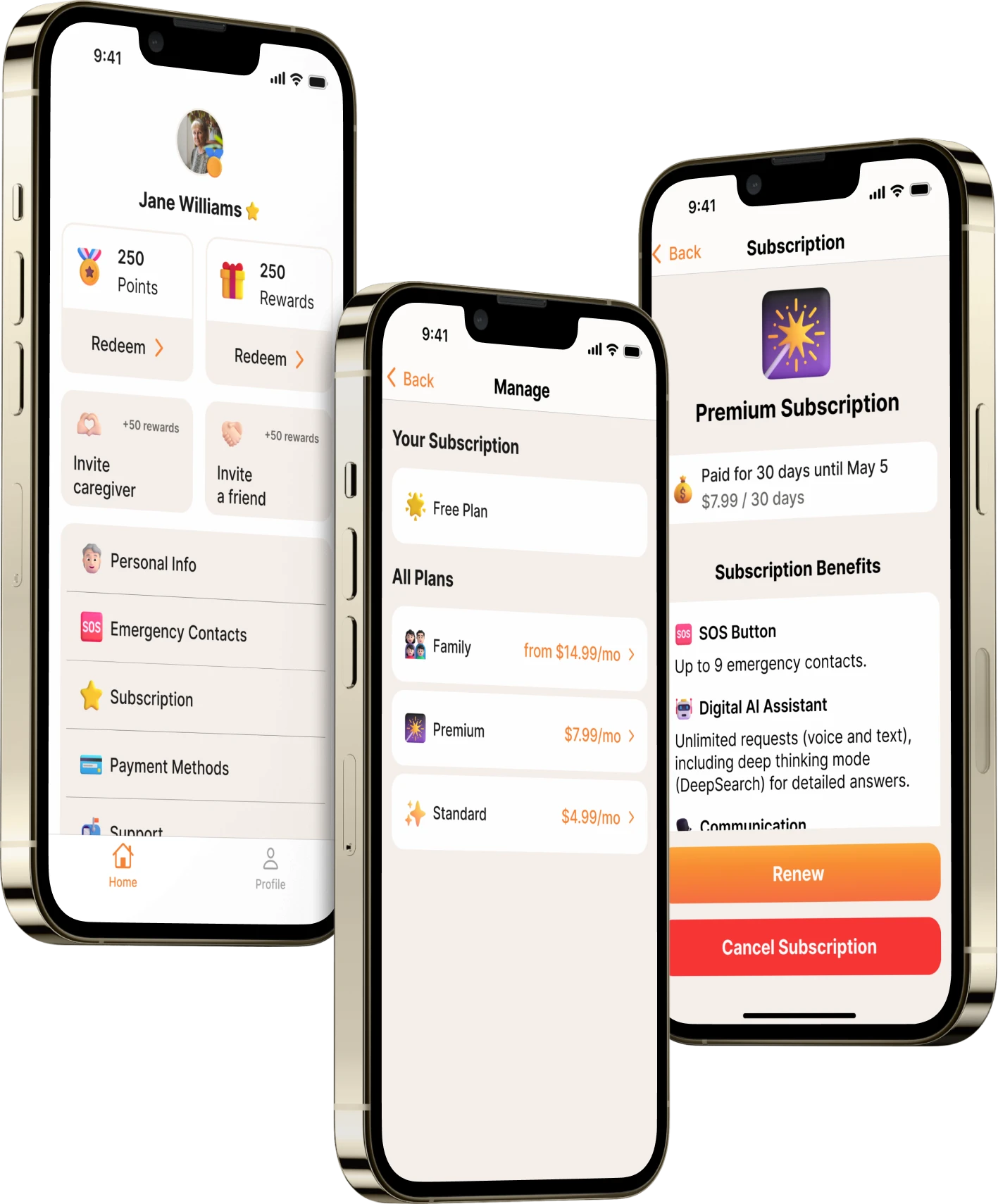
Advanced features require a subscription, with clear controls and a visible status. Users always see whether the subscription is active and when it renews, and any important change is confirmed by a notification. Status checks run on the server so repeated payment notifications cannot cause errors.
The carer profile
The carer profile is the hub for looking after someone from a distance. It is where you add the person you care for, set up reminders and emergency contacts, and jump straight to their location and the events that matter. Every action is split by role and available only with the user’s consent, so support keeps the balance between help and personal boundaries.
-
Defined the pensioner / carer / administrator roles, the key scenarios and the scope of the MVP.
-
Simplified the navigation for the 55+ audience: large elements, high contrast, the fewest possible steps. Sonya introduces the app.
-
Built the iOS and Android apps and the back end, wired up notifications, a chat with voice messages and payments.
-
Tested the critical scenarios, prepared release builds and permissions, and passed the store reviews.
How we did it
 Alexander KonovalovFounder, InterPensioner
A professional team and an easy one to work with. They handle the problems properly and keep their eyes on the result.
Results
We shipped the InterPensioner MVP for iOS and Android and built one product around two scenarios: everyday support and emergency help. The pensioner–carer model came with a clear split of roles, plus a web admin panel for running the service. The key features — SOS, reminders, chat, leisure and the assistant — work as one system without overloading the interface for an older user.
Achievements
-
 MVP on the App Store and Google Play
 -
 Simple UX for the 55+ audience
 -
 Ready to scale
Other cases

Get in touch if you want an app of your own
We’ll hop on a 15–30 minute call, go through your idea for free and suggest where to start and how to build it.