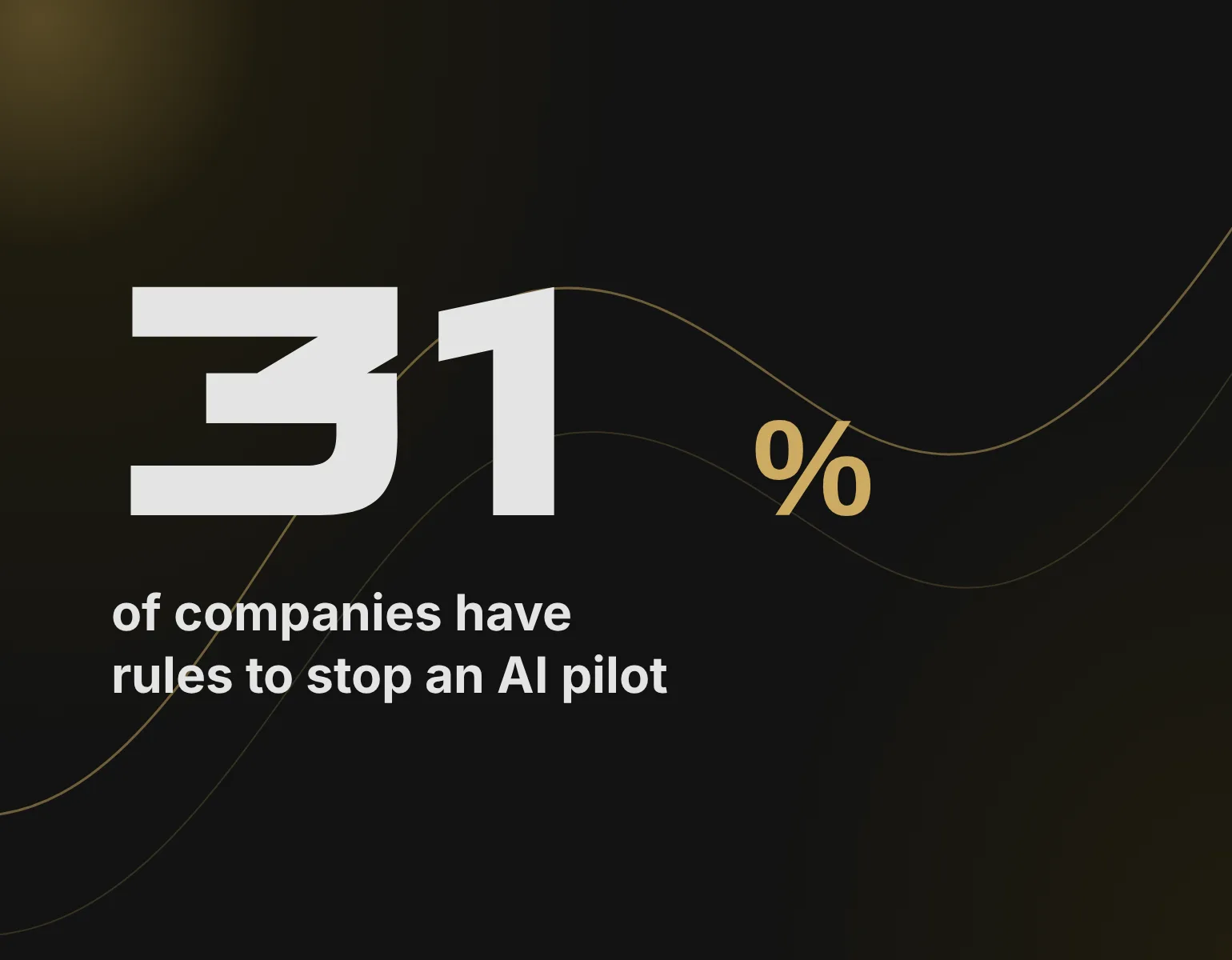

Updated November 2026
What this guide covers
AI integration means adding a model to a system your team and customers already use. The model call is the easy part. The real work sits around it: data paths, permissions, the cost of each call, and models that get retired.
In short:
- Spend week one on your own system: data, API limits, and roles.
- Make sure AI sees no more than the person using it.
- Price every call, and set limits per customer below the provider cap.
- Pin the model version, because providers retire models on a schedule.
- Before launch, name who owns costs, prompts, and model changes.
Start with what’s already running: what AI integration actually means
AI integration puts a model inside software you already run: your app, CRM, support desk, or document flow. Your team keeps working where it works today, and the AI shows up there. Nobody has to open one more tool.
Most enterprise AI use cases are bought rather than built. In the Menlo Ventures 2025 survey of 495 US enterprise leaders, 76% of AI use cases were purchased, up from 53% in 2024. Enterprise spending on generative AI reached $37 billion in 2025, against $11.5 billion a year earlier.
Buying works when the task is generic. It stops working when the task depends on your data, your roles, and your rules. A bought tool keeps its own copy of the data and its own idea of who sees what. An integration uses yours.
Buy an AI tool
One more app
- Keeps its own data copy
- Its own idea of roles
- Team opens another tool
Integrate AI
Inside what you run
- Uses your data
- Follows your roles
- Team stays where it works
Under the hood, an AI API integration is simple: your system sends a request to a model provider and gets an answer back. The rest of this guide is about everything that request touches.
Why one API call isn’t the job
The first call to a model takes an afternoon. What takes weeks is everything a live system needs around that call: limits, errors, costs, and models that change while you use them.
Three things the provider documentation says, and what each means for live code:
- Anthropic’s API version 2026-10-21 stopped accepting the temperature, top_p, and top_k parameters. Code that still sends them gets a 400 error.
- When an account hits its monthly spend cap, Anthropic returns a 429 error with no retry time. Retries keep failing until the first day of the next month.
- OpenAI promises at least six months’ notice before shutting down a generally available model, unless safety requires faster action. That is enough time to test a replacement, if someone owns the job.
A demo rarely hits these limits. Production traffic does, so plan for them early. This is the job of the AI integration API layer, the code between your product and the provider. It handles retries, fallbacks, logging, and a clear message for the user when the model is down.
Where it lands in a growing company
In a company with its own product and a few hundred people, four places make a natural start: the support desk, the CRM, the document flow, and the product itself. Each one already has data, users, and roles.
| System | What AI does there | What to check first |
|---|---|---|
| Support desk | Drafts replies from past tickets | Can an agent see only their own customers? |
| CRM | Sorts and enriches incoming leads | Are the key fields filled in, and by whom? |
| Document flow | Pulls fields out of files | What does a wrong field cost downstream? |
| Your product | One new feature for users | What does the user see when AI is down? |
Two examples from our own work show the pattern. Wizard AI, our agent for incoming requests, lives in the chat where a sales manager already works. It reads a request, finds context in the company knowledge base, drafts a reply, and opens a lead card in Trello. It never sends anything to a client: the manager decides.
Where AI can start
-
Support desk, draft replies
-
CRM, sort and enrich leads
-
Documents, pull out fields
-
Your product, one new feature
DocuFlow does the same for documents. The AI sorts each incoming file and pulls out the fields, and a person checks the result instead of typing it. Nobody retypes a document from scratch anymore.
Step 1. Spend the first week on the system you already run
The first week of an AI integration project goes on the system you already run. You look at where the data lives, what your own API allows, who holds which role, and what one record looks like from start to finish.
What to look at in that first week:
- Data. Where the records live, how complete the fields are, and who owns them.
- Your own API. Its limits, its authentication, and whether a test environment exists.
- Roles. Who can see which records today, written down rather than assumed.
- One record, end to end. How a single ticket, lead, or document moves through the system.
- The person doing it by hand. How long the task takes now and where it goes wrong.
This is also the moment when plans change. A field that should hold the customer type turns out to be often empty. A system’s API turns out to be read-only. Better to learn it in week one than in week five. Our readiness assessment guide covers the data side in more detail.
At Beetrail, a pilot runs 4–6 weeks on one process and the client’s real data. The better you know the system on day one, the more of that time goes on the AI itself.
Step 2. Decide who sees what through AI
An AI feature works inside the same permissions as the person using it. You also need to know what leaves your system for the model provider and how long it stays there.
AI should never see more than the person asking it.
Picture a support agent who asks the AI to summarize a customer’s history. If the search behind it ignores roles, the summary can pull in another customer’s ticket. The model did nothing wrong. The integration skipped the permission check that the rest of your product already makes.
The provider side takes an afternoon of reading. By default, OpenAI does not use API data for training and keeps logs for up to 30 days. Zero retention is available only by approval. Anthropic deletes API inputs and outputs within 30 days and does not train on them by default. If your product handles personal data in the EU, our guide to AI and GDPR goes further.
Step 3. Put a price on every call and an owner on the bill
Every AI call has a price you can work out before launch. Someone on your side has to own that number, the same way someone owns hosting costs.
Claude Sonnet 5.5, per million tokens
-
2 $
input
-
10 $
output
-
0,1 $
cached input
Anthropic pricing, November 2026
As of November 2026, Anthropic charges $2 per million input tokens and $10 per million output tokens for Claude Sonnet 5.5. Cached input costs $0.10. The smaller Haiku 5.5 costs $0.10 for input and $0.50 for output on prompts up to 100,000 tokens. Batch processing takes 50% off both.
At these prices, the bill of an AI integration depends on volume more than on the rate. Three questions settle most of it:
- How many calls does one user make in a day, and how long is each one?
- Can part of the work run in a batch overnight instead of live?
- What happens when one heavy customer makes ten times the usual number of calls?
The last one matters most. Provider accounts have monthly spend caps: Anthropic’s Start and Build tiers stop at $500 and $1,000 a month. Hit the cap, and the feature stops for everyone until the month ends. Set your own limits per customer and per plan, below the provider cap.
Step 4. Plan for the day your model is retired
The model you launch on will be retired. Put the migration in the budget and the calendar on day one, and rerun your tests on every new version.

Model retirement is routine. Anthropic gives at least 60 days’ notice for its public models. It told customers on September 30, 2026, that Claude Sonnet 4.5 would be retired on November 30, 2026. After that date, requests to the model fail.
What helps:
- pin the model version in your code, so nothing changes without a decision;
- keep a set of real test cases with known good answers;
- run them on the new version before you switch, and compare quality and cost.
Step 5. Roll out to live users, then name who runs it
Launch AI on one process and a part of your users first. Keep the old path working for when the AI is down. Before launch, agree who watches costs, who updates prompts, and who signs off on a model change.
Start with one team or a small group of customers who know they are trying something new. Run the AI path next to the old one and compare three things: how long the task takes, how often the result needs fixing, and what one task costs. Widen the group only when all three hold.
Then write down the owners. Three roles cover most of it:
- Costs. Watches spend per customer and per plan, and changes the limits.
- Prompts. Reviews bad answers each week and updates the instructions.
- Model changes. Reads provider notices, runs the tests on a new version, and signs off on the switch.
In a small company one person can hold two of these roles. What matters is that each has a name.
-
Review
Free, one process
-
Pilot
One process, real data
-
Build
Fixed price, phases
-
Support
Monthly, after launch
Our own projects follow this order, from a free review to monthly support after launch. The code belongs to the client. If you plan a pilot of your own, our guide to scoping an AI proof of concept shows how to set the thresholds before the work begins.
Bottom line
AI integration works when you treat it like any other change to a live system. Pick one process. Check the permissions. Know the cost per call. Name an owner for the day after launch. The model is the part that changes most often, so the work around it is what keeps the feature running. This week, pick one process and write down three things: who sees its data, what one call costs, and who answers when the model changes.
What to read next:
- How to implement AI in business: where to start
- AI readiness assessment: what to prepare first
- AI proof of concept: how to scope one
If you want a second pair of eyes on one process, our AI automation team runs a free short review.
FAQ
Can you add AI to an existing app without rebuilding it?
Yes. In most cases the AI runs as a separate service that your app calls through an API. The core code stays as it is. What changes is the layer around the call: permissions, limits, logging, and a fallback.
What happens if the AI provider goes down?
The feature that depends on it stops. Your product should not. Design the old path to keep working, show the user a clear message, and log the failure so someone sees it.
Is my data used to train the model?
Not by default with the main providers’ APIs. OpenAI and Anthropic both say API data is not used for training by default. Anthropic deletes it within 30 days, and OpenAI keeps logs for up to 30 days. Check the terms of the exact plan you use.
How long does it take to add an AI feature?
A first working version on one process usually takes a few weeks. Our pilots run 4–6 weeks on the client’s real data. Most of the risk sits in the existing system, so that is where the work starts.
- What this guide covers
- Start with what’s already running: what AI integration actually means
- Why one API call isn’t the job
- Where it lands in a growing company
- Step 1. Spend the first week on the system you already run
- Step 2. Decide who sees what through AI
- Step 3. Put a price on every call and an owner on the bill
- Step 4. Plan for the day your model is retired
- Step 5. Roll out to live users, then name who runs it
- Bottom line
- FAQ